website statistics

How The 360-Degree Animation Was Created In Olympic Opening Ceremony?

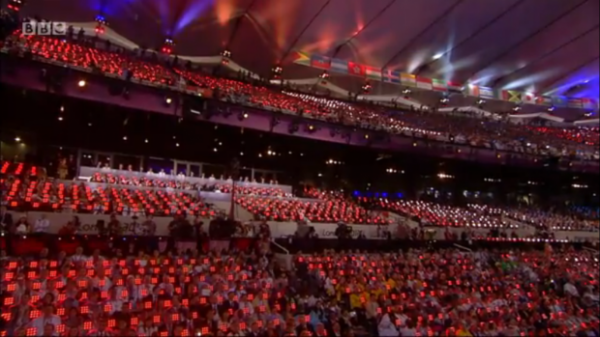
During the opening ceremony of London Olympics, everyone among the 70,000 + audience used a pixel tablet to create a truly 3D animation.

When do you use Facebook?

View Results

Loading ... Loading ...
1 Star2 Stars3 Stars4 Stars5 Stars (Rate This)
Loading ... Loading ...

Olympics 2012 opening ceremony in London was a treat indeed. With so many popular characters and ideas put into it, from Harry Potter to Mr. Beans, it was something everyone could more or less relate to. Besides, the magnificent effects which studded the entire stadium as well as the live transmission of the event were also amazing!
London Olympics 2012

What is rather surprising is that the organizers of London Olympics 2012 handed over an LED paddle to everyone among the 70,500 people in the audience. This virtually made the entire audience a part of creating 360-degree animations in the stadium.

The device was offered together with each seat. It comprised of nine LED full-color pixels and was, in turn, wired into a control rack. As soon as the opening ceremony started, these pixels would start a remarkable display of lights, based on the programming of the organizers. This resulted in awesome 3D animations which ran among the entire audience.

According to the creative director at Crystal, Will Case, “The audience literally became part of the action.” Crystal was the company behind the production of opening ceremony animations. The tablet systems used during the show were built by Tait technologies.

These ‘pixel’ tablets were designed to be such that the video which was displayed through them could be visible at an angle of 180 degrees both horizontally and vertically. And, this was probably the largest ever show in which so many people collaborated to create 3D animation effects.

Courtesy: ZDnet


A Look At London Olympics 2012 [Infographic]

Motorola Rolling Out Android Jelly Bean To Xoom Tablet
You can also press the left/right arrow key on your keyboard to go to previous/next post
  On July 30, 2012(9 months, 25 days ago.)

Recent Search

Recent Tutorials

This tutorial will show how to use S.M.A.R.T. (Self Monitoring Analysis and Reporting Technology) to continuously collect information on health of your equipment.
In this tutorial I'll show you how you can easily protect yourself from any kind of security breaks that may occur through Java.
Today Apple enabled "Two Step Verification" for iCloud And Apple ID. But the process is not that simple. But no worry, here we have made a step by step tutorial.
Cant remember your iPhone passcode? Here I will show you some workaround on what to do and how to recover and restore for every possible scenario.
This tutorial will show you how to perform the Winapp2.ini installation inside CCleaner and how to use it under Windows operating system.
With app called AD Sound Recorder, you can record any stream that passes through your sound card or speakers and in this tutorial I will show you how to do that.
If you want to have Boxee app inside your Apple TV, in this tutorial we will show you how to install XBMC and Boxee using Windows on your Apple TV.
This tutorial will show you how to transfer PS3 Saved Game Files from your PC to your PS3 game console.
Adding videos from external sources such as internet, more specifically from YouTube, is a great solution to enhance a presentation; in this tutorial I will show you the procedure.
If you are one of new comers to Windows Phone 8, like me, in this tutorial I will walk you through the process to update your Windows Phone 8 device.
Close You Have To Login
User:
Pass:
Login With »Login With TwitterLogin With Facebook