website statistics

18 Year Old Student Created Levitating Light Bulb

18 year old electrical engineering student Chris Rieger from the University of Queensland has developed a prototype of a levitating light bulb - LevLight.

When do you use Facebook?

View Results

Loading ... Loading ...
1 Star2 Stars3 Stars4 Stars5 Stars (Rate This)
Loading ... Loading ...

Have you seen any “Levitating Light Bulb?” If not, then you are going to see one. 18 year old electrical engineering student Chris Rieger from the University of Queensland, Australia after spending 6 months on a project, has developed a prototype of a levitating light bulb. He calls this LevLight. Rieger’s LevLight is a combination of a magnetic wireless power transfer system and a magnetic levitating control system.
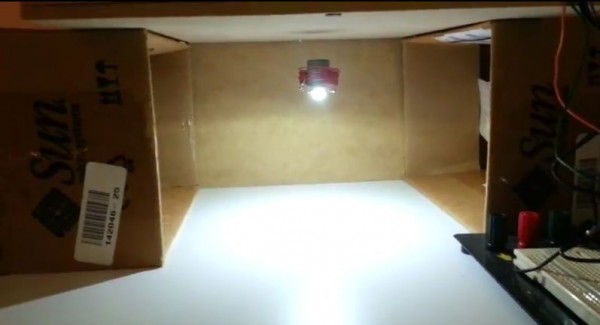

Levitating Light Bulb, Image Credit : Screenshot

Electrical Engineering student Chris Rieger from the University of Queensland, Australia became inspired by a Jeff Lieberman sculpture called light bulb. After spending 6 months, he successfully made a prototype of the levitating light bulb. The prototype of the LevLight uses magnetic levitation and wireless power transfer to create a really neat LED oddity. Rieger modified a Hall Effect Levitator circuit to include 300 meters (984 feet) of 20awg wire for the electromagnetic drive coil and a 3-pin, 1.325mV/g linear hall effect sensor to provide feedback on the position of the wirelessly suspended light. LevLight uses a low power LED positioned on the bottom of a permanent magnet surrounded by a simple and wireless power transfer circuit.

The circuit Rieger used was from the 4HV electronics. The setup consists of a single wire ring connected to the power source which is made from an old 350W power supply unit and banana plug ports, and pulled 0.5A at 12V. The current adjusts with the coil in order to keep the light unit stationary. The drive coil and wireless mechanism are hidden from view inside a wooden enclosure raised on two cardboard box columns and, with the power switched on, the LED light floats in the space underneath.

Rieger mentioned that when the power to the levitating system is turned off the LED light unit jumps up to attach itself to the base of the wooden box rather than falling to the ground. For more, head over to Chris Rieger.

Have a look at the demo video below.

Source : Chris Rieger
Thanks To : Hack A Day

Buy Cheapest Related Product From Amazon.com


Ex-Nokia Staff Form Jolla To Build MeeGo-Based Smartphones

Thunderbolt Cables Price May Reduce In 2013
You can also press the left/right arrow key on your keyboard to go to previous/next post
  On July 8, 2012(11 months, 16 days ago.)

Recent Search

Recent Tutorials

This tutorial will show how to use S.M.A.R.T. (Self Monitoring Analysis and Reporting Technology) to continuously collect information on health of your equipment.
In this tutorial I'll show you how you can easily protect yourself from any kind of security breaks that may occur through Java.
Today Apple enabled "Two Step Verification" for iCloud And Apple ID. But the process is not that simple. But no worry, here we have made a step by step tutorial.
Cant remember your iPhone passcode? Here I will show you some workaround on what to do and how to recover and restore for every possible scenario.
This tutorial will show you how to perform the Winapp2.ini installation inside CCleaner and how to use it under Windows operating system.
With app called AD Sound Recorder, you can record any stream that passes through your sound card or speakers and in this tutorial I will show you how to do that.
If you want to have Boxee app inside your Apple TV, in this tutorial we will show you how to install XBMC and Boxee using Windows on your Apple TV.
This tutorial will show you how to transfer PS3 Saved Game Files from your PC to your PS3 game console.
Adding videos from external sources such as internet, more specifically from YouTube, is a great solution to enhance a presentation; in this tutorial I will show you the procedure.
If you are one of new comers to Windows Phone 8, like me, in this tutorial I will walk you through the process to update your Windows Phone 8 device.
Close You Have To Login
User:
Pass:
Login With »Login With TwitterLogin With Facebook