After all the rumors and speculations, Apple has finally revealed its tablet pc. The much waiting revolutionary device. It is the talk of the tech world. It’s the latest creation of Apple. It’s now official. It’s iPod.

Apple has officially announced its new magical, revolutionary device for surfing the web, reading and sending email, viewing photos, watching movies or videos, listening to music, playing games, reading e-books and so forth, which named as Apple iPad though previously rumored as Apple iTablet or Apple iSlate.
iPad will be able to run all of the 140,000 apps from the App Store, featuring 12 next-generation, innovative multi-touch applications that work in both portrait and landscape. It will be available in 2 versions – Wi-Fi and Wi-Fi + 3G models.
iPad can handle games. Specifically graphics intensive games such as the one demoed by EA. It can even do pixel double so that existing games can maximize the 9.7-inch screen since all of these games were developed for the small screen estate of iPhone and iPod touch.
With literally thousands of articles and blog posts being written about Apple’s new device, it’s easy to experience information overload. So We tried to give a glimpse & raw information about the device. And don’t worry, we will update you on iPad all the time.
“iPad is our most advanced technology in a magical and revolutionary device at an unbelievable price,” commented Steve Jobs, CEO for Apple. “iPad creates and defines an entirely new category of devices that will connect users with their apps and content in a much more intimate, intuitive and fun way than ever before.”
Hardware:
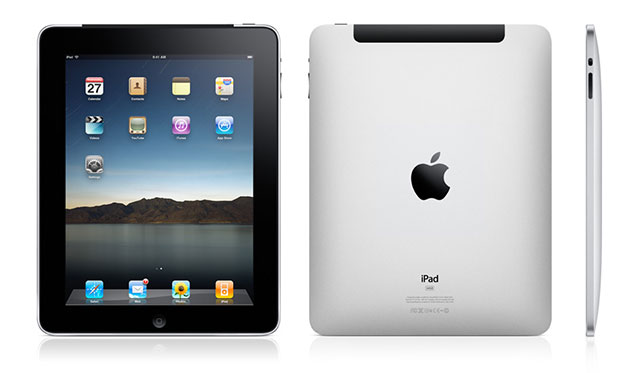
It’s a device that looks alike to a large iPhone or iPod Touch. More like a size of a DVD Box. It incorporates a 9.7-inch LCD touch-screen display, which makes use of the same multitouch technology found on the iPhone, Apple’s Magic Mouse, and its notebook trackpads.

Like the iPhone and iPod, it sports a finger-friendly OS with an on-screen QWERTY keyboard, and an accelerometer that can detect whether the device is in portrait or landscape mode. It has a 30-pin dock connector, built-in Wi-Fi, and a home button that jumps users back to the main screen of the OS. It also has a volume rocker and a mute button–just like the iPhone. The iPad will come in 16, 32, and 64GB capacities.
Interface:
The interface should be familiar to you; it looks a lot like the iPhone OS interface. In fact, it’s essentially a custom version of the iPhone 3.2 OS. Primary apps are housed at the bottom and you swipe left and right through your home screens to find apps. Steve Jobs even mentioned that it would be easy for people to pick up on the interface because so many people (7.5 million) have either an iPhone or an iPod touch.
There is a new SDK for developers to build apps specifically for the iPad, but all iPhone apps run in the iPad. iPhone apps can run either in their native resolutions or in a “double pixel mode” for full-screen use. Most of the apps we’ve seen run very well in double pixel mode. Developers will be able to modify their apps using the new SDK to optimize them for the iPad, though.
Most everything else is just like the iPhone, but larger. The keyboard is larger, although we have yet to see whether typing is more efficient via your thumbs or with all 10 digits.
Web:
Just like the iPhone, it utilized Safari Mobile as its browser. It’s bigger, but not much else is different. And just like the iPhone, it does not support Adobe Flash, a plug-in that Apple simply doesn’t like.
In fact, most of the other standard web apps are the same between the iPhone and the iPad. Email, for example, utilizes a similar interface, but it does have more features such as email previews. Google Maps runs on the iPad just as it does on the iPhone.
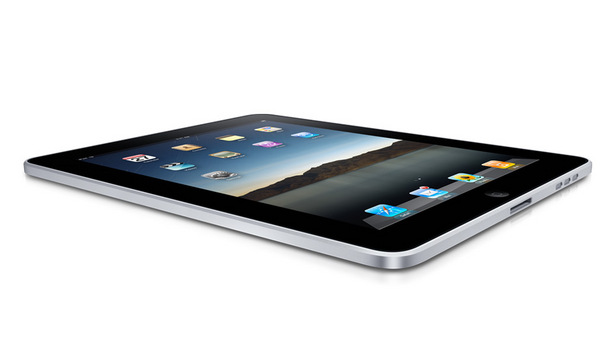
One app that did get some new features though was the Photo app, which now sports an iPhoto-like interface and some new multi-touch inputs that allow you to easily view and manage multiple pictures.
Wi-Fi:
Apple’s tablet comes in two models, based on their connectivity. Both versions have Wi-Fi connectivity, which is to be expected. However, the higher-end model also comes with 3G access — for $130 more, you can have a 3G-enabled tablet.
If you want the 3G model, you have to use it currently on AT&T: it’s the official launch partner of the iPad. Luckily though, you don’t have to sign a contract to use the 3G connection. Instead, you prepay for however many months of 3G access you desire. It costs $14.99 for 250 MB of data per month, while you’ll need to fork over $29.99 monthly for an unlimited plan. You can cancel any time without any termination fee.
The iPad utilizes microGSM, meaning that it’s not specifically bound to AT&T. Thus, you can expect it to work on international carriers sometime in June or July. That doesn’t mean you can just stick in a T-Mobile or Verizon card though: Verizon and Sprint use the incompatible CDMA 3G format, while the iPad’s 3G modem doesn’t support T-Mobile’s 3G frequency.
Applications:
As for apps, the iPad’s screen runs larger than what can be found on Apple’s smaller portable devices, which means developers have more screen real estate to work with. At the same time, the iPad is backwards compatible with existing iPhone and iPod Touch applications. Apps with smaller screen resolutions are simply scaled up to fit. Apple is giving developers a way to modify their applications to work with both sets of hardware.
Apple CEO Steve Jobs demonstrated the tablet running numerous first-party apps, including iTunes, a photo gallery, its Safari Web browser, iCal, e-mail, Google Maps, and YouTube. Many shared traits of what’s been seen on the iPhone, just with more screen real estate.
Several companies also demonstrated their new iPad-optimized apps:
• Gameloft showed off a larger-resolution version of its hit first-person shooter N.O.V.A., which will be out “later this year.”
• The New York Times demoed a tablet-friendly version of its app, which mimics the layout of reading a newspaper in portrait mode, except with video links that open up within an embedded player.
• Brushes, a popular iPhone app, demoed the upcoming iPad version of its image editing software, which now makes use of the larger screen real estate to conceal large pop-up menus.
• MLB.com unveiled a tweaked version of its app that adds video highlights, team info, virtual baseball cards, and more on-screen overlays.
Apple also introduced an updated version of its iWork software. It’s the first version of the software to run on one of Apple’s portable devices, and makes full use of the iPad’s touch screen. This confirms a rumor from The New York Times earlier this month.
eBook:
Apple essentially drove a dagger straight into Amazon and the Kindle’s hearts with the iPad. Not only is the device comparable in price to the Kindle DX, but it has its own bookstore: iBooks.
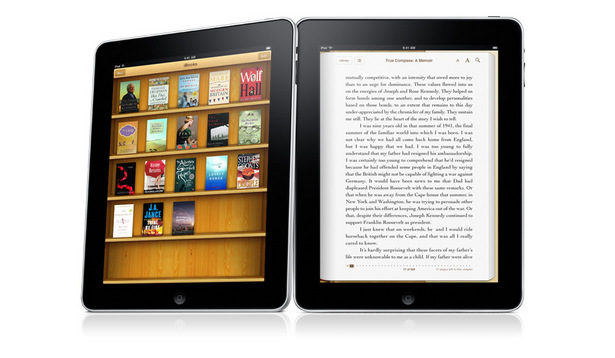
iBooks, announced today at the iPad event, is a new native application for iPhone, iPod Touch and iPad that allows you to browse, download and read e-books. At launch, five book publishers will have publications on iBooks: Penguin, Simon and Schuster, HarperCollins, Macmillian and Hachette. Left off the list is McGraw-Hill, whose CEO accidentally spilled the beans on the tablet a day too early. We think it’s possible that Apple handed retribution to McGraw-Hill for the leak, although you’ll likely see its books on the iPad at some point.
Here’s how Steve Jobs described iBooks:
“The iBooks app is a great, new way to read and buy books. Just download the app for free from the App Store, and you’ll be able to buy everything from classics to bestsellers from the built-in iBookstore. Once you’ve bought a book, it’s displayed on your Bookshelf. To read it, all you have to do is tap on it and it opens up. The high-resolution, LED-backlit screen displays everything in sharp, rich, color, so it’s very easy to read, even in low light.”
Time will tell whether the iPad is suitable for long-term reading, but Apple didn’t hold back any punches in its quest to wrest the ebook crown from Amazon.
TV, Movies and Video:
The video display itself is crisp and sharp, and that was on clear display when Apple demoed several movies on the device. The video interface is just like the iPhone’s video interface, with options for bookmarking, fast-forwarding, rewinding, etc. Oh, and it plays video in HD.
It also has an iTunes store-like interface for browsing videos, movie chapters, and purchasing video content. On the left-hand side you’ll find your viewing options with screenshots, descriptions and video length. On the right-hand side are graphs, either from that movie or TV show.
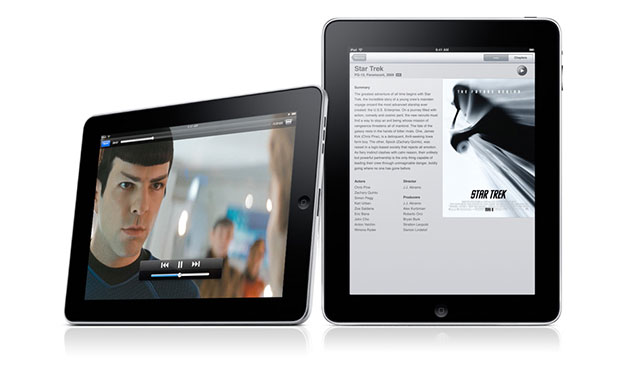
Still, this device is NOT a widescreen device. There is a lot of black space on the top and bottom when watching a film in widescreen mode. We expect that Apple will address this in future versions with slightly longer iPads, but for now you’ll just have to deal with it.
Gaming:
You really want to look out for the iPad as a gaming device, because EA and others are going to build some amazing games on this platform.

Several games were demonstrated for the iPad, including Need for Speed Shift and N.O.V.A. In Need for Speed, the driver moves the car by turning the tablet. Tapping on the device changes your perspective and zooms. You utilize the touchscreen to accelerate and change gears. Our estimation is that the game looks great — better than an iPhone game — but still doesn’t compare to the PC. In N.O.V.A., a first-person shooter, you can use thee fingers to open a door or slide two fingers to toss a grenade. There are more input possibilities with Apple’s tablet.
The same things that made the iPhone a popular gaming platform were apparent in these demos, however the iPad’s HD capabilities and its more advanced touch screen will make it a stronger gaming platform. And with all iPhone games running on the device, there’s already a big library in its collection.
Music Playing:
Perhaps the one advantage of the tablet is that it’s got a better on-board output than the touch. There’s reference to built-in speakers plural rather than just the one although confirmation is required. If so, that would be important if you want to continue listening to music on the device in a room in the house which doesn’t have an audio set up and you also don’t want to be tied to your player by heaphones cable. That might sound rather specific but think doing the washing up or ironing or other such scenes of domestic bliss while streaming Spotify onto your device.
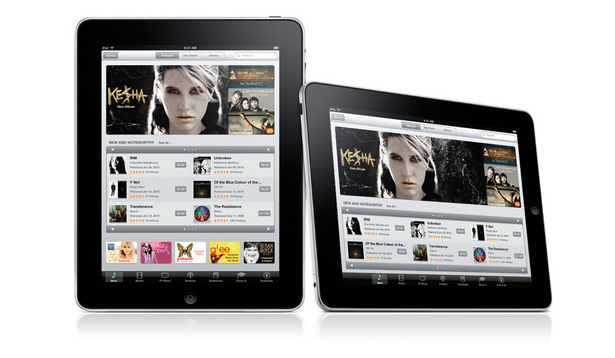
Also, and this is one of emotion rather than anything else, the iTunes LP feature, as released in the latest incarnation of the Appe music software, would actually work really well on the iPad. Reading all those lyrics and looking at the album art with a large flat piece of hardware in your hands is rather reminiscent of old vinyl albums. Could the iPad be the LP for the 21st century?
On the other hand, that’s go to be out-weighed by the fact that you can then stick the iPod touch into your pocket and go out to work. With the tablet, you’d need a pretty capacious suit lining.
iWork:
For productivity and business work on the iPad, Apple has introduced a new version of its iWork software specifically designed for the touchscreen device. It’s been in development for over a year, apparently.
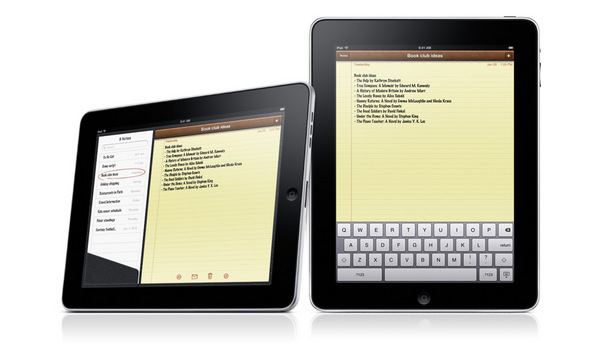
A rundown of the key features and applications in iWork for the iPad:
– Keynote: Apple’s flagship presentation software has gotten an overhaul that allows you to easily view and add slides using the touchscreen interface. You can made edits, browse through slides and more.
– Pages: Word processing on the iPad goes through Pages, which allows you to type more effectively without a physical keyboard and provides touch-based formatting options. For example, dragging images on a page is easy since there’s auto-wrap.
– Numbers: Apple’s spreadsheet feature lets you design data cells and spreadsheets with the multi-touch interface.
– Cost: It costs $9.99 for each app in the app store.
It’s important to note that you can open Excel, Word and Powerpoint documents in iWork, meaning that you can work on your PC documents on your iPad.
Summary – Features And Specifications Of Apple iPad:
- Large 9.7-inch LED-backlit wide Multi-Touch screen (1024 x 768 pixels resolution) with IPS (in-plane switching) technology and fingerprint-resistant oleophobic coating
- Extremely powerful, power efficient 1GHz Apple A4 system-on-a-chip
- Customizable Home Screen provides users one-tap access to everything on iPad
- Spotlight Search allows users to search across Apple iPad, and its built-in apps including Mail, Contacts, Calendar, iPod and Notes
- Browse and buy music, TV shows, podcasts on your iPad by just tap on the iTunes Store icon
- Safari web browser lets users navigate through the Internet easily
- Bluetooth 2.1 + EDR technology and Wi-Fi (802.11 a/b/g/n) connectivity
- Based on latest iPhone OS 3.2
- Support speeds up to 7.2 Mbps on HSDPA networks (Wi-Fi + 3G model only)
- Built-in 25Whr rechargeable lithium polymer battery supports up to 10 hours of battery life
- 30-pin dock connector lets users connect to new iPad accessories such as Camera Connection Kit or Keyboard Dock
- Support variety of languages including English, French, German, Japanese, Dutch, Italian, Spanish, Simplified Chinese and Russian
- Integrated speaker, microphone, accelerometer, ambient light sensor and digital compass
- A-GPS (Wi-Fi + 3G model) or cellular (Wi-Fi + 3G model)
- Available in 3 variants of flash memory capacities – 16GB, 32GB and 64GB
Complete list of features and specifications can be found on Apple website.
Sources: 901am.com, Cnet.com, Mashable.com, MacWorld.com, Pocket-Lint.com