website statistics

Dell Working On A USB-Sized PC That Gives Access To Windows, Mac OS, Chrome OS

Dell is currently working on a very exciting product - a USB-sized tiny PC that gives users access to Chrome OS, Windows, Mac OS and other apps in the cloud.

When do you use Facebook?

View Results

Loading ... Loading ...
1 Star2 Stars3 Stars4 Stars5 Stars (Rated: 5.00/5)
Loading ... Loading ...

PC sales have declined rather sharply over the recent years and it is no wonder that the mainstream PC vendors are having a hard time putting up with it. Dell is one example of that. However, the company is now gearing up for a rather revolutionary product – a USB-sized PC that you can plug into, say, a TV panel and access multiple operating systems with it.
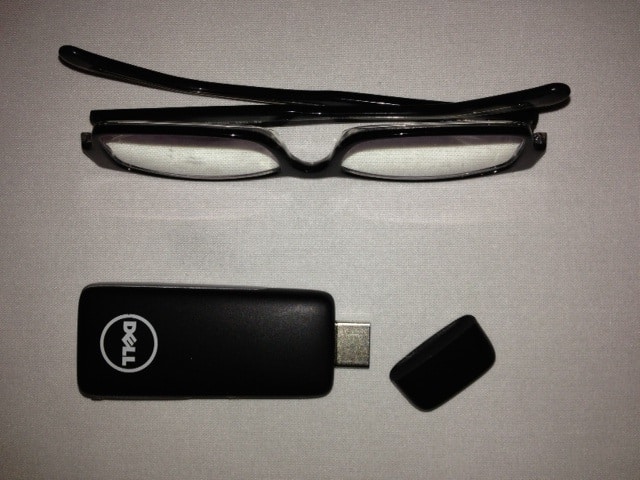

Project Ophelia

Naturally, the idea is very intriguing. The whole notion is steeped well into cloud computing. This is how the tiny PC is going to work: once you plug it into a machine, it tries to access any Wi-Fi connection that is available. Once it is connected to the internet, it then goes on to give the users access to Windows, Mac OS, Chrome OS and a whole lot of other software and apps.

This way, the entire OS remains in the cloud whereas you can enjoy it all the same with the help of a tiny USB-sized computer. The idea has immense potential and may well go on to reshape the way we use computers. Dell is currently branding this product as ‘Ophelia.’

Moreover, the machine with which this USB is plugged pushes off nearly all the tasks to the cloud servers while using the OS so that the user’s machine takes minimal load. To add icing to this treat, Dell’s vice-president has stated that he hopes Ophelia will be available for a price of $50. Imagine getting a whole load of remotely available operating systems with a USB device that size. Now that’s really worth looking forward to.

Source: Quartz

Courtesy: BGR

Buy Cheapest Related Product From Amazon.com


Apple Shipped Nearly 52 Million iPhones During Q4 Of 2012

UK Mobile Users Will Be Able To Make Payments Via Text Service By 2014
You can also press the left/right arrow key on your keyboard to go to previous/next post
  On January 16, 2013(4 months, 3 days ago.)

Recent Search

Recent Tutorials

This tutorial will show how to use S.M.A.R.T. (Self Monitoring Analysis and Reporting Technology) to continuously collect information on health of your equipment.
In this tutorial I'll show you how you can easily protect yourself from any kind of security breaks that may occur through Java.
Today Apple enabled "Two Step Verification" for iCloud And Apple ID. But the process is not that simple. But no worry, here we have made a step by step tutorial.
Cant remember your iPhone passcode? Here I will show you some workaround on what to do and how to recover and restore for every possible scenario.
This tutorial will show you how to perform the Winapp2.ini installation inside CCleaner and how to use it under Windows operating system.
With app called AD Sound Recorder, you can record any stream that passes through your sound card or speakers and in this tutorial I will show you how to do that.
If you want to have Boxee app inside your Apple TV, in this tutorial we will show you how to install XBMC and Boxee using Windows on your Apple TV.
This tutorial will show you how to transfer PS3 Saved Game Files from your PC to your PS3 game console.
Adding videos from external sources such as internet, more specifically from YouTube, is a great solution to enhance a presentation; in this tutorial I will show you the procedure.
If you are one of new comers to Windows Phone 8, like me, in this tutorial I will walk you through the process to update your Windows Phone 8 device.
Close You Have To Login
User:
Pass:
Login With »Login With TwitterLogin With Facebook