website statistics

Western Digital Announces 5-mm Thick Cheaper Hybrid Drives For Ultrabooks

Western Digital has unveiled 5-mm thick hybrid drives. These drives comprise of both HDD and SDD, thus delivering speed without being expensive.

When do you use Facebook?

View Results

Loading ... Loading ...
1 Star2 Stars3 Stars4 Stars5 Stars (Rate This)
Loading ... Loading ...

Until now, the popular trend had been that of expanding the storage space of a hard drive while keeping its size constant. However, with Ultrabooks and other mobile devices hitting the market, hardware vendors are now trying to trim down the size of drives while keeping its storage space constant. For instance, Western Digital has now introduced a 5-mm thick hybrid drive.
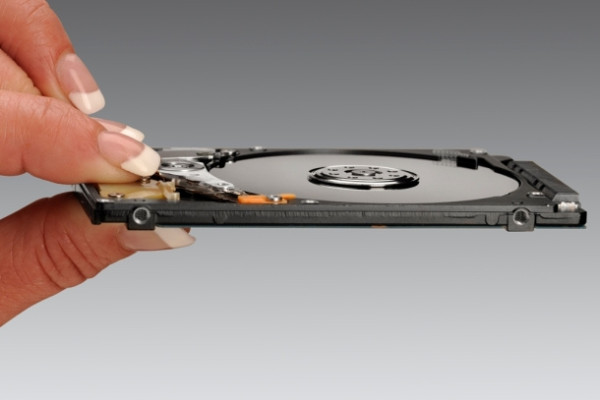

Hybrid drive

The 5-mm thick hybrid drive from Western Digital is quite impressive. Because it combines the power of solid-state drive with the more traditional HDD in such a small size. The SSD part is relatively tiny, which essentially lets the system boot from it, thus making it speedier.

The larger part of the drive comprises of the regular HDD. This way, the 5-mm thick hybrid drive provides great system speeds without being expensive. The minimal thickness of the hybrid drive makes it an ideal option for the ultrabook vendors who are always trying to trim down the waist of their ultrabooks.

Western Digital hasn’t revealed what would be the exact capacity of the MLC NAND Flash that would be a part of this hybrid drive. However, based on the fact that many ultrabooks currently tool 20 GB of 32GB flash drives, we can expect a similar sized NAND Flash to go into the hybrid drive.

However, we don’t expect these hybrid drives to go into commercial use, as being parts of ultrabooks, before 2013. Western Digital has just unveiled these drives and it will take a while for ultrabook vendors to line up and lay their hands on it.

Courtesy: Arstechnica

Buy Cheapest Related Product From Amazon.com


Report Says Approximately 20% Of US Internet Users Can’t Stream HD Video

New Version Of The Night Flier Now Available For Android
You can also press the left/right arrow key on your keyboard to go to previous/next post
  On September 11, 2012(8 months, 15 days ago.)

Recent Products

Buy Now | Compare  
Buy Now | Compare  
Compare  

Recent Search

Recent Tutorials

This tutorial will show how to use S.M.A.R.T. (Self Monitoring Analysis and Reporting Technology) to continuously collect information on health of your equipment.
In this tutorial I'll show you how you can easily protect yourself from any kind of security breaks that may occur through Java.
Today Apple enabled "Two Step Verification" for iCloud And Apple ID. But the process is not that simple. But no worry, here we have made a step by step tutorial.
Cant remember your iPhone passcode? Here I will show you some workaround on what to do and how to recover and restore for every possible scenario.
This tutorial will show you how to perform the Winapp2.ini installation inside CCleaner and how to use it under Windows operating system.
With app called AD Sound Recorder, you can record any stream that passes through your sound card or speakers and in this tutorial I will show you how to do that.
If you want to have Boxee app inside your Apple TV, in this tutorial we will show you how to install XBMC and Boxee using Windows on your Apple TV.
This tutorial will show you how to transfer PS3 Saved Game Files from your PC to your PS3 game console.
Adding videos from external sources such as internet, more specifically from YouTube, is a great solution to enhance a presentation; in this tutorial I will show you the procedure.
If you are one of new comers to Windows Phone 8, like me, in this tutorial I will walk you through the process to update your Windows Phone 8 device.
Close You Have To Login
User:
Pass:
Login With »Login With TwitterLogin With Facebook