website statistics

Google Is Working On Introducing A Password Generator In Chrome

When do you use Facebook?

View Results

Loading ... Loading ...
1 Star2 Stars3 Stars4 Stars5 Stars (Rate This)
Loading ... Loading ...

Chrome is fast becoming one of the most used browser around the globe. Currently, it has taken the lead on Mozilla Firefox and is now contesting Microsoft’s Internet Explorer for the top spot. The reason why it has become so wildly popular is because it offers speed, is very, very light and Google keeps rolling out newer versions and better features for it. For instance, we have been told by Google now that the company is working on introducing a built-in strong password generator in Chrome.
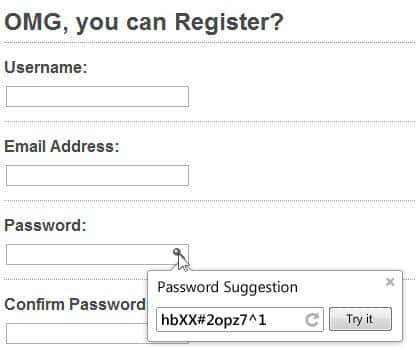

This password generator will automatically generated strong passwords for the use and suggest it to them. The user will then have the choice of selecting the suggested password or giving their own password. According to Google, “Chrome’s long term solution to this problem is browser sign in plus OpenID. While implementing browser sign in is something that we can control, getting most sites on the internet to use OpenID will take a while. In the meantime it would be nice to have a way to achieve the same affect of having the browser control authentication. Currently you can mostly achieve this goal through Password Manager and Browser Sync, but users still know their passwords so they are still susceptible to phishing. By having Chrome generate passwords for users, we can remove this problem.”

When a user reaches the sign up page, Chrome will automatically place a key icon in the password box. When the user clicks that, it will reveal a strong password as a suggestion which the user may or may not choose.

However, Chrome will also automatically save the password in Password manager and that can, in turn, make a user being forced to use Chrome only if he forgets his password. In this way, although this is a very useful feature, it can make users highly dependent on Chrome for the security of their online accounts.

Buy Cheapest Related Product From Amazon.com


[Tutorial] How To Turn Off Facebook Groups Email Notifications

Most Impressive Apple Top Ten Statistics, You Probably Dont Know Yet
You can also press the left/right arrow key on your keyboard to go to previous/next post
  On February 20, 2012(1 year, 2 months ago.)

Recent Search

Recent Tutorials

This tutorial will show how to use S.M.A.R.T. (Self Monitoring Analysis and Reporting Technology) to continuously collect information on health of your equipment.
In this tutorial I'll show you how you can easily protect yourself from any kind of security breaks that may occur through Java.
Today Apple enabled "Two Step Verification" for iCloud And Apple ID. But the process is not that simple. But no worry, here we have made a step by step tutorial.
Cant remember your iPhone passcode? Here I will show you some workaround on what to do and how to recover and restore for every possible scenario.
This tutorial will show you how to perform the Winapp2.ini installation inside CCleaner and how to use it under Windows operating system.
With app called AD Sound Recorder, you can record any stream that passes through your sound card or speakers and in this tutorial I will show you how to do that.
If you want to have Boxee app inside your Apple TV, in this tutorial we will show you how to install XBMC and Boxee using Windows on your Apple TV.
This tutorial will show you how to transfer PS3 Saved Game Files from your PC to your PS3 game console.
Adding videos from external sources such as internet, more specifically from YouTube, is a great solution to enhance a presentation; in this tutorial I will show you the procedure.
If you are one of new comers to Windows Phone 8, like me, in this tutorial I will walk you through the process to update your Windows Phone 8 device.
Close You Have To Login
User:
Pass:
Login With »Login With TwitterLogin With Facebook