website statistics

Track Your Phone Even When The Battery Is Dead With Signal Flare By Lookout

Lookout, the company well-known for its useful Lookout Mobile Security app, has now released a new feature called 'Signal Flare' which can track a lost phone even with dead battery.

When do you use Facebook?

View Results

Loading ... Loading ...
1 Star2 Stars3 Stars4 Stars5 Stars (Rate This)
Loading ... Loading ...

A number of smartphones today come pre-equipped with the feature of letting the user track the phone in case it goes missing. However, many users are unable to do so when the battery of the lost smartphone dies. Lookout’s Signal Flare intends to resolve this problem.
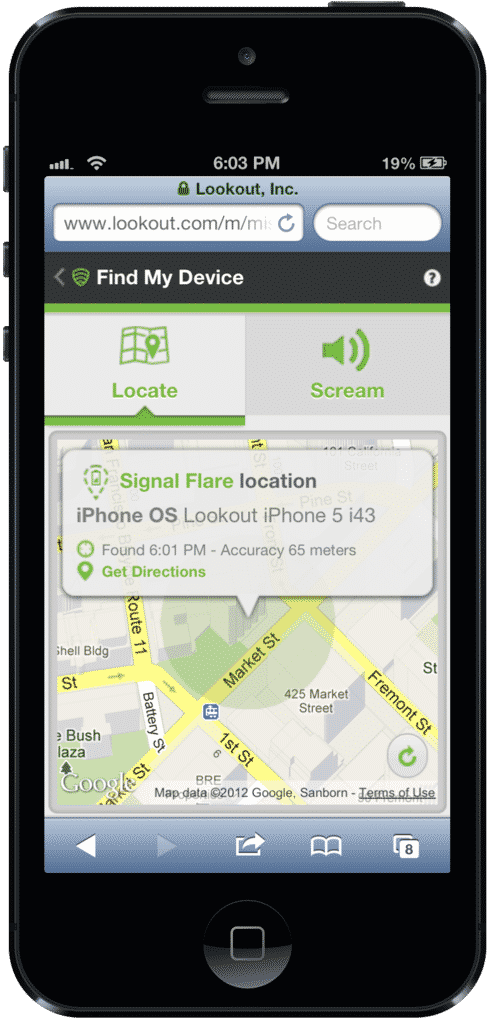

Signal Flare

According to Lookout, it discovered that of the total smartphones that go missing, 30 percent can not be tracked simply because their battery runs out. So if the device is lost or stolen, it can no longer be retrieved, rendering the built-in tracking feature useless.

To offer a viable alternative, Lookout has now released a new feature called ‘Signal Flare.’ The feature essentially tracks down and saves the last known location of the device whenever it is running low on battery. This is done so that in case the mobile is lost and the battery goes dead, the user gets to know the last location of the device just before the battery juice ended.

Users can then determine this last recorded location by simply logging into Lookout’s website and find out this location under the Missing Device tab. The feature is now included in the free Lookout Mobile Security app, both for Android as well as iPhone users.

Such Android users who make use of the Android version of the app can also add in a few more bucks, $2.99 a month to be exact, and get a Premium version of the app which brings more advanced features such as the ability to remotely lock the phone as well as wipe the data to avoid it being accessed by anyone else.

You can download the app right away from iTunes or the Google Play store, depending on whether you are using iPhone or an Android smartphone.

Source: Lookout

Courtesy: All Things D

Buy Cheapest Related Product From Amazon.com


Ford Racing Unveiled “Twin-turbo Mustang Cobra Jet” Drag Racing Car At SEMA

[Tutorial] How To Mount ISO Files In Windows 8 Without Any Additional Software
You can also press the left/right arrow key on your keyboard to go to previous/next post
  On October 31, 2012(6 months, 25 days ago.)

Recent Search

Recent Tutorials

This tutorial will show how to use S.M.A.R.T. (Self Monitoring Analysis and Reporting Technology) to continuously collect information on health of your equipment.
In this tutorial I'll show you how you can easily protect yourself from any kind of security breaks that may occur through Java.
Today Apple enabled "Two Step Verification" for iCloud And Apple ID. But the process is not that simple. But no worry, here we have made a step by step tutorial.
Cant remember your iPhone passcode? Here I will show you some workaround on what to do and how to recover and restore for every possible scenario.
This tutorial will show you how to perform the Winapp2.ini installation inside CCleaner and how to use it under Windows operating system.
With app called AD Sound Recorder, you can record any stream that passes through your sound card or speakers and in this tutorial I will show you how to do that.
If you want to have Boxee app inside your Apple TV, in this tutorial we will show you how to install XBMC and Boxee using Windows on your Apple TV.
This tutorial will show you how to transfer PS3 Saved Game Files from your PC to your PS3 game console.
Adding videos from external sources such as internet, more specifically from YouTube, is a great solution to enhance a presentation; in this tutorial I will show you the procedure.
If you are one of new comers to Windows Phone 8, like me, in this tutorial I will walk you through the process to update your Windows Phone 8 device.
Close You Have To Login
User:
Pass:
Login With »Login With TwitterLogin With Facebook