
MobileBuster Sling Note is an exciting multi-tasker app for iPad users and is a recent launch that converts an iPad into a productive tool for creating documents, making annotations, calculating, social networking and much more, without having to flip between two programs. Users are able to open two different applications on one screen to easily drag photos, text, links, or numbers back and forth between them, also two browsers open at once, create sketches, import, export and email files. It’s more than a web/notetaker, you can copy/paste from web and draw/text/insert photos/web addresses, etc and the note side can be converted to a PDF either through iTunes or email………..
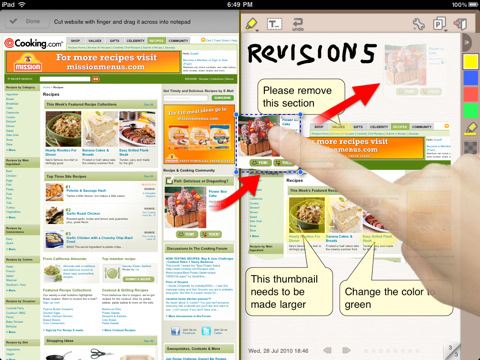
MobileBuster, the developers of Sling Note has released an exciting multi-tasker app for iPad users. Microsoft Courier tablet fans rejoice! The application is a recent launch that converts an iPad into a productive tool for creating documents, making annotations, calculating, social networking and much more, without having to flip between two programs. Users are able to open two different applications on one screen to easily drag photos, text, links, or numbers back and forth between them, have two browsers open at once, create sketches, import, export and email files. MobileBuster has recently launched the ultimate creative and productive multi-tasking app for iPad. It’s called Sling Note and it provides a user with easy-use tools for the freedom of having two different applications or web browsers open at once and being able to drag photos, texts, links, numbers and more, back and forth between two programs or applications. People who do online research, create budgets or scientific reports, or those who do production design are highly likely to save a lot of time and effort by using this app, although it is just as good for those who collect recipes or need a school project done. Really, anybody at all who appreciates being able to work with two screens at one time will find Sling Note extremely useful.
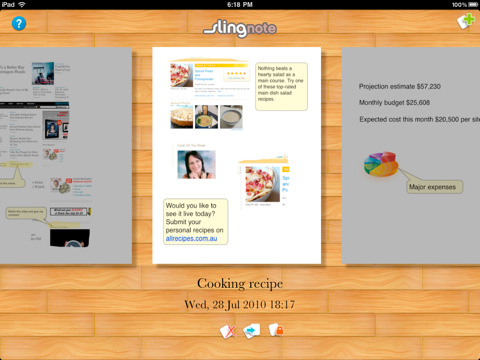
A user merely opens two applications of their choosing, side by side. They can select from a notepad, calculator, any web browser, Gmail, chat, Twitter, Facebook. Data and information can be dragged from one application to the next, such as when a link or text from the web is put into a notepad document. Each side of the screen can be used separately, as well, perhaps surfing the web while chatting with friends. Additionally, users can cut webclips, annotate, open two browsers at once, create sketches, perform calculations, add imported PDF, DOC, PPT, XLS, RTF files, keys, pages and numbers. Files can also be exported and emailed. The point is, that flipping back and forth between applications is no longer necessary because Sling Note eliminates the need by conveniently putting those programs side by side on one screen. Sling Note 1.007 is only $2.99 (USD) and available worldwide exclusively through the App Store in the Productivity category. Promo codes are available for qualified reviewers. Please specify the website or blog you represent when making your request.
Features :
- Cut web clips and drop them into notepad
- Drag web link into notepad and vice versa
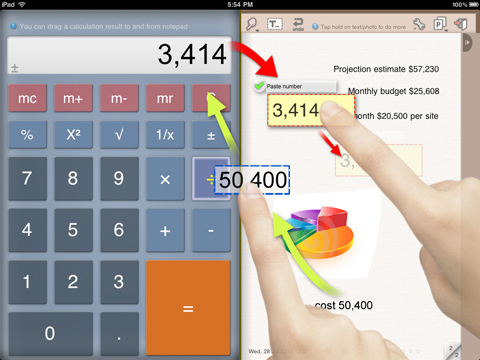
- Drag calculation result into notepad and vice versa
- Annotate web clips, photos and text with pen, highlighter and tooltips
- Drop text boxes and tooltips with movable pointer
- Draw sketches and diagrams with automatic curve smoothing
- Use three finger swipe gesture to switch between applications easily
- Landscape mode to pair two applications side by side, or Portrait mode to focus on one application
- Email notepad page to yourself and other people
- Export notepad page as a PDF
- Import PDF, DOC, PPT, XLS, Keys, Pages, Numbers and RTF files
- Translate website with one click
- Dual browser to let you open Gmail, chatting, twittering, updating Facebook while browsing online
- Import photo from your library
- Print your notes wirelessly
- Take photos from Sling Note (iPad 2 only)
- Online research
- Bug reporting and website annotation
- Photo annotation
- Product design and note taking
- Budget/scientific calculation
[ttjad keyword=”ipad”]


Mobile Buster Sling Note multi-tasker application are available best of the features to developing. Also the best garments to supporting them and getting to the perfects location to adapting on them.
coupon code