website statistics

Everything You Install On Windows 8 Will Be Known To Microsoft

With the help of a feature called Windows SmartScreen, Microsoft will be able to know about every single app you install on your Windows 8 machine.

When do you use Facebook?

View Results

Loading ... Loading ...
1 Star2 Stars3 Stars4 Stars5 Stars (Rate This)
Loading ... Loading ...

The world is eagerly waiting for Windows 8, the next big release from Microsoft. The beta releases of Windows 8 have attracted great reviews from users and critics. However, there are some critical privacy concerns which have now been cited about this new operating system (OS).
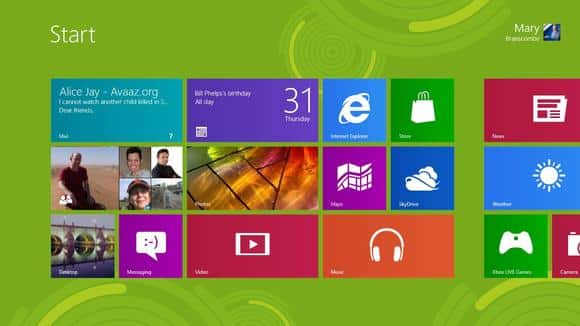

Windows 8 SmartScreen

The privacy issues in Windows 8 have been cited by Nadim Kobeissi, who had been testing the RTM release of Windows 8. While Kobeissi highly commends the speed and performance of the RTM release, he goes on to cite how he is concerned about the way user’s privacy may be violated in the OS.

The whole point of contention is basically a feature called “Windows SmartScreen.” This feature is enabled by default and although a user can disable it manually, it is not that easy.

The feature essentially informs Microsoft of every app that you install on your Windows 8 machine. After getting identification information about the app you are trying to install, and coupling it with your IP address, the feature sends this information to Microsoft servers.

The problem with this is that all these user data goes into Microsoft servers and the company can be made to reveal the data to legal authorities under many different pretexts. This severely undermines the user’s privacy rights. Also, when in a country where activists and other internet users tend to tread carefully and keep their online activity footprint-free, this can pose a serious problem to their security.

Another thing that Kobeissi cites is that the information sent by this feature to Microsoft servers is not adequately secure and can even be intercepted on its way. This essentially means that apart from infringing upon user’s privacy rights, this feature may also comprise the security of their data.

You can disable the feature but there will doubtless be a lot of such Windows users who wouldn’t know about this and will continue to share their data without even knowing about it. I hope that Microsoft will address these crucial issue soon.

Source: Nadim Kobeissi

Courtesy: Slashdot

Buy Cheapest Related Product From Amazon.com


Samsung Says “Something Smart Is Coming”; Probably A Windows 8 Laptop

Jury Found Samsung ‘Guilty’ Of Copying, Awarded $1.051 Billion To Apple
You can also press the left/right arrow key on your keyboard to go to previous/next post
  On August 25, 2012(9 months, 3 days ago.)

Recent Products

Buy Now | Compare  
Buy Now | Compare  
Compare  

Recent Search

Recent Tutorials

This tutorial will show how to use S.M.A.R.T. (Self Monitoring Analysis and Reporting Technology) to continuously collect information on health of your equipment.
In this tutorial I'll show you how you can easily protect yourself from any kind of security breaks that may occur through Java.
Today Apple enabled "Two Step Verification" for iCloud And Apple ID. But the process is not that simple. But no worry, here we have made a step by step tutorial.
Cant remember your iPhone passcode? Here I will show you some workaround on what to do and how to recover and restore for every possible scenario.
This tutorial will show you how to perform the Winapp2.ini installation inside CCleaner and how to use it under Windows operating system.
With app called AD Sound Recorder, you can record any stream that passes through your sound card or speakers and in this tutorial I will show you how to do that.
If you want to have Boxee app inside your Apple TV, in this tutorial we will show you how to install XBMC and Boxee using Windows on your Apple TV.
This tutorial will show you how to transfer PS3 Saved Game Files from your PC to your PS3 game console.
Adding videos from external sources such as internet, more specifically from YouTube, is a great solution to enhance a presentation; in this tutorial I will show you the procedure.
If you are one of new comers to Windows Phone 8, like me, in this tutorial I will walk you through the process to update your Windows Phone 8 device.
Close You Have To Login
User:
Pass:
Login With »Login With TwitterLogin With Facebook