website statistics

Get Back The Start Menu In Windows 8 With Classic Shell

When do you use Facebook?

View Results

Loading ... Loading ...
1 Star2 Stars3 Stars4 Stars5 Stars (Rate This)
Loading ... Loading ...

Not many of us tend to miss many of the features in older versions of Windows. However, Windows 8 doesn’t feature a ‘Start menu’ and that can be something which will take some time to get used to. In fact, many of us want it back and for those who do, the good news is that with Classic Shell, you can have it all right on Windows 8, no matter how Metro Microsoft makes it.
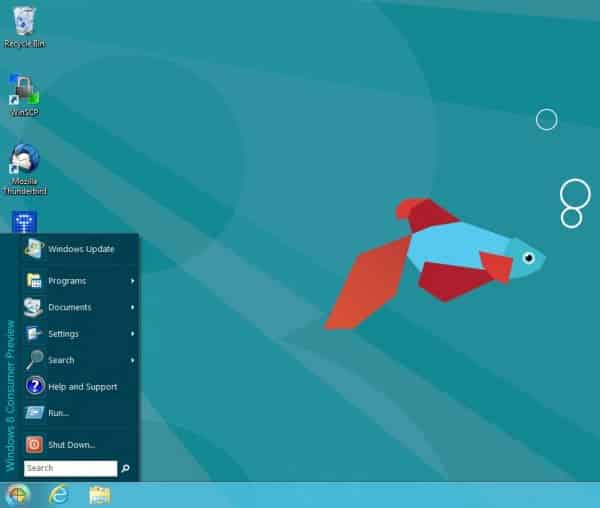

Classic Shell is basically a collection of many different programs. The chief objective of these programs is to let the users get back features from old Windows interfaces, features which have been done away with in newer versions.

Now, Classic Shell has been updated. Many users who have had the chance to try their hands on the Customer Preview of Windows 8 have been complaining that it doesn’t feature a Start Menu. This makes navigation all the more harder, even when the new Metro interface is really cool and sleek.

For such users, the problem is pretty much solved with the updated Classic Shell. You can now get the old classic start menu right on your Windows 8 with the help of it. The coolest part is that the feature works even on the Customer Preview, so you can check it out to your heart’s contentment before the full version of Windows 8 is out.

The feature comes without any qualms. You get to have everything that normally a Windows Start Menu incorporates, say, in Windows 7. Moreover, it feels like a very native offering since it works really smooth and fast. Classic Shell has also furnished a number of other classic Windows features for Windows 8 users. You might want to check them out here.

Buy Cheapest Related Product From Amazon.com


[Tutorial] How To Protect Sensitive Documents – Windows 7

[Tutorial] How to Create Password Reset Disk In Windows 7
You can also press the left/right arrow key on your keyboard to go to previous/next post
  On April 4, 2012(1 year, 1 month ago.)

Recent Search

Recent Tutorials

This tutorial will show how to use S.M.A.R.T. (Self Monitoring Analysis and Reporting Technology) to continuously collect information on health of your equipment.
In this tutorial I'll show you how you can easily protect yourself from any kind of security breaks that may occur through Java.
Today Apple enabled "Two Step Verification" for iCloud And Apple ID. But the process is not that simple. But no worry, here we have made a step by step tutorial.
Cant remember your iPhone passcode? Here I will show you some workaround on what to do and how to recover and restore for every possible scenario.
This tutorial will show you how to perform the Winapp2.ini installation inside CCleaner and how to use it under Windows operating system.
With app called AD Sound Recorder, you can record any stream that passes through your sound card or speakers and in this tutorial I will show you how to do that.
If you want to have Boxee app inside your Apple TV, in this tutorial we will show you how to install XBMC and Boxee using Windows on your Apple TV.
This tutorial will show you how to transfer PS3 Saved Game Files from your PC to your PS3 game console.
Adding videos from external sources such as internet, more specifically from YouTube, is a great solution to enhance a presentation; in this tutorial I will show you the procedure.
If you are one of new comers to Windows Phone 8, like me, in this tutorial I will walk you through the process to update your Windows Phone 8 device.
Close You Have To Login
User:
Pass:
Login With »Login With TwitterLogin With Facebook