website statistics

Microsoft Explains Improved Movie And Music Players In Windows 8

When do you use Facebook?

View Results

Loading ... Loading ...
1 Star2 Stars3 Stars4 Stars5 Stars (Rate This)
Loading ... Loading ...

Microsoft is gradually lifting the wraps off its big release which is anticipated some time later this year. The company has been slowly showing off the new and added features in Windows 8. Here’s the latest on the list. Microsoft is now touting the movie and music players in the upcoming OS, claiming that they will offer a far better experience for the users.
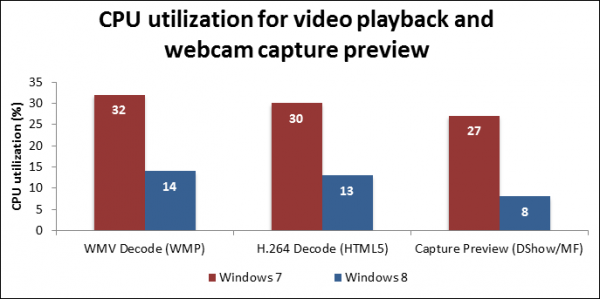

According to a recent blog post by Media Platform and Technologies group, Windows 8 will be equipped with far better movie and music players. Essentially, these players will perform equally well on all hardware platforms which meet minimum requirements for Windows 8.

Moreover, the new playback for movie and music players will be able to save on the battery life while at the same time processing data at a better pace. Citing the example of audio playback, the team writes that audio data will be created into batches, each of which will then be made into chunks and then processed which is very helpful in conserving battery while at the same time, leaving the CPU less busy.

For media playback, Microsoft has also enhanced the adaptive bitrate system. Due to this new system, when a video streams on Windows 8, its first few frames are streamed at a slower rate.

According to the post, “Instead of mixing all audio content and sending the resulting (often incoherent) stream to the speakers, Windows can pause a stream when a second stream is played and when it makes sense to do so. In most cases, Windows prioritizes audio coming from the app that is in the foreground. When you move the app to the background, the system quiets the stream.”

Source: Building Windows 8

Courtesy: The Verge


Opera CEO Not Interested To Sell Opera To Facebook

The Voter Registration Process About To Go Digital In New York
You can also press the left/right arrow key on your keyboard to go to previous/next post
  On June 10, 2012(11 months, 16 days ago.)

Recent Search

Recent Tutorials

This tutorial will show how to use S.M.A.R.T. (Self Monitoring Analysis and Reporting Technology) to continuously collect information on health of your equipment.
In this tutorial I'll show you how you can easily protect yourself from any kind of security breaks that may occur through Java.
Today Apple enabled "Two Step Verification" for iCloud And Apple ID. But the process is not that simple. But no worry, here we have made a step by step tutorial.
Cant remember your iPhone passcode? Here I will show you some workaround on what to do and how to recover and restore for every possible scenario.
This tutorial will show you how to perform the Winapp2.ini installation inside CCleaner and how to use it under Windows operating system.
With app called AD Sound Recorder, you can record any stream that passes through your sound card or speakers and in this tutorial I will show you how to do that.
If you want to have Boxee app inside your Apple TV, in this tutorial we will show you how to install XBMC and Boxee using Windows on your Apple TV.
This tutorial will show you how to transfer PS3 Saved Game Files from your PC to your PS3 game console.
Adding videos from external sources such as internet, more specifically from YouTube, is a great solution to enhance a presentation; in this tutorial I will show you the procedure.
If you are one of new comers to Windows Phone 8, like me, in this tutorial I will walk you through the process to update your Windows Phone 8 device.
Close You Have To Login
User:
Pass:
Login With »Login With TwitterLogin With Facebook