website statistics

Europe’s Cheapest E-Reader Txtr Beagle Now In US, But Lost The ‘Cheap’ Charm

World's cheapest and smallest e-Reader 'Beagle' made by German electronics company Txtr has reached in the U.S. However, it's not cheap anymore.

When do you use Facebook?

View Results

Loading ... Loading ...
1 Star2 Stars3 Stars4 Stars5 Stars (Rate This)
Loading ... Loading ...

In October 2012, German electronics company Txtr launched the world’s cheapest and smallest e-Reader called Beagle for €10 ($12). The e-Reader was being sold through wireless carriers in Europe and people also showed great interest buying it. The good news is, Txtr Beagle e-Reader is now available in the US. But for this, U.S. users have to pay more than 5 times the original price.
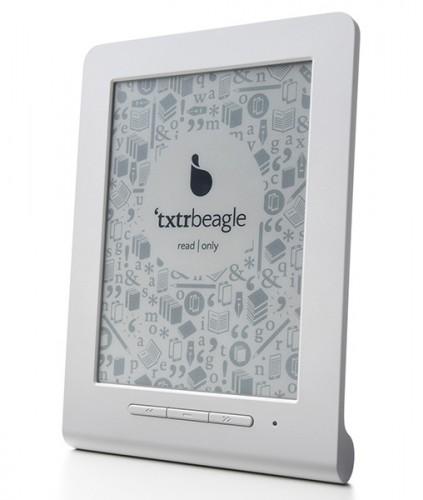

Txtr Beagle e-Reader

The Beagle weighs 128 grams (with batteries) or 111 grams (without batteries). It measures 140 mm x 105 mm x 4.8 mm and comes with a small 5-inch Electronic Ink screen and 4 GB memory. The Beagle neither have any touchscreen, 3G, Wi-Fi connectivity or fixed rechargeable battery nor any USB based data transfer interface. In fact, Beagle can’t process ebooks on its own, so it needs the Txtr Android 4.0 app to convert an ebook to page images and transfer the page images to the Beagle over Bluetooth. Users can transfer data only via Bluetooth. It can hold 5 folders full of page images, with one folder set aside for each title.

When beagle was launched in Europe, its price was €10 or $12 (still now, it is being sold at that price). Now the device has reached the U.S. But, its price is not $12 or something like that in the U.S. Rather people have to pay $69 including a $10 voucher for the world’s ‘cheapest’ e-Reader.

Source: Liliputing

Buy Cheapest Related Product From Amazon.com


AT&T Says Law Against Unlocking Phones Won’t Affect Its Customers

Syntellia Shows Leap Motion Fleksy That Lets You Type On Air
You can also press the left/right arrow key on your keyboard to go to previous/next post
  On March 11, 2013(2 months, 8 days ago.)
  • Tsais

    Another sad misrepresentation not worthy of the name journalism!

    Giving a price for a gadget that’s being sold with a contract, without specifying the terms and costs of that contract is utterly meaningless. What good is it, when you get Txtr for $12 if you end up paying another $10 per month for 2 years? What really is the price then?

    Any comparison based on this so-called ‘price’ is useless hogwash…

    It was clear from the start: with Txtr being sold on contract, it would end up costing just as much or more than other reader units from different companies that often have a nicer feature set.


Recent Search

Recent Tutorials

This tutorial will show how to use S.M.A.R.T. (Self Monitoring Analysis and Reporting Technology) to continuously collect information on health of your equipment.
In this tutorial I'll show you how you can easily protect yourself from any kind of security breaks that may occur through Java.
Today Apple enabled "Two Step Verification" for iCloud And Apple ID. But the process is not that simple. But no worry, here we have made a step by step tutorial.
Cant remember your iPhone passcode? Here I will show you some workaround on what to do and how to recover and restore for every possible scenario.
This tutorial will show you how to perform the Winapp2.ini installation inside CCleaner and how to use it under Windows operating system.
With app called AD Sound Recorder, you can record any stream that passes through your sound card or speakers and in this tutorial I will show you how to do that.
If you want to have Boxee app inside your Apple TV, in this tutorial we will show you how to install XBMC and Boxee using Windows on your Apple TV.
This tutorial will show you how to transfer PS3 Saved Game Files from your PC to your PS3 game console.
Adding videos from external sources such as internet, more specifically from YouTube, is a great solution to enhance a presentation; in this tutorial I will show you the procedure.
If you are one of new comers to Windows Phone 8, like me, in this tutorial I will walk you through the process to update your Windows Phone 8 device.
Close You Have To Login
User:
Pass:
Login With »Login With TwitterLogin With Facebook