website statistics

AirBlue Now Allows File Transfer Through Bluetooth On iOS

When do you use Facebook?

View Results

Loading ... Loading ...
1 Star2 Stars3 Stars4 Stars5 Stars (Rate This)
Loading ... Loading ...

Bluetooth file sharing is nearly always desired for a smartphone, no matter what awesome other features it packs. For iOS users, especially for iPhone users, including iPhone 4S, here are some good news. AirBlue Sharing is a smart tweak that now lets you transfer files through Bluetooth on an iOS. You can sent and received multiple files which may include photos, videos, contacts, notes etc. Moreover, the file transfer rate is excellent going up to 1.7 MB/s.
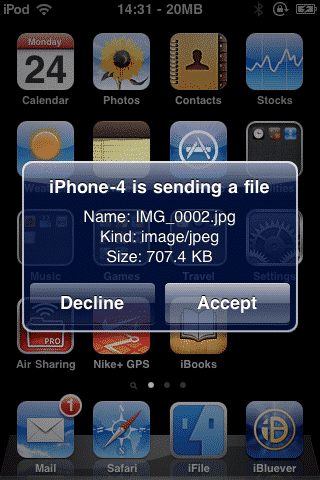

The tweak is very easy to use. It requires absolutely no configuration on your iOS device. Once you have installed it, you can start sharing files right away. Once you have shared or received a file through Bluetooth, the Bluetooth automatically goes off so as to save power of the device. The speeds of iOS to iOS file transfer through Bluetooth is really good and you can share a video within seconds.

If you are sharing a file at a location where no Wi-fi is available, your iPhone will create a Wi-fi hotspot of it’s own. You can choose files from your Photos, Music, Videos, Contacts, Notes or a number of other folders to share them to another device. The best part of this tweak is that unlike some devices, you don’t have to wait for one file sharing to end to start another. On the contrary, you can share multiple files at the same time and receive multiple files at the same time.

AirBlue Sharing is compatible with nearly all well-known operating systems including Mac OS X, Windows XP, Windows Vista, Windows 7, Linux, Nokia, Android, BlackBerry and other devices with Bluetooth enabled.

You can purchase AirBlue Sharing from Cydia store on your device for a mere $4.99.

Buy Cheapest Related Product From Amazon.com


HMZ-T1 Personal 3D Viewer By Sony

Chrome Beta Gets More Hardware Acceleration And JavaScript
You can also press the left/right arrow key on your keyboard to go to previous/next post
  On February 12, 2012(1 year, 3 months ago.)

Recent Search

Recent Tutorials

This tutorial will show how to use S.M.A.R.T. (Self Monitoring Analysis and Reporting Technology) to continuously collect information on health of your equipment.
In this tutorial I'll show you how you can easily protect yourself from any kind of security breaks that may occur through Java.
Today Apple enabled "Two Step Verification" for iCloud And Apple ID. But the process is not that simple. But no worry, here we have made a step by step tutorial.
Cant remember your iPhone passcode? Here I will show you some workaround on what to do and how to recover and restore for every possible scenario.
This tutorial will show you how to perform the Winapp2.ini installation inside CCleaner and how to use it under Windows operating system.
With app called AD Sound Recorder, you can record any stream that passes through your sound card or speakers and in this tutorial I will show you how to do that.
If you want to have Boxee app inside your Apple TV, in this tutorial we will show you how to install XBMC and Boxee using Windows on your Apple TV.
This tutorial will show you how to transfer PS3 Saved Game Files from your PC to your PS3 game console.
Adding videos from external sources such as internet, more specifically from YouTube, is a great solution to enhance a presentation; in this tutorial I will show you the procedure.
If you are one of new comers to Windows Phone 8, like me, in this tutorial I will walk you through the process to update your Windows Phone 8 device.
Close You Have To Login
User:
Pass:
Login With »Login With TwitterLogin With Facebook