
At the iPad 2 announcement, Apple announces Photo Booth, iMovie and GarageBand for both iOS 4.3 and iPad 2. There is also a video demo in a official video. Checkout the video after the break.
Photo Booth
With the introduction of a front-facing camera in Apple’s second-generation iPad, the company is finally bringing Photo Booth to iOS, and it looks pretty great. The app was demonstrated at the iPad 2 event and showed off real-time video effects the same as those featured in the desktop Photo Booth application. Multitouch also allows you to manipulate photos effects by tapping and dragging the on your device’s screen.

Although it’s great to see Photo Booth make its way over to iOS, it’s even more exciting that Garageband and iMovie will follow. Steve talked about iMovie first at today’s event, an application which is already available on the iPhone and will soon be available to enjoy on the iPad.
iMovie
iMovie for iPad packs in a precision video editor, multitrack audio recording, new themes, AirPlay playback to AppleTV, and the ability to save videos in HD to your camera roll, or share them via YouTube, Facebook, Vimeo, and CNN iReport.
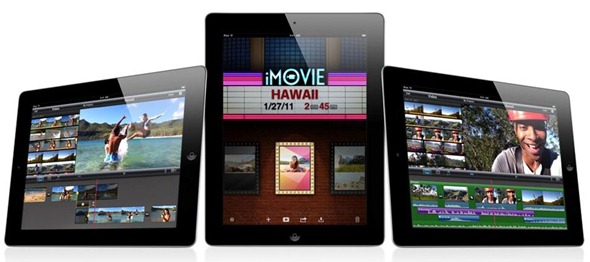
When you start the application you’ll be greeted by a new home screen that displays all of your thumbnails in the style of a blockbuster movie poster. Once you get into the application, it’s laid out with your iMovie interface at the top of your screen and a timeline at the bottom.
You have the option of importing video in realtime straight from your device’s camera, or you can import files from your camera roll. Edit your movies with some fantastic transitions and the ability to add and subtract frames from both sides of your clips. A new voice recording feature also allows you to record a commentary straight over the top of your movie, or add a soundtrack using tracks from your iPod library.
iMovie for will be a universal app, so if you already have it for iPhone you it should be updated to support iPad, and will be available in the App Store from March 11th for $4.99.
Garageband
Garageband looks great on the iPad, and I know that personally I’m going to have much more fun with this application on the iPad than I do on my Mac. Built-in touch instruments include a grand piano, drums, organs, and guitars; along with more than 250 loops, and 8-track recording and mixing. It also works together with its Mac counterpart, so you can start a project on your Mac and continue working on it from your iPad.
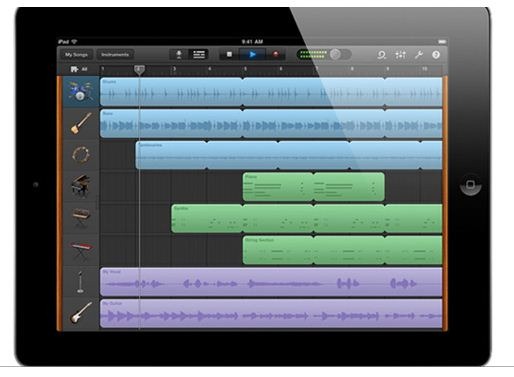
Record your music at the touch of a button and then trim and edit your music afterwards. Up to 8 different tracks allow you to choose a variety of instruments with which to make your music, all of which can be played on the iPad incredibly easily. When you’re done with your track you can send it to iTunes or share it via email.
Garageband will also launch with the iPad 2 on March 11th, and will be available through the App Store with a price tag of $4.99.
Thanks
Click On Ads To Buy iPhones Accessories
