
Data Master is a very useful app for the iOS users. It helps to take over the control of using both Cellular and Wi-Fi data usage. The app is developed by Nutec Apps, LLC. Data Master monitors data usage from the device itself. That means you can keep track of your data usage habits, and control it when necessary. This app come with a price tag of $1.99 usually. But for a limited time period the app can be downloaded for free from App Store.
iTunes Link: http://itunes.apple.com/app/data-master/id480520604?mt=8
Overview:
Data Master will manage both Cellular (3G/Edge/GPRS) and Wi-Fi data usage real time from your device. This app will let you be in control of your data usage to avoid the costly overage charges your provider may charge. Data Master monitors data usage from the device itself and is not reliant on setting up or logging into your provider’s web site.
Features include:
✔ Works with ANY cellular provider in any country by reading data usage from the device.
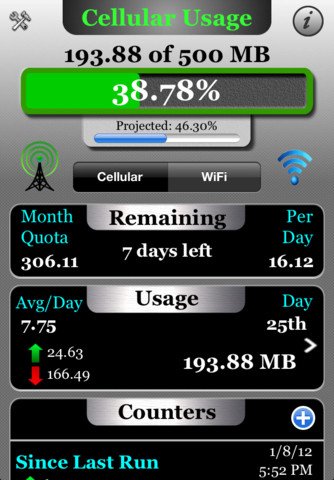
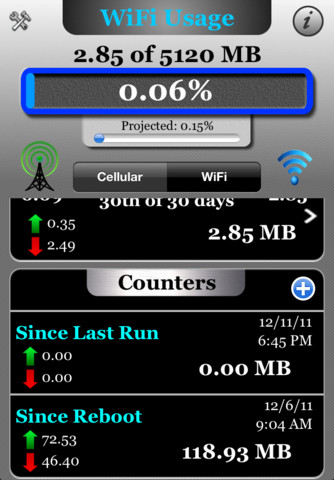
✔ Simple and clear user interface with custom progress bar graphically showing your usage and predicted usage.
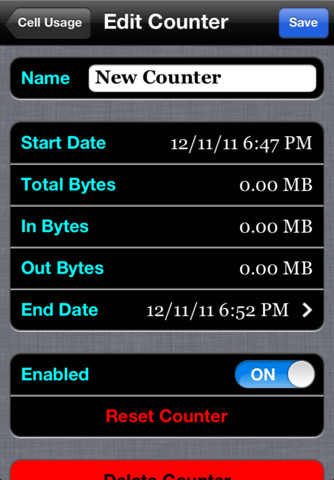
✔ Custom counters can be setup allow you to monitor usage during a certain period to help identify data hogging apps. Counters can be easily enabled or disabled and can even be configured to end at a predetermined time.
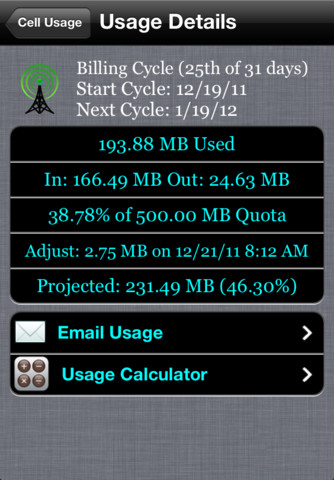
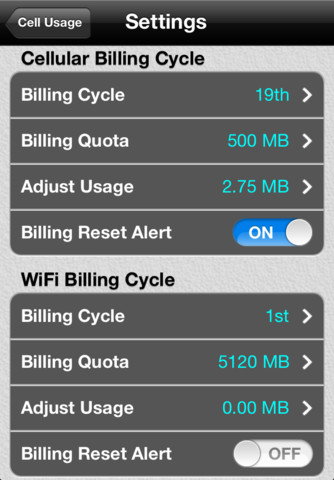
✔ Billing periods and quota limits can be configured on a monthly or weekly basis to match your providers billing schedule.
✔ Remaining usage section shows remaining days, data left in quota and quota per day.
✔ Works on any iOS device (iPhone/iPad/iPod Touch) running iOS4.x or later.
✔ Email your usage information at any time.
Additional Feature – Custom Calculator:
✔ Data Master includes a special calculator to help you calculate typical usage for many tasks. See how much data is required when streaming music or video.
Data Master is a must have app for anybody on a restrictive data plan. Don’t pay those expensive overage charges again.
New in Version 1.01
Fixed minor bugs after device reboots and billing reset.
Removed background location services.
Corrected a few UI typos.
Our Review:
Data Master is a very useful app specially for those who cater to cellular data subscriptions. Because these subscriptions are a bit limited in terms of data usage, it could come handy if the data usage can be tracked within the mobile device. If you need to know the volume of Internet usage via your cellphone, then the data can be utilized for selecting data plans in future.
To use this app you need to set the correct values before to get quite precise information. The App Data Master helps you to save the settings for EDGE 3G WIFI.
There is a Cellular billing cycle feature that tracks your uses of mobile Internet. Billing Cycle helps you to cut bills by setting Billing Quota to track usage for a month. There is also a notification system that warns you for the usages of the Internet that can be set at 50%, 80% to 100%. You can also set billing alert settings when the cutoff date comes. This wonderful app needs 0.6 MB free space on your iOS device.
Requirements: Compatible with iPhone 3GS, iPhone 4, iPhone 4S, iPod touch (3rd generation), iPod touch (4th generation) and iPad. Requires iOS 4.0 or later. This app is totally free to download from iTunes.
Current Version: 1.01
Size: 0.6 MB

easily enabled or disabled and can even be configured to end at a predetermined time.