The iPhone 4 Dual SIM Adapter case comes with a ribbon cable that pops into your SIM slot.The dual SIM iPhone case system gives your multiple personality on life….
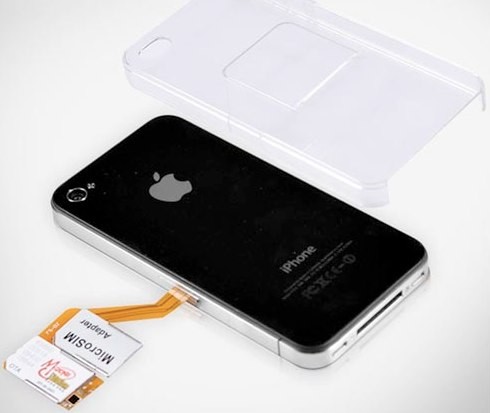
Well it doesn’t quite change the iPhone 4 as the actual Dual SIMs aren’t held within the iPhone 4. According to an article over on Slash Gear by Chris Davies, and by way of Gear Diary,each SIM card slips into a special adapter which is then connected to the regular SIM tray and then wraps over the side of the iPhone 4 to rest on its rear.The SIM adaptor and SIM cards are then covered by a plastic transparent case that clips over the iPhone 4 to keep the SIM adapter safe. Apparently there is no need to trim down the SIMs but you can’t have both active simultaneously.
Luckily, USBFever has a hacktastic solution to this problem (a followup to their iPhone 3G version), with a new $30 case that can host dual full size SIM cards on the back of an iPhone 4 (entombed in some classy clear plastic, naturally), while running an adapter to the iPhone 4’s micro SIM slot. You can then switch between the two SIMs from the iPhone’s own settings menu, though unfortunately you can’t rock both SIMs simultaneously.
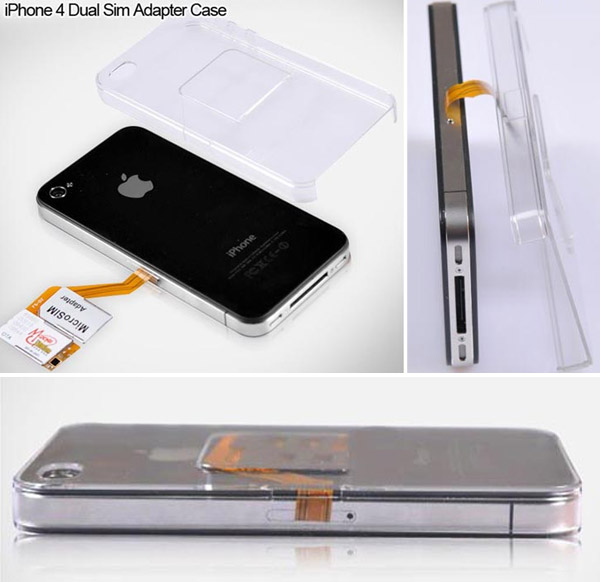
Well, a lot of us travel between countries and not everyone likes AT&Ts data roaming plans. Now, you can keep both your USA SIM and UK SIM plugged in. And you can do it without worrying about dropping, losing or forgetting either of them while traveling. Each SIM clips into a special adapter that goes round the side of the iPhone 4, while IN the case and into the SIM tray. The transparent plastic shell keeps everything safely in place.
Due to iOS 4 limitations you cannot have both SIMs active at the same time, but you can switch between them via the SIM Applications menu in the iPhone 4′s settings. After a minute or two it will switch over. You will have to be running iOS 4.0.0/4.0.1/4.0.2 for that to work, though.
Features:
– One iPhone (4G) with 2 SIM Cards
– No need to cut your SIM CARD
– STK Menu
– Comes with Crystal case to protect the dual sim card and your iPhone
Set-up inside iPhone:
– Home ==> settings ==> Phone ==> SIM Applications: select your desire SIM card (If you don’t want it to select SIM card for you when the signal is low, please don’t select “auto/SW)
It’s handy little device and only $30, available now from USBfever.
Resources :engadget.com,ismashphone.com,phonesreview.co.uk