website statistics

How To Fix Error 1600 When You Load iOS 5.0.1, 5.1, 5.1.1 Or iOS 6

He we will provide solution for Error 1600, when installing iOS 6 on iPhone or iPad.

When do you use Facebook?

View Results

Loading ... Loading ...
1 Star2 Stars3 Stars4 Stars5 Stars (Rate This)
Loading ... Loading ...

A lot of us have been rather hasty to jump the iOS 6 bandwagon and upgrade to this latest firmware. Most users did so primarily to get a taste of the new release and lay their hands on some of the awesome features that Apple has included in iOS 6. However, the problem is that if you wish to revert back to a lower firmware from iOS, you will run into a whole host of problems.

One of the main problems that you will face when downgrading your iOS devices from iOS 6 to, say, iOS 5.1.1 is that you will face an error 1600. This problem occurs when iTunes is unable to verify from an Apple server that your iOS device is eligible for the firmware it is asking for.

The whole thing occurs because when you are running Cydia and then try to restore your device to an earlier firmware, a host entry redirects gs.apple.com to a Cydia server rather than an Apple server. Naturally, when iTunes try to verify your device, this data is sent over to a Cydia server which doesn’t generate an appropriate response and as a result, iTunes ‘thinks’ that your device is ineligible for the firmware.

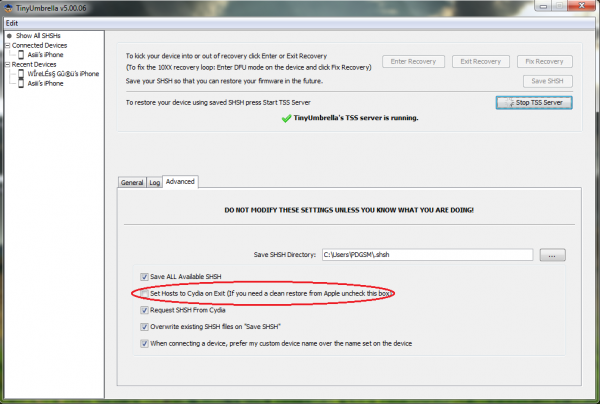
Here’s an easily and convenient solution to counter this problem. You can simply install the tool ‘TinyUmbrella.’ With the help of this tool, you can decide the data routed through Cydia. Launch the tool and simply uncheck the ‘Set hosts to Cydia on Exit’.

After doing so, launch iTunes again and try to restore to your older firmware. This time, you won’t face the error 1600.

Source: Jailbreak Matrix


Microsoft Reveals Impressive Skype Statistics: 54% Skype Users Are Female And 33% College Educated

ARM And AMD Collaborate For The Adoption Of Chip Security Ecosystem
You can also press the left/right arrow key on your keyboard to go to previous/next post
  On June 14, 2012(1 year, 0 months ago.)

Recent Search

Recent Tutorials

This tutorial will show how to use S.M.A.R.T. (Self Monitoring Analysis and Reporting Technology) to continuously collect information on health of your equipment.
In this tutorial I'll show you how you can easily protect yourself from any kind of security breaks that may occur through Java.
Today Apple enabled "Two Step Verification" for iCloud And Apple ID. But the process is not that simple. But no worry, here we have made a step by step tutorial.
Cant remember your iPhone passcode? Here I will show you some workaround on what to do and how to recover and restore for every possible scenario.
This tutorial will show you how to perform the Winapp2.ini installation inside CCleaner and how to use it under Windows operating system.
With app called AD Sound Recorder, you can record any stream that passes through your sound card or speakers and in this tutorial I will show you how to do that.
If you want to have Boxee app inside your Apple TV, in this tutorial we will show you how to install XBMC and Boxee using Windows on your Apple TV.
This tutorial will show you how to transfer PS3 Saved Game Files from your PC to your PS3 game console.
Adding videos from external sources such as internet, more specifically from YouTube, is a great solution to enhance a presentation; in this tutorial I will show you the procedure.
If you are one of new comers to Windows Phone 8, like me, in this tutorial I will walk you through the process to update your Windows Phone 8 device.
Close You Have To Login
User:
Pass:
Login With »Login With TwitterLogin With Facebook