HQ: To Do is an wonderful app developed by Sleeping Giant Apps. This app was cost $1.99 which is totally free now to download from iTunes store. The new, intuitively designed and stylishly simple app to help manage your busy life! All buff, and no fluff, HQ is unlike any other productivity app you’ve seen. From now you will never miss any of your meeting and events.

iTunes Link: http://itunes.apple.com/app/hq-to-do/id441434925?mt=8
Our Review:
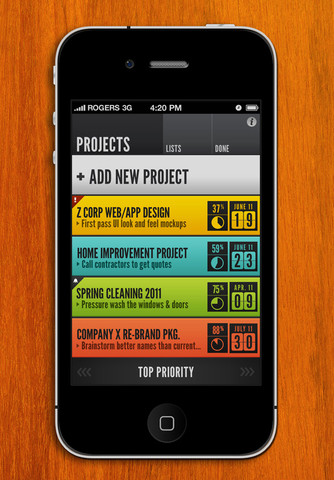
HQ: To Do is a small sized app can run in any iOS device. I have started using this app in my iPhone and it runs great. Very interesting and useful app, so simple to play with nice colorful graphics user interface. HQ was uniquely designed to help you spend less time managing your tasks and projects, and more time actually getting them done!
Quickly manage everything from simple task lists (like groceries, to-dos, checklists, etc.) to larger, time-sensitive projects. Set deadlines, estimate and track time, color-code and filter YOUR data to suit YOUR needs using our trimmed down, lightning-fast and stylishly simple UI.
FEATURES –
- UNIQUE LOOK & FEEL: HQ looks and feels unlike any other productivity app available. If you’re looking for something delightfully different to add to your daily routine, look no further!
- SIMPLICITY & SPEED: Large, thumb-friendly hit-zones. Custom color coded projects & lists. Visual iconography and high-contrast fonts. Quick loading & lightning-fast transitions. We designed HQ to help you spend less time using it, and more time getting things done!
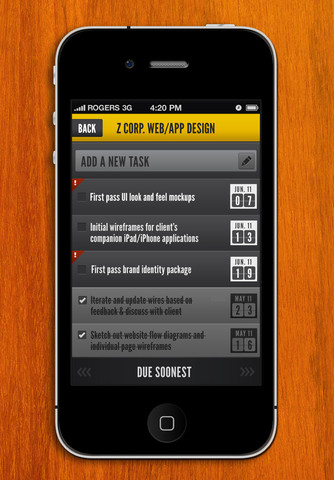
- KEY VISUAL FEEDBACK: Color code-able projects & lists that immediately show progress & deadline indicators, as well as your next “task-at-hand” right from the main view! No additional taps necessary to view key information & details.
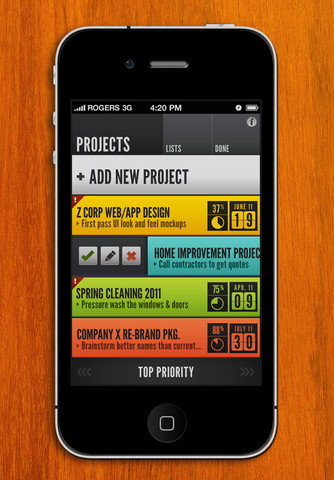
- CONTEXTUAL MENUS: Need to modify, delete or mark something as complete quickly? Simply swipe any project, list or task to the right to gain immediate access to critical functions.
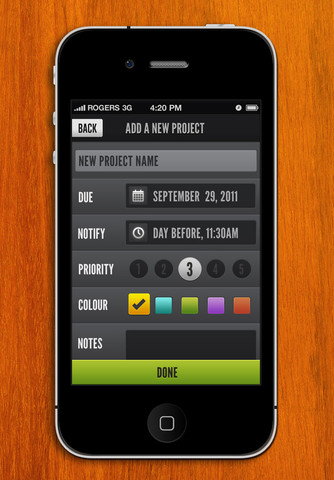
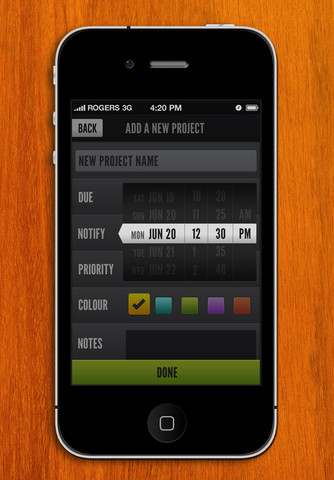
- NOTIFICATIONS: Have a need to be notified of an upcoming due date for a project or a task ? Just set the due date, and when to be notified and let it the reminder keep you in check.
- “QUICK-SWIPE” FILTERING: Quickly filter, re-order and organize your projects and lists using our quick-swipe filtering feature which is always “thumb-ready” at the bottom of the screen. No matter how you like to view your data, it’s only a swipe or two away!
What’s New in Version 1.1.2:
Minor bug fix update.
• Projects / tasks default to no due date
• Fixed a bug that could cause a crash if more than 255 characters were entered in a note
• Fixed badge notifications improperly displaying on the home screen
• fixed a bug with the text field entry deletion dismissing the keyboard, rather than deleting the text
Requirements: Compatible with iPhone 3GS, iPhone 4, iPhone 4S, iPod touch (3rd generation), iPod touch (4th generation) and iPad. Requires iOS 3.2 or later. This app is totally free to download from iTunes.
Current Version: 1.1.2
Size: 2.3 MB
[ttjad keyword=”ipad”]