website statistics

Quick Reader – Ebook Reader App For iOS [Price Drop]

Quick Reader such a nice reading app developed for the iOS platform. This app was cost $1.99 but it's free now.

When do you use Facebook?

View Results

Loading ... Loading ...
1 Star2 Stars3 Stars4 Stars5 Stars (Rate This)
Loading ... Loading ...

Quick Reader is a reading app developed for the iOS. This app lets you highly customize your reading interface. This premium app is developed by Pinet Sarl. This app is free for a limited time at App Store. Grab it before it returns to the usual price.


Quick Reader iTunes Link: http://itunes.apple.com/us/app/quick-reader/id540205892?mt=8

Our Review:

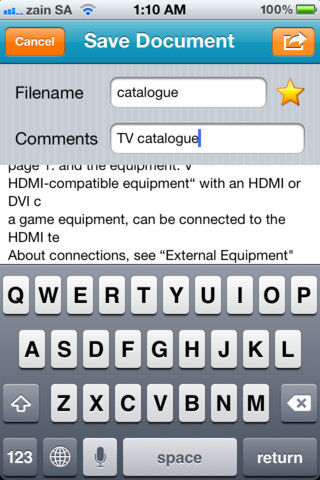
QuickReader is a small app but highly customizable. You can set the look and feel of your ebook reader app from the color to the font size. Users can scan, edit scanned text and manage documents using this app. You can set multiple design color schemes or select from the thousands of colors to create your own individual style. Before scanning any page you can adjust brightness, contrast, color balance, auto enhancement, drawings addition, text addition, image cropping, and image rotation.

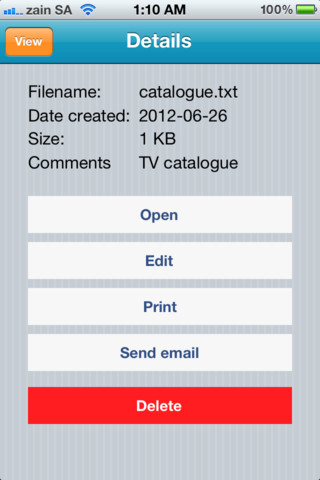
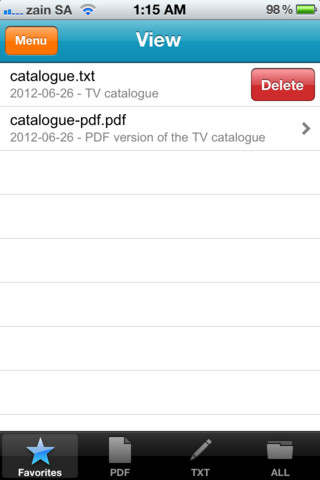
QuickReader allows users for multiple-page processing in both PDF and editable text formats. Once you are done with your document, save it in your device for further use; like open to read, share with your friends through email, modify it again and directly print it from here. Quick Reader comes with a nice technology and avoid the hassle of constant page processing.

Requirements: Compatible with iPhone 3GS, iPhone 4, iPhone 4S, iPod touch (3rd generation), iPod touch (4th generation) and iPad. Requires iOS 5.1 or later. This app is totally free to download from iTunes.

Current Version: 1.1.0 Size:8.0 MB
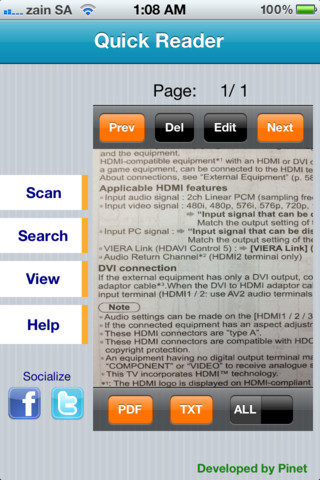
iPhone Screenshot 1
iPhone Screenshot 2
iPhone Screenshot 3
iPhone Screenshot 4

Buy Cheapest Related Product From Amazon.com


FBI Seized Three Domains For Android App Piracy

NASA Plans To Launch “Android Powered Lowest-cost Satellites”
You can also press the left/right arrow key on your keyboard to go to previous/next post
  On August 26, 2012(9 months, 26 days ago.)

Recent Search

Recent Tutorials

This tutorial will show how to use S.M.A.R.T. (Self Monitoring Analysis and Reporting Technology) to continuously collect information on health of your equipment.
In this tutorial I'll show you how you can easily protect yourself from any kind of security breaks that may occur through Java.
Today Apple enabled "Two Step Verification" for iCloud And Apple ID. But the process is not that simple. But no worry, here we have made a step by step tutorial.
Cant remember your iPhone passcode? Here I will show you some workaround on what to do and how to recover and restore for every possible scenario.
This tutorial will show you how to perform the Winapp2.ini installation inside CCleaner and how to use it under Windows operating system.
With app called AD Sound Recorder, you can record any stream that passes through your sound card or speakers and in this tutorial I will show you how to do that.
If you want to have Boxee app inside your Apple TV, in this tutorial we will show you how to install XBMC and Boxee using Windows on your Apple TV.
This tutorial will show you how to transfer PS3 Saved Game Files from your PC to your PS3 game console.
Adding videos from external sources such as internet, more specifically from YouTube, is a great solution to enhance a presentation; in this tutorial I will show you the procedure.
If you are one of new comers to Windows Phone 8, like me, in this tutorial I will walk you through the process to update your Windows Phone 8 device.
Close You Have To Login
User:
Pass:
Login With »Login With TwitterLogin With Facebook