Sparrow is a very easy and popular mailing app for iOS based devices. The developer of Sparrow brings some updates for their users through fixing some bugs. This premium utility app can be downloaded for $2.99 App Store. Checkout the features below before you decide.

iTunes Link: http://itunes.apple.com/app/sparrow/id492573565?mt=8
Price: $2.99
Overview:
Sparrow is an iPhone mail client designed with love to provide you with an efficient and pleasant mailing experience. With its pane navigation, its new threading system and many new features, you’ll never look back.
Warning: Sparrow does not do Push notification yet
Features:
– Full IMAP and POP support:
Use your Gmail, Hotmail, Google Apps, iCloud, Yahoo, AOL, Mobile Me and custom IMAP/POP accounts.
– Unified Inbox
All your mails in a unique mailbox.
– Attachments
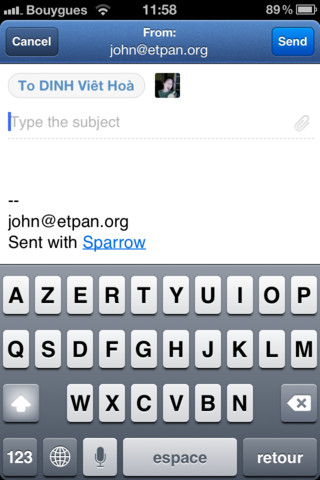
Directly attach photos & images when composing a mail. No more cumbersome back and forth with your photo library.
– Up & down your conversations
Swipe up or down on a message to navigate a conversation.
– Everything is a swipe away
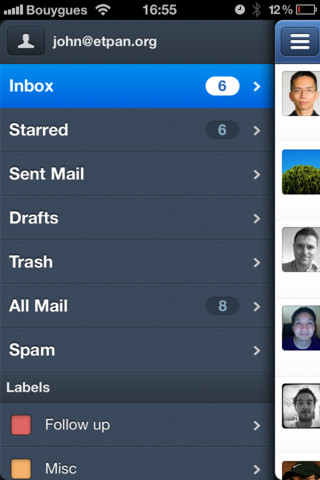
Swipe once to uncover your mailboxes, labels and folders.
Swipe again to get to your account list.
– Faces
Mail is much nicer with your friends’ profile pictures.
– Message swipe
Star, add a label, archive or delete a conversation right away simply by swiping a message.
– Smart contacts
Your most frequent contacts on top of the list.
– Send & Archive
The best way to reach inbox zero easily.
– Built-in web browser
Navigate the web within Sparrow.
– Quick mailbox switch
Navigate between your inbox, unread and favorites by tapping/swiping the top bar.
– Mark all as read
One click to rule them all. You can also press a message for a few seconds to mark it as read/unread.
– Thread view
Tap the top bar in the conversation to quickly navigate all messages in a thread.
– Pull to refresh
Finally, the simplest way to refresh comes to email.
– Priority Inbox support
Automatically identify your important email and separates it out from everything else.
– Alias
Have a pro and a private mail address? Use alias to keep things separated.
– Powerful search
Local and remote search allow you to find the mail you’re looking for.
And many more features crafted with love to discover:
– Quick sender switch in compose window
– Mark all as read
– Read/unread with a long press on a message cell
– Reply all quick switch
Learn more about Sparrow for iPhone and Sparrow for Mac on:
www.sprw.me
Follow them on Twitter @Sparrow
Our Review:
Sparrow is a simple mailing app that brings all the mailing features on your iOS device. With this app you can access all major web-mail services such as Gmail, Hotmail, Google Apps, iCloud, Yahoo, AOL, Mobile Me and custom IMAP/POP accounts. All the possible mailing features are include with this app. So this is the ultimate solutions for the business people to remain connected with the mail box, and doing their job faster in a simple way. Recently they have brought an updated version of the app. With this update Sparrow now supports POP. Some other bugs are also fixed like folder mapping issues. So if you need to connect with web mail services frequently from your smartphone or tablet, then you should try this app.
Requirements: Compatible with iPhone 3GS, iPhone 4, iPhone 4S, iPod touch (3rd generation), iPod touch (4th generation) and iPad. Requires iOS 5.0 or later. This app is totally free to download from iTunes.
Current Version: 1.3
Size: 9.8 MB



[ttjad keyword=”ipod-nano”]