
A few days ago i’ve posted “Steps To Create Folders in iOS 4.0“.I think it has helped all of you a lot to create a folder in iPhone with a new OS iOS 4.0.

Interesting matter that shocked me and i think you too is that it automatically assigns a name to the folder based on the iPhone apps inside it.
If that isn’t good enough then folks at iPhone J.D. have figured out a way to assign fancy symbols to a folder name using Glyphboard.
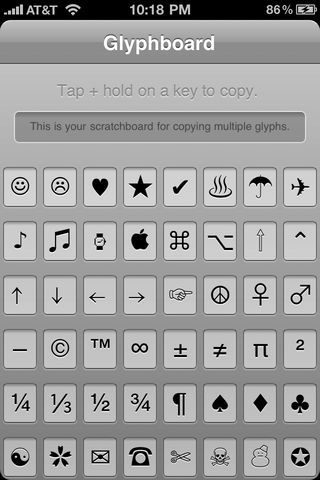
Glyphboard is an iPhone web app developed by Neven Mrgan, which includes 48 fancy symbols that can be copied and pasted anywhere. As you might have guessed it, you can also use them for folder names.
Just follow the steps to assign fancy symbols to folders:
1. All you need to do is, point your iPhone’s Safari browser to http://mrgan.com/gb/ to launch the Glyphboard web app.
2. Then tap on the + button and choose Add to Home Screen.
3. Exit iPhone Safari and tap on the Glyphboard on your iPhone’s home screen.
4. To select one of the 48 fancy symbols , tap and hold on a symbol to select and then tap on the Copy button.
5. If you want to create a folder with multiple symbols then you can use the scratchboard at the top to copy multiple symbols.
6. You can then use the symbols copied to iPhone’s clipboard to assign it to folder names by pasting it.

So there you go, a cool way to add a touch of style to your folder names.
Plz give your comments if it works succesfully.

I still like the andriod, I think it is better than iphone!!!
Free website builder services hit in diverse styles and templates.
You should be superior to use a website builder with your webhost as any well-thought-of visitors will be subjected to everybody or more.
These websites can attend to arrange for everything that is vital for building a website.
Free website builder have made the undertaking of erection a website easier and less complicated. Flush with the most tiro computer user can under promptly and patently increase a site.
Why profit a design unmovable thousands of dollars when you can straight away and easily establish a adept net situate on your own?
Using a [url=http://www.jkahosting.com] free website builder [/url], you fool the extras and the service better of erection a professional website fast and clear it is tranquillity looks skilful and works as if you paid someone thousands to do so seeking you.
Some delicate features with a freed webiste builder classify pull and particle guide, gadgets, decoative fonts, shopping carts, and seo help.
A actual locality builder should have all of the above. If you cannot increase a website and do not be to twerp round with html cypher than it is importantly recommended that you use a website builder.
Pingback: http://%/bvyhrda
Pingback: http://%/bvyfdep
I am very like
Interesting matter that shocked me and i think you too is that it automatically assigns a name to the folder based on the iPhone apps inside it.
cool. it works and the best part is you get these additional symbols without a jailbreak
KOS:VICKHATER:WRP
As you might have guessed it, you can also use them for folder names.
Sounds like a great resource for beginners or people who have some experience. Thanks for posting!