
This is a complete guideline to downgrade iOS 4.0.2 to 4.0.1 / 4.0 on iPhone 4, 3GS, 3G and iPod Touch 3G, 2G.In this guide TinyUmbrella has used.
In order to downgrade from iOS 4.0.2 iPhone 4, iPhone 3GS, 3G, iPod Touch 3G and iPod Touch 2G users MUST have SHSH blobs saved for 4.0.1/4.0 firmware.
If you’ve SHSH blobs saved on Saurik’s server via Cydia, download them into your computer first.For that:
* Connect your device, Fire up the TinyUmbrella (Download Link below-Step 1) and Check mark the Advanced Options.
* Select your device, firmware (the one for which you’ve SHSH saved at Cydia; 4.0.1, 4.0) and Cydia as Location.
* Hit the save My SHSH button. that’s it.
The steps are given below:
Note:Read the whole process first and then try it with your own risk.
Step 1:Required Stuff
Download TinyUmbrella and desired firmware for iPhone 4, 3GS, 3G, iPod Touch 3G, 2G from the links below:
* Download iOS 4.0.1
* Download iOS 4.0
* Download TinyUmbrella
Step 2:DFU Mode
Put your iPhone into DFU Mode
Step 3: Start TSS Server
iPhone 3G and iPod Touch 2G (Non-MC) please skip to step 4. iPhone 3GS and iPod Touch 3G and iPod Touch 2G (MC) users:
1. Run the TinyUmbrella
2. Hit the Display SHSH button to confirm that downloaded SHSH blobs has been cached by TinyUmbrella for 4.0.1 or 4.0. (If you already have them in your PC, drag and drop the SHSH blobs in the TinyUmbrella window then hit the display SHSH blobs button to confirm).
3. Then hit the Start TSS Server button.
Step 4:Restoring the Firmware
1. Now Open the iTunes.
2. Hold down the Shift (Windows)/Alt (Mac) key and hit the Restore button.
3. Select the downloaded firmware (from Step 1) and let the restore process complete.
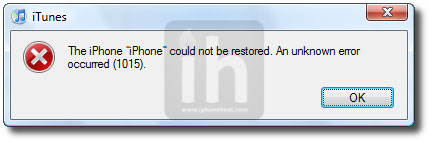
iTunes will bring up error 1015, 1013 or 1011 message. Don’t worry, it’s normal. You’ve successfully downgraded your iPhone/iPod Touch firmware.
Step 5:Getting Out of Recovery
Now in order to get out of recovery mode, hit the “Kick Device Out of Recovery” button on TinyUmbrella right below the Start TSS Server button.
You could always get support from UnlockAlliPhone.com about any Unlock & JailBreak issue of any model of iPhone including iPhone 2G,3G & 3GS and also upcoming iPhone 4. They provide Premium Members Support for life time. Means just pay one time a small fee and you will receive support(real human support – avg response time 2 hour) for all present & future version of iPhone.
can downgrade firmwares but not the basebands
any way can i downgrade the baseband fr 5.14.xx to lower?
uggs outlet uggs on sale cheap uggs Ugg boot uggs outlet is a legendary ugg store brand, ugg boots sale you ugg boots outlet stores can’t understand why ugg boots sale it cheap uggs for sale has a cheap ugg boots ugly cheap uggs and cheap ugg sale cunbersome appearance ugg boots for sale when uggs store ugg outlet store
Did u get the $1995 from pay pal