website statistics

Switch Between iPhone Apps With Style Through ‘Aero’

When do you use Facebook?

View Results

Loading ... Loading ...
1 Star2 Stars3 Stars4 Stars5 Stars (Rate This)
Loading ... Loading ...

Cydia store keeps shipping out quite innovative and helpful tools for Apple devices. The latest in the series of such tools is ‘Aero’ tweak. This is basically a package that enables the user to switch between apps while multitasking but in a stylish way. A lot of iPhone users recount that Apple’s native multitasking leaves them craving for more. For such users, Aero may be the perfect solution.
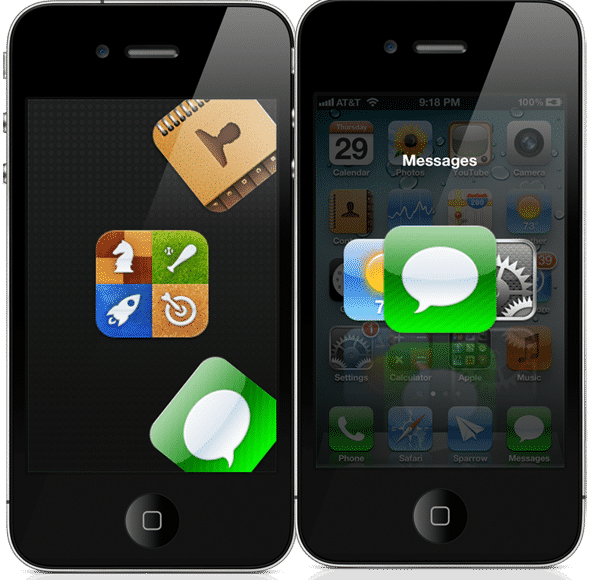

Once you install the Aero tweak, you are able to view all the apps that are currently running on your iPhone. You can then easily switch between these different apps. Essentially, Aero lets you accomplish more or less the same in terms of switching between apps that the default Apple software lets you do. The only difference is that it provides you a very beautiful and engaging interface to do so.

This tool comes with Activator compatibility. It also supports nine animations describing app-switching. These include Linear, Rotary, Cover Flow, Wheel, Rotary, Cylinder, Time Machine and others.

You can also enable app-wrapping with the help of Aero. This lets the apps which are running on your iPhone wrap around the screen and look really cool. Moreover, you can also remove apps from the background while using Aero.

Multi-tasking is one of the most essential and defining features of iOS. iPhone users, specifically, can’t imagine a smartphone without multitasking. And while Apple’s native software may be a little clumsy and awkward during multitasking, you can enjoy a far more smooth and beautiful multitasking with the help of Aero.

You can get the Aero tweak from ModMyi repository for a cost of mere $1.99. Naturally, in order to get the tweak, you need to have a jailbroken iPhone.

Buy Cheapest Related Product From Amazon.com


Winklevoss Twins Gear Up For A Venture Capital Firm Of Their Own

iStorage – Premium App Turns iOS Devices Into USB Disks [Free]
You can also press the left/right arrow key on your keyboard to go to previous/next post
  On April 29, 2012(1 year, 0 months ago.)
  • http://freeappsforiphone123.blogspot.in/ free apps for iphone

    I find it very relevant item thank you for writing about it. lol


Recent Search

Recent Tutorials

This tutorial will show how to use S.M.A.R.T. (Self Monitoring Analysis and Reporting Technology) to continuously collect information on health of your equipment.
In this tutorial I'll show you how you can easily protect yourself from any kind of security breaks that may occur through Java.
Today Apple enabled "Two Step Verification" for iCloud And Apple ID. But the process is not that simple. But no worry, here we have made a step by step tutorial.
Cant remember your iPhone passcode? Here I will show you some workaround on what to do and how to recover and restore for every possible scenario.
This tutorial will show you how to perform the Winapp2.ini installation inside CCleaner and how to use it under Windows operating system.
With app called AD Sound Recorder, you can record any stream that passes through your sound card or speakers and in this tutorial I will show you how to do that.
If you want to have Boxee app inside your Apple TV, in this tutorial we will show you how to install XBMC and Boxee using Windows on your Apple TV.
This tutorial will show you how to transfer PS3 Saved Game Files from your PC to your PS3 game console.
Adding videos from external sources such as internet, more specifically from YouTube, is a great solution to enhance a presentation; in this tutorial I will show you the procedure.
If you are one of new comers to Windows Phone 8, like me, in this tutorial I will walk you through the process to update your Windows Phone 8 device.
Close You Have To Login
User:
Pass:
Login With »Login With TwitterLogin With Facebook