website statistics

Kodak ESP 3.2 Wireless All-in-one Printer

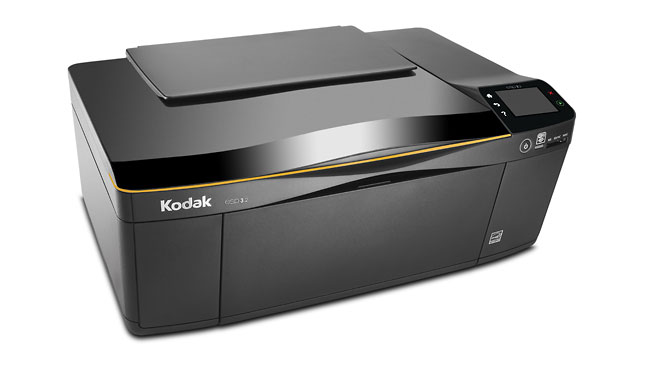
The Kodak ESP 3.2 is a all-in-one printer, because it is not only a printer but also a copier and scanner.

When do you use Facebook?

View Results

Loading ... Loading ...
1 Star2 Stars3 Stars4 Stars5 Stars (Rate This)
Loading ... Loading ...

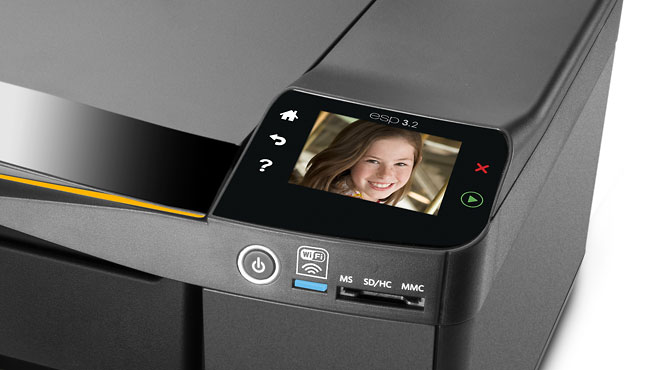
The Kodak ESP 3.2 is not only a printer but also a copier and scanner. What makes Kodak ESP 3.2 all-in-one printer different from other printers? It’s the quality of the printer that makes happy to get the job done for the home users though it’s not the best one. It not only can deliver the lowest average cost per page but also gives the lowest total ink replacement cost that you want. This affordable printer’s notable features are 2.4-inch color touch screen interface for effortless navigation, Wi-Fi with simple setup and Google Cloud Print.
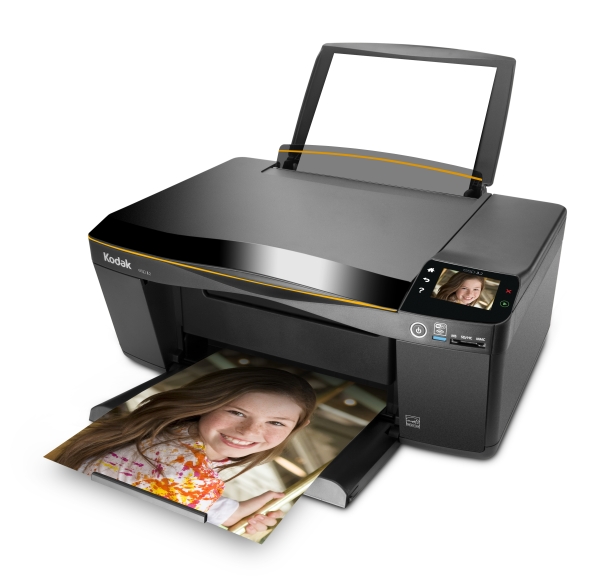
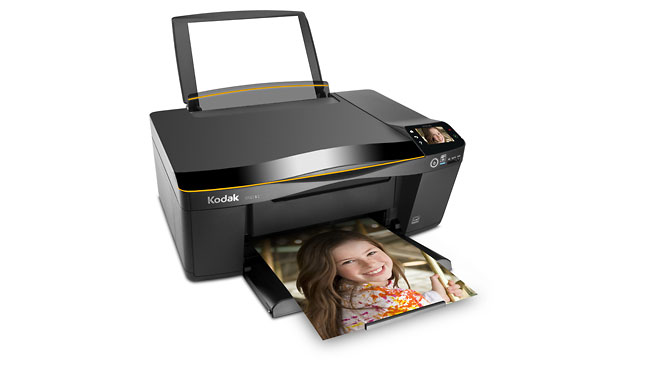
Kodak ESP 3.2 All-in-One, Image credit: TTJ

Among all the features, Google Cloud Print compatibility mode is the best that user will get attracted to. It helps you to print anything from your smartphone, tablet or computer no matter where you are. The printer has two cartridges – one black cartridge and one color cartridge. This is compatible with the Kodak 30 series of pigment-based ink cartridges.

The Kodak ESP 3.2 all-in-one is neither fast nor the coolest printer on the world. It can print the finest quality glossy photo which obviously will satisfy your mind. By using its software bundle, you can handle scanning, OCR, and even 3D photos. You can also control everything from with its single nicely rendered interface. The Kodak ESP 3.2 has USB and Wi-Fi connections that ensure you to operate this printer tethered or untethered mode. The printer has a 2.4-inch LCD touch screen display. Actually it’s an easy to use printer.

Specifications

Printer type Inkjet Multifunction Scan/Copy
Number of Colors 4

Cost Per Page

  • Plain Text Page (Highest yield vendor ink): 3 cents per page
  • 4-color page (cheapest vendor ink): 9.5 cents per page
Maximum sheet capacity 100 sheets
Standard Number of Input Trays 1
Optional Trays Available No
Automatic Document Feeder Not Available
Automatic Duplexer Not available

Display

  • Size: 2.4-inch
  • LCD Type: Color
  • Photo preview: Yes
  • Touchscreen: Yes
  • Text Only: NO

Connectivity

Interfaces: Wi-Fi, USB
Media Reader Support
  • Memory Stick PRO Duo
  • MultiMedia Card (MMC)
  • SD Card
Operating System Support
  • Macintosh OS X 10.5.x
  • Macintosh OS X 10.6
  • Microsoft Windows 7, Vista, XP 

Size and Weight

  • Height: 7-inch
  • Width: 16.5-inch
  • Depth: 12.4 inches
  • Weight: 11.5 pounds

Scanning

  • Scanner Type: Flatbed
  • Maximum Scan Size: Letter
  • Horizontal Optical Scan Resolution: 1200
  • Vertical Optical Scan Resolution: 1200
  • Maximum External Bit Depth: 24-bit
Dimensions 7″H x 16.5″W x 12.4″D

Pros

  • Great photos.
  • Super-cheap ink.
  • Google Cloud Print compatibility.
  • Wi-Fi.

Cons

  • Little noisy in operation.
  • Slow.
  • No automatic duplexer.
  • No Text support.

Buy Link & Price Comparison:

Price

ebay $99.99
Target $79.99
Staples $99.99
Google Shopping Search

Image Galley

Source: PCWorld

Buy Cheapest Related Product From Amazon.com


Want To Be Iron Man? Need $1.6 Billion

Apple And Google Battling On Kodak Patents
You can also press the left/right arrow key on your keyboard to go to previous/next post
  On July 31, 2012(9 months, 25 days ago.)
  • not what it used to be

    it sucks, mainly because you need BOTH ink cartridges to print either color only or b/w, so if you’re out of color and just want to b/w, you can’t do it-still have to buy a color cartridge as well. Came here looking for a windows 8 driver… looking like it’s going to Goodwill, Vinny’s or the dumpster if it’s not compatible w/Win. 8 and it probably isn’t


Recent Search

Recent Tutorials

This tutorial will show how to use S.M.A.R.T. (Self Monitoring Analysis and Reporting Technology) to continuously collect information on health of your equipment.
In this tutorial I'll show you how you can easily protect yourself from any kind of security breaks that may occur through Java.
Today Apple enabled "Two Step Verification" for iCloud And Apple ID. But the process is not that simple. But no worry, here we have made a step by step tutorial.
Cant remember your iPhone passcode? Here I will show you some workaround on what to do and how to recover and restore for every possible scenario.
This tutorial will show you how to perform the Winapp2.ini installation inside CCleaner and how to use it under Windows operating system.
With app called AD Sound Recorder, you can record any stream that passes through your sound card or speakers and in this tutorial I will show you how to do that.
If you want to have Boxee app inside your Apple TV, in this tutorial we will show you how to install XBMC and Boxee using Windows on your Apple TV.
This tutorial will show you how to transfer PS3 Saved Game Files from your PC to your PS3 game console.
Adding videos from external sources such as internet, more specifically from YouTube, is a great solution to enhance a presentation; in this tutorial I will show you the procedure.
If you are one of new comers to Windows Phone 8, like me, in this tutorial I will walk you through the process to update your Windows Phone 8 device.
Close You Have To Login
User:
Pass:
Login With »Login With TwitterLogin With Facebook