website statistics

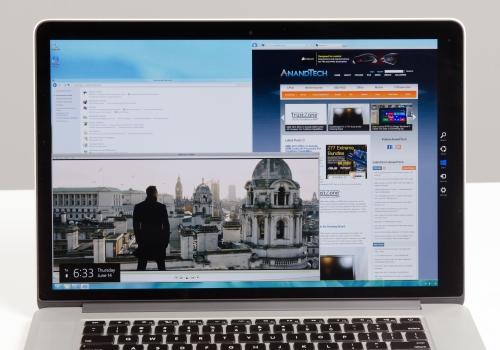
Windows 8 On Retina Display MacBook Pro Is A Sight To Behold

When do you use Facebook?

View Results

Loading ... Loading ...
1 Star2 Stars3 Stars4 Stars5 Stars (Rate This)
Loading ... Loading ...

Retina display MacBook Pro is currently probably one of the most powerful as well as the ultra desirable notebook on the market. Apple was able to pack an amazing Retina display and some extra-ordinary power in the machine. Ever since the machine was released, the world has been looking to newer ways to fully bring out the beauty of its Retina display.
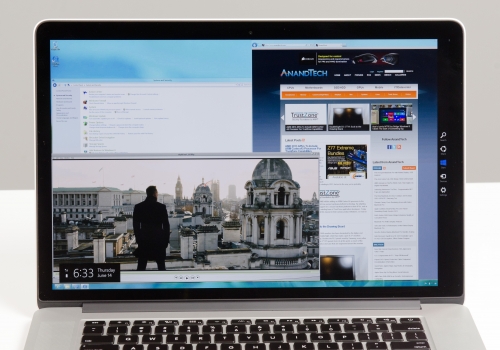
Windows 8 on the Retina Display MacBook, Image Credit: iclarified.com

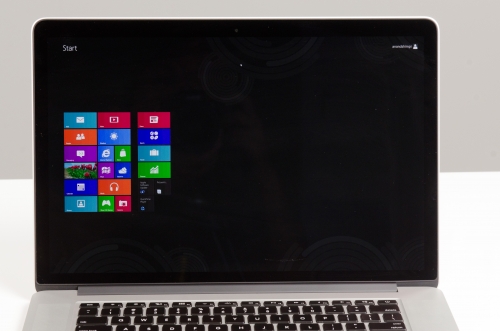
Anand Tech had a new idea to explore MacBook Pro’s Retina display. Many critics have deemed Microsoft’s upcoming Windows 8 as probably the best when it comes to visual experience. Thus, folks at Anand tech decided to check out how did Windows 8 look like on MacBook Pro’s Retina display.

A slight problem that they ran into was that GeForce GT 650M doesn’t have any native driver support for Windows 7 or Windows 8. The amazing part is that even without the Nvidia driver, the display was able to provide a  Windows 8 preview in all its clarity and glory.

Packing a massive 2880 x 1800, Retina display provides what is the most clear and vivid display yet. However, Apple doesn’t offer a lower than 1920 x 1200 desktop resolution in OS X. However, on Windows, you can adjust the resolution with a little more freedom. When you go with the unscaled 2880 x 1800 resolution, the text with the icons and the general User Interface elements tend to look very small. And only such users with an excellent eyesight may be able to enjoy them.

If Apple eventually choose to include a native resolution option with OS X, that is definitely going to solve a lot of such problems for Retina MacBook Pro users in the coming days.
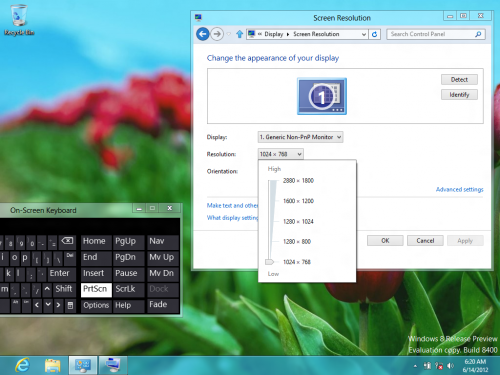
83162-500.png (500×375)
83167-500.jpg (500×350)
83166-500.jpg (500×331)

Source: AnandTech
Courtesy: iClarified

Buy Cheapest Related Product From Amazon.com


J&R Offers Sony NSZ-GS7 Network Media Player Powered With Google TV

iPhone Baseband “06.15.00″ Downgrade Finally Released By iPhone Dev Team
You can also press the left/right arrow key on your keyboard to go to previous/next post
  On June 18, 2012(11 months, 9 days ago.)

Recent Search

Recent Tutorials

This tutorial will show how to use S.M.A.R.T. (Self Monitoring Analysis and Reporting Technology) to continuously collect information on health of your equipment.
In this tutorial I'll show you how you can easily protect yourself from any kind of security breaks that may occur through Java.
Today Apple enabled "Two Step Verification" for iCloud And Apple ID. But the process is not that simple. But no worry, here we have made a step by step tutorial.
Cant remember your iPhone passcode? Here I will show you some workaround on what to do and how to recover and restore for every possible scenario.
This tutorial will show you how to perform the Winapp2.ini installation inside CCleaner and how to use it under Windows operating system.
With app called AD Sound Recorder, you can record any stream that passes through your sound card or speakers and in this tutorial I will show you how to do that.
If you want to have Boxee app inside your Apple TV, in this tutorial we will show you how to install XBMC and Boxee using Windows on your Apple TV.
This tutorial will show you how to transfer PS3 Saved Game Files from your PC to your PS3 game console.
Adding videos from external sources such as internet, more specifically from YouTube, is a great solution to enhance a presentation; in this tutorial I will show you the procedure.
If you are one of new comers to Windows Phone 8, like me, in this tutorial I will walk you through the process to update your Windows Phone 8 device.
Close You Have To Login
User:
Pass:
Login With »Login With TwitterLogin With Facebook