website statistics

LG Nitro HD For A Smooth, Plastic Experience

When do you use Facebook?

View Results

Loading ... Loading ...
1 Star2 Stars3 Stars4 Stars5 Stars (Rate This)
Loading ... Loading ...

For all those smartphone users out there who are simply tired of the war for metal, glass, slick looks, a plastic-cased smartphone which functions quite finely may offer just the break. Released recently and bundled with an AT & T contract, LG Nitro HD is a plastic baby that does the job perfectly.
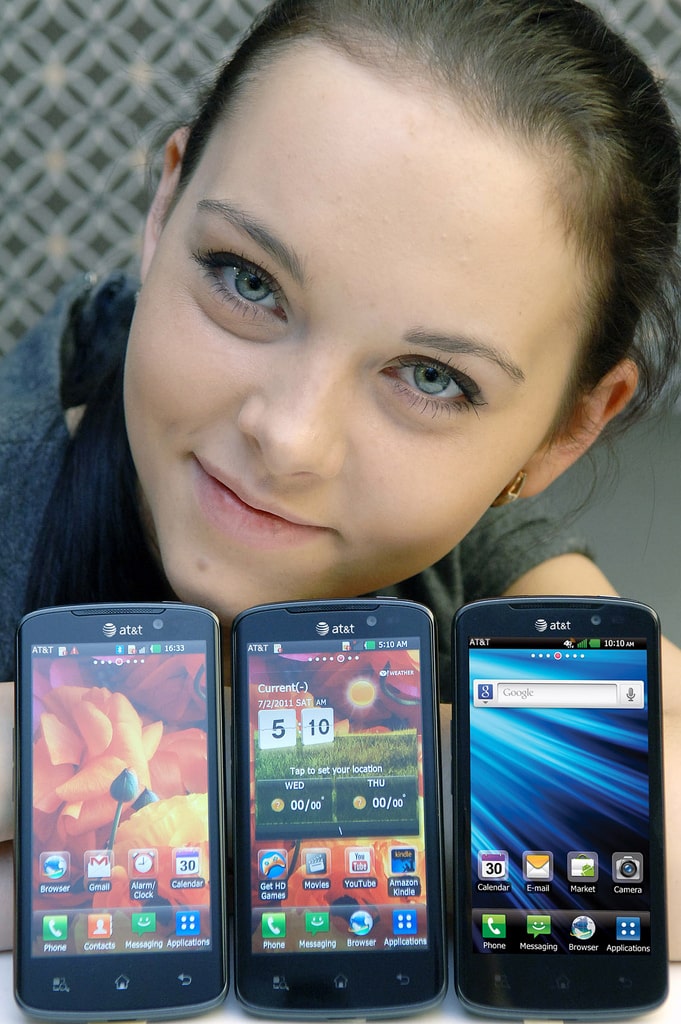
The device is barely anything short of the features you would normally seek in a smartphone, say the reviewers. Even the plastic casing doesn’t come off as a turn off with the back done pretty smoothly. The size, however, may be a little bothersome to few but that’s compensated by the larger-than-usual display size. The screen is a cool 4.5-inches whereas the thickness of LG Nitro HD is about 10.4 mm.

Turn on’s:
The quality of the display. It is exceptionally well, with the pixel density even more than that of an iPhone 4. Not the best of the displays when compared to Android phones but certainly one that beats many awesome smartphones.The design too, has been done intelligently, Despite having used plastic, the texture of the back is pretty slick. The phone functions smoothly, running LG Optimus Skin atop Android. A tab bit removed from the genuine Android experience but still works pretty fine.

The camera, too, is a thumbs up, adjusting well between lightning conditions and snapping high-quality images.

Turn off’s:
The charging port for the phone is right at the bottom, something which the mobile industry has fairly abandoned for larger part. It can be bothersome because during charging, you may find it cumbersome to maneuver your mobile. Also, the thickness of the set may be a turn-off for some.

In all, LG Nitro HD is a fair deal, coming at $249 with a two-year AT &T contract.

Image courtesy LGEPR.

Buy Cheapest Related Product From Amazon.com


Kindle Fire Sales – How Many Millions?

iPhone 4S Satisfied 96% Users
You can also press the left/right arrow key on your keyboard to go to previous/next post
  On December 2, 2011(1 year, 5 months ago.)

Recent Search

Recent Tutorials

This tutorial will show how to use S.M.A.R.T. (Self Monitoring Analysis and Reporting Technology) to continuously collect information on health of your equipment.
In this tutorial I'll show you how you can easily protect yourself from any kind of security breaks that may occur through Java.
Today Apple enabled "Two Step Verification" for iCloud And Apple ID. But the process is not that simple. But no worry, here we have made a step by step tutorial.
Cant remember your iPhone passcode? Here I will show you some workaround on what to do and how to recover and restore for every possible scenario.
This tutorial will show you how to perform the Winapp2.ini installation inside CCleaner and how to use it under Windows operating system.
With app called AD Sound Recorder, you can record any stream that passes through your sound card or speakers and in this tutorial I will show you how to do that.
If you want to have Boxee app inside your Apple TV, in this tutorial we will show you how to install XBMC and Boxee using Windows on your Apple TV.
This tutorial will show you how to transfer PS3 Saved Game Files from your PC to your PS3 game console.
Adding videos from external sources such as internet, more specifically from YouTube, is a great solution to enhance a presentation; in this tutorial I will show you the procedure.
If you are one of new comers to Windows Phone 8, like me, in this tutorial I will walk you through the process to update your Windows Phone 8 device.
Close You Have To Login
User:
Pass:
Login With »Login With TwitterLogin With Facebook