website statistics

NEC Shows Off Medias W N-O5E, A Dual-Screen Smartphone

NEC has unveiled a new handset, namely Medias W-N05E, which comes with dual screens and runs Android.

When do you use Facebook?

View Results

Loading ... Loading ...
1 Star2 Stars3 Stars4 Stars5 Stars (Rate This)
Loading ... Loading ...

Dual-screen smartphones are nothing new – other vendors have at least tested them out in the past. However, neither of them has gained any traction so far. Apparently, that hasn’t stopped NEC from dishing out yet another dual-screen Android smartphone, the Medias W N-05E.
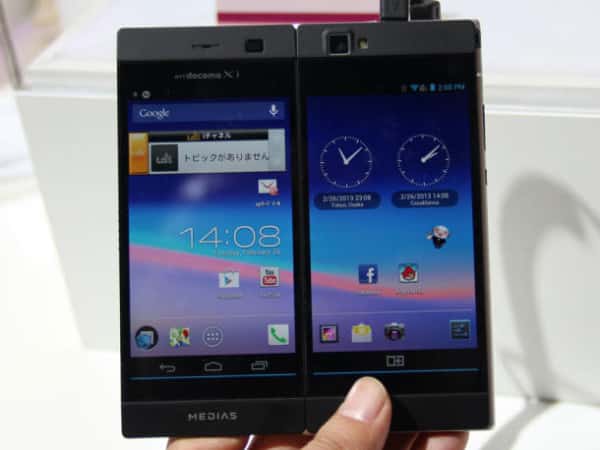

NEC Medias W N-05E

Medias W N-05E features 1.5GHz dual-core processor together with 1GB of RAM. By default, it comes with 16GB of storage space, which can then be extended using microSD card slot. Moreover, it packs a 8.1-megapixel camera.

The highlight of the handset, of course, is the fact that it has two screens. These screens essentially sit side by side – imagine having a 5.6-inch tablet with a division right in the middle of the display. When both screens are being viewed, side by side, they do look like a mini tablet indeed. NEC has specialized some apps for this dual-screen mode. For instance, if you view your mail on the two screens, one of them lets you view the list of messages while the other displays any selected messages.

Both screens feature 4.3-inch qHD displays and you can fold one of the screens if it is not in use. That makes using the other screen like a normal smartphone possible. Alternatively, if you want to share something with a friend, an easy way to do so on Medias W N-05E is to simply tilt one screen to the opposite side. This lets the other person, say sitting across from you on a table, view whatever you are viewing on the smartphone screen.
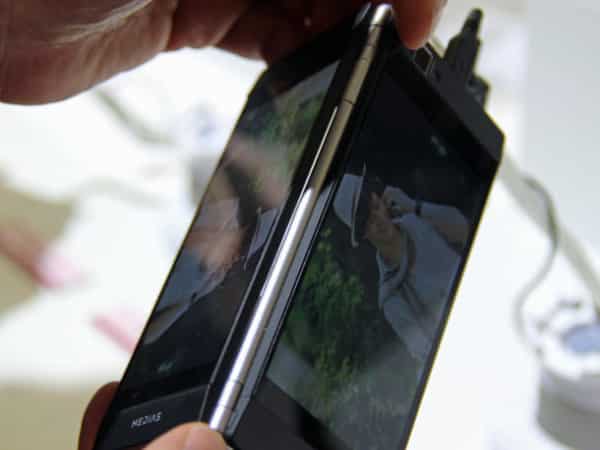
NEC Medias W N-05E folded

In the landscape mode, you can enjoy a huge virtual keyboard, covering one entire screen, when typing a message. In all, the handset(s) is not bad but at the end of the day, all it looks like is a tablet that has been split in half. The big question is, why shouldn’t a user rather purchase a tablet?

Courtesy: CNET

Buy Cheapest Related Product From Amazon.com


LG And Huawei Put Firefox OS Phone Silently At MWC 2013

Fujitsu Offers Stylistic S01 With Simplified Features For Seniors
You can also press the left/right arrow key on your keyboard to go to previous/next post
  On February 27, 2013(3 months, 22 days ago.)

Recent Search

Recent Tutorials

This tutorial will show how to use S.M.A.R.T. (Self Monitoring Analysis and Reporting Technology) to continuously collect information on health of your equipment.
In this tutorial I'll show you how you can easily protect yourself from any kind of security breaks that may occur through Java.
Today Apple enabled "Two Step Verification" for iCloud And Apple ID. But the process is not that simple. But no worry, here we have made a step by step tutorial.
Cant remember your iPhone passcode? Here I will show you some workaround on what to do and how to recover and restore for every possible scenario.
This tutorial will show you how to perform the Winapp2.ini installation inside CCleaner and how to use it under Windows operating system.
With app called AD Sound Recorder, you can record any stream that passes through your sound card or speakers and in this tutorial I will show you how to do that.
If you want to have Boxee app inside your Apple TV, in this tutorial we will show you how to install XBMC and Boxee using Windows on your Apple TV.
This tutorial will show you how to transfer PS3 Saved Game Files from your PC to your PS3 game console.
Adding videos from external sources such as internet, more specifically from YouTube, is a great solution to enhance a presentation; in this tutorial I will show you the procedure.
If you are one of new comers to Windows Phone 8, like me, in this tutorial I will walk you through the process to update your Windows Phone 8 device.
Close You Have To Login
User:
Pass:
Login With »Login With TwitterLogin With Facebook