
V.I.O release POV.HD video system which is a professional-grade alternative to other film-through-hell helmet cameras such as the GoPro HD or Drift Innovations HD170.Rugged POV.HD video system can captures 1080p through anything……..
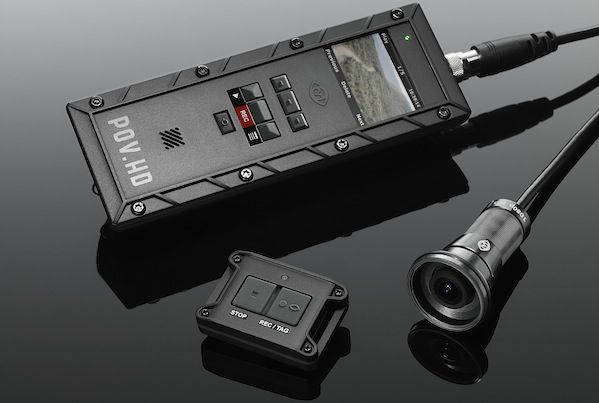
The new POV.HD follows the award-winning form-factor of its predecessor, but with all-new internal components and functionality. The POV.HD features new in-field flexibility capabilities and records up to 5 hours of crisp HD video. Thanks to the exceptionally small and robust nature of the POV.HD camera head, options for capturing creative and beautiful video angles are limitless.The POV.HD comes with a laundry list of proprietary functionality driven by user feedback. The recording unit features a 2-inch LCD screen to view footage in the field, edit video and make exposure control adjustments. A simple set of controls allows the user to easily “tag” the best footage in the field, so final editing is finished quickly back in the studio. The recorder, run by Texas Instruments’ new Da Vinci DM368 Video Processor, supports a real-time video pipeline that enhances image quality and produces crystal clear 1080p H.264 video. The 2-oz wearable camera head captures 142 degree FOV, at 1080p 30fps-the widest point-of-view camera angle available on the market. The camera head also features video capture at 720p 60fps, a high-quality 6-element glass lens and a native 1080p CMOS sensor designed specifically to produce optimal-quality, Full HD video.
In addition to utilizing the best video components available on the market, the POV.HD excels in the single most important test for point-of-view cameras: durability and ruggedness. The POV.HD is IP67 certified and is commonly used in a wide variety of extreme environments due to the unit’s dust, water and shockproof ratings and ability to handle extreme temperatures.
IN-FIELD FLEXIBILITY:
In-field Editing
- Tag scenes while recording from either the recorder or the wireless remote control
- Compile tagged scenes into highlight clips automatically and in-the-field
In-field Exposure Control
- Exposure Compensation – Improve color saturation and contrast in especially bright or grey shooting conditions
- Exposure Metering – Set the automatic exposure control sampling area
Four Recording Methods
- Clip Mode – Start and stop recording action from your POV
- Loop Mode – Capture footage from the past
- Loop & Forward Mode – Capture footage from the past + continue recording into the future
- Still Image Mode
IN THE BOX:
- POV.HD Recorder with LCD
- Wide Angle Camera Head
- LVDS Cable
- Wireless Remote Control
- Carrying Case
- Mounting Systems
- 4GB SDHC Card
- USB Cable
- Analog A/V Cable
- Quick Start Guide
- 4 AA Batteries
- Preloaded Tutorials
I received the VIO POV HD 2 days ago replacing my GoPro. I purchased the GoPro for a trip to Antarctica 6 months ago. Use it a lot for motorsports also. Got annoyed by the poor GoPro footage quality in the 1080 edges of the frames. Like trees. They look like shit with the GoPro. I studied available footage and tests for bout 3 days befor purchasing a GoPro alternative. This thing is producing AMAZING footage and the remote is great.