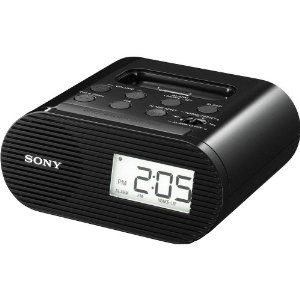
The new Sony ICFC05iPBLK Clock Radio allows you to charge your iPhone, iPod Touch and iPod’s battery while you sleep. This Sony ICFC05iPBLK Clock Radio is the space-saving bedside accessory for iPod and iPhone users. Set the alarm to wake to the radio, iPod, or a buzzer. The charging tray ensures both you and your iPod/iPhone start the day with a fully charged battery. Plus, The Sony ICFC05iPBLK Clock Radio features a built-in digital FM tuner lets you choose from a wide variety of radio, talk and music programming. Order the Sony ICFC05iPBLK Clock Radio today! This is an Amazon’s product review. Checkout more details bellow.
|
Product Features
- Compatibility: iPod mini; iPod nano 1G, 2G, 3G, 4G, 5G; iPod classic 4G, 5G, 5.5G, 6G; iPod touch 1G, 2G; iPhone 1G, 3G, 3GS
- Wake or sleep to iPod/iPhone, FM radio, or buzzer
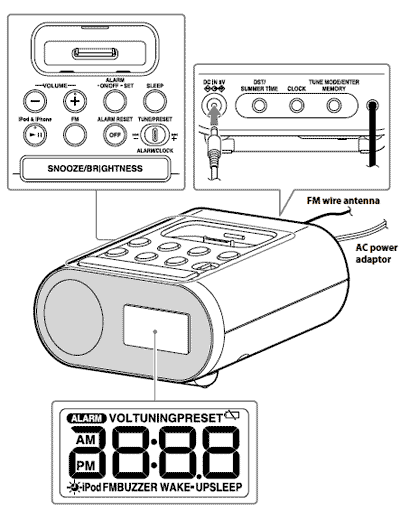
- Digital FM radio tuner with 20 user presets
- Sleep timer adjustable to 15, 30, 60, or 90 minutes
- Backup battery keeps time in the event of power outages
Technical Details
- Brand Name: Sony
- Model: ICFC05IPBLK
- Width: 7.00 inches
- Height: 4.00 inches
- Weight: 1.44 pounds
Charge While You Listen–or While You Sleep
Your iPod or iPhone will charge while docked to help you avoid a drained battery, whether you’re listening or not. When you wake up ready to go, your device will be, too.
Enjoy FM Radio
A built-in digital FM tuner lets you catch up on the news, check the weather, or take in your favorite morning show while you get ready for your day. Pull up your favorites in an instant, with 20 presets.
Not Too Faint, Not Too Bright–Just Right
The high, medium, and low brightness settings ensure you can easily read the display during the day or night, without being distracted while trying to fall asleep.
Alarm Options
Wake up to your iPod, iPhone, the radio, or an old-school buzzer. If you can’t bear to get up just yet, the alarm features a programmable snooze from 10 to 60 minutes.
Sleep Timer
The sleep timer lets you drift off to your favorite tunes on iPod or the radio, adjustable to 15, 30, 60, or 90 minutes.
Backup Battery
To keep accurate time, a CR2032 battery provides a backup power source. You’ll still be on time in the event of a power outage.
What’s in the Box
Sony ICF-C05iP, AC power adapter, dock adapters, and documentation.
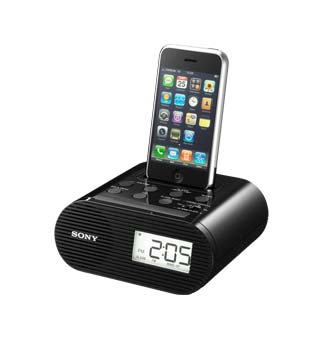
Wake to your iPod, radio, or buzzer.
That’s all about the Sony ICF-C05iP Clock Radio for iPhone And iPod Touch. This device is available in Amazon.com. You can directly order or buy from here.
Source
[ttjad keyword=”i-doc-station”]