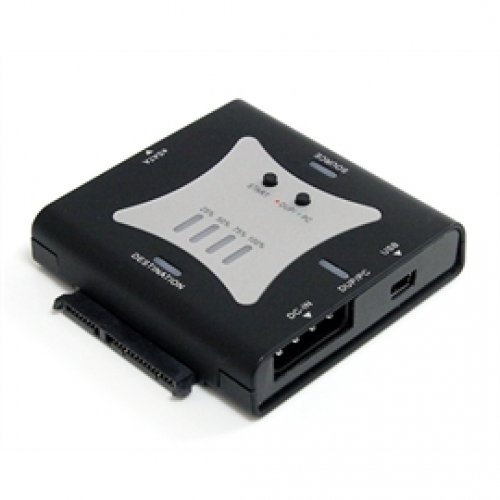
StarTech has just announced the launch of its latest Standalone Portable Hard Drive Duplicator. The SATDUPUE Portable SATA Hard Drive Duplicator with eSATA and USB offers an easy, hardware solution for duplicating/cloning a SATA hard drive, or can be connected to a desktop and laptop computer for use as an external hard drive dock. As a standalone hard drive duplicator, the SATDUPUE lets you can create an exact 1-to-1 sector clone from one hard drive to another, including partition and boot sector information and all data, at a rate of up to 72 MBps; as an external hard drive dock, it supports plug-and-play installation and can be connected to a host computer through either USB 2.0 or eSATA, providing data transfer speeds of up to 480 Mbps or 3 Gbps respectively. This is an Amazon’s product review.
|
Product Features
- Standalone cloning operation with LED progress indicator allows for creating 1:1 copies of hard drives without having to connect to a host computer
- A unique, compact design that fits in the palm of your hand, for ease of use and maximum portability
- On-the-fly switching from Duplicator to USB 2.0 or eSATA connectivity with the push of a button, allows a connected computer system to read/write to the drives
- Standalone Sector-by-Sector hard drive copying including the HPA
- Push-button switching between Duplicator mode and Docking Station mode
- A single SATA revision 2 compliant eSATA host interface, with supported data transfer rates up to 3 Gbps
- Compact, pocket-sized form factor
- High Speed USB 2.0 compliant host interface, with supported transfer rates up to 480 Mbps
Technical Details
- Brand Name: StarTech
- Model: SATDUPUE
- Hard Disk Description: External
Standalone Portable Hard Drive Duplicator a multi-purpose data storage solution that enables users to make exact duplicates of their SATA hard drives without the use of a PC. For those times when you don’t need to copy hard drives, it works as a connector for people to connect bare SATA drives to a desktop or laptop computer through eSATA or USB.
The Standalone Portable Hard Drive Duplicator is available now for $77.99 and can be purchased from StarTech’s website. This StarTech Brings Standalone Portable Hard Drive Duplicator is also available in Amazon.com. You can also directly order or buy from here.