website statistics

Toshiba Android 3.0 Honeycomb Tablet

When do you use Facebook?

View Results

Loading ... Loading ...
1 Star2 Stars3 Stars4 Stars5 Stars (Rate This)
Loading ... Loading ...

Toshiba made tablet sporting the Android 3.0 Honeycomb operating system will be joining the tablet wars sometime in spring and has now released a teaser page for its new Android tablet.The device has an NVIDIA Tegra 2 dual core processor and a 6:10 Widescreen with HD quality capacitive touchscreen display………
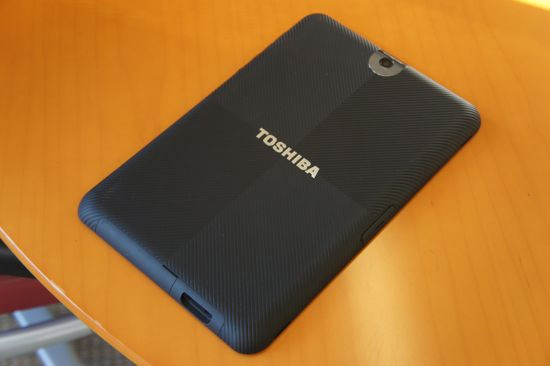
A teaser site has gone live for the Toshiba Android tablet with Honeycomb and the tablet was shown in CES.Toshiba states on the bottom of the website the tablet is coming in Spring.

Features :

  • Toshiba will offer the Toshiba Tablet in 5 colors with Black being the only confirmed color at the moment.
  • Android 3.0 Honeycomb OS will be shipped with the Toshiba Tablet.
  • The Nvidia Tegra 2 1GHz dual-core SoC will power the tablet.
  • A 10.1-inch 720p HD (1280 x 800 resolution) capacitive multi-touch display with 16:10 aspect ratio, a built-in ambient light sensor (detects outside lights and auto-adjusts screen brightness and contrast) and a built-in G-sensor (accelerometer for screen rotation).
  • There are two on-board cameras for video chatting and taking pictures. There is a 2MP front-facing camera and a 5 MP rear-facing camera with autofocus.
  • Stereo speakers are located on the bottom of the Toshiba Tablet (when tablet is held in landscape)
  • For ports the Toshiba Tablet has: Headphone jack (1/4 inch), Microphone jack, USB 2.0 port, mini-USB 2.0 port, HDMI port, SD memory card reader.
  • Connectivity wise the tablet has Wi-Fi and Bluetooth.
  • The tablet will come with a removable battery, a screwdriver is all that is needed to remove the battery if you want to replace it. Right now no other main-stream tablet offers this simple feature.


Thanks

Untethered Jailbreak for iOS 4.2.1 : Video Demo of the Greenpois0n

GeoHot To Release Limera1n Jailbreak iOS 4.3, Limesn0w to Unlock iPhone
You can also press the left/right arrow key on your keyboard to go to previous/next post
  On January 22, 2011(2 years, 3 months ago.)

Recent Search

Recent Tutorials

This tutorial will show how to use S.M.A.R.T. (Self Monitoring Analysis and Reporting Technology) to continuously collect information on health of your equipment.
In this tutorial I'll show you how you can easily protect yourself from any kind of security breaks that may occur through Java.
Today Apple enabled "Two Step Verification" for iCloud And Apple ID. But the process is not that simple. But no worry, here we have made a step by step tutorial.
Cant remember your iPhone passcode? Here I will show you some workaround on what to do and how to recover and restore for every possible scenario.
This tutorial will show you how to perform the Winapp2.ini installation inside CCleaner and how to use it under Windows operating system.
With app called AD Sound Recorder, you can record any stream that passes through your sound card or speakers and in this tutorial I will show you how to do that.
If you want to have Boxee app inside your Apple TV, in this tutorial we will show you how to install XBMC and Boxee using Windows on your Apple TV.
This tutorial will show you how to transfer PS3 Saved Game Files from your PC to your PS3 game console.
Adding videos from external sources such as internet, more specifically from YouTube, is a great solution to enhance a presentation; in this tutorial I will show you the procedure.
If you are one of new comers to Windows Phone 8, like me, in this tutorial I will walk you through the process to update your Windows Phone 8 device.
Close You Have To Login
User:
Pass:
Login With »Login With TwitterLogin With Facebook