website statistics

Tectonic+ 1.0 for iPhone and iPad Has Released

When do you use Facebook?

View Results

Loading ... Loading ...
1 Star2 Stars3 Stars4 Stars5 Stars (Rate This)
Loading ... Loading ...

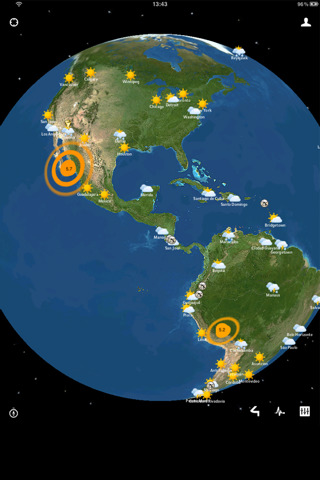
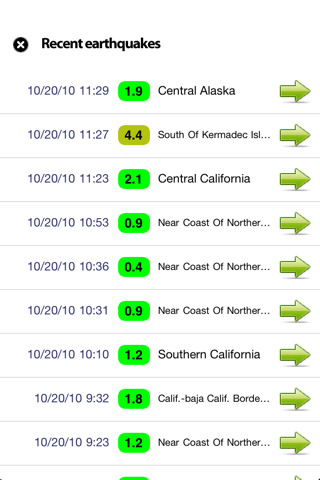
California based app4touch has released Tectonic+ 1.0 for iPhone and iPad, an improved version of the popular Tectonic application. Recent earthquakes, hurricanes and tornadoes are displayed on a 3D interactive globe.

Description

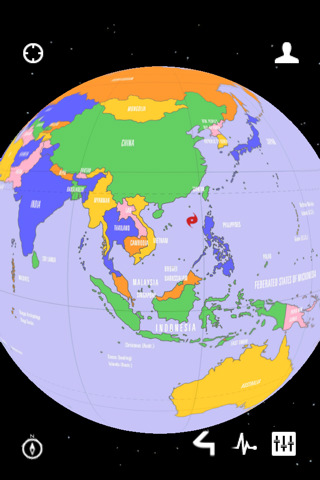
San Jose, California – app4touch has launched Tectonic+ 1.0, an improved version of the popular Tectonic application. It’s now available for iPhone and iPad. Recent earthquakes, hurricanes and tornadoes are displayed on a 3D interactive globe. You can move a 3D glove to any direction with a finger.

You can use a pinch action to zoom in and out of a particular area of the globe. To perform a Pinch, place two fingers on the globe and spread them apart (to zoom in) or squeeze your fingers together (to zoom out). You will see that earthquakes often occur along plate tectonics.

Features

* Recent earthquakes displayed on a 3D interactive globe
* Filter options by Magnitude, Quantity and Timeframe
* Displays current Hurricanes and Tordanoes
* Displays the most active volcanoes on the planet
* Displays the main Tectonic+boundaries
* Displays current Weather for the main cities of the world
* Displays your actual location on the globe
* Three different earth appearance with many options
* Full Google Map integration to display more details

Device Requirements:

* iPhone 3GS, 4, iPod touch (3rd Gen), iPod touch (4th Gen), and iPad
* Requires iOS 3.1.3 or later
* 15.8 MB

Pricing and Availability:

When you purchase the iPhone version, the iPad version is free and vice versa. All updates are free for lifetime. Tectonic+ is available for $0.99 (USD) only until end of December 2010. It’s a special introductory price.

Download link is given

here

.

Some screenshots are given below.

Click On Adds To Buy iPad

Toshiba Satellite T215D-S1140RD 11.6 Inch Notebook PC

Interior Design App LivingRoom for iPad 1.4 Has Released
You can also press the left/right arrow key on your keyboard to go to previous/next post
  On October 31, 2010(2 years, 6 months ago.)

Recent Search

Recent Tutorials

This tutorial will show how to use S.M.A.R.T. (Self Monitoring Analysis and Reporting Technology) to continuously collect information on health of your equipment.
In this tutorial I'll show you how you can easily protect yourself from any kind of security breaks that may occur through Java.
Today Apple enabled "Two Step Verification" for iCloud And Apple ID. But the process is not that simple. But no worry, here we have made a step by step tutorial.
Cant remember your iPhone passcode? Here I will show you some workaround on what to do and how to recover and restore for every possible scenario.
This tutorial will show you how to perform the Winapp2.ini installation inside CCleaner and how to use it under Windows operating system.
With app called AD Sound Recorder, you can record any stream that passes through your sound card or speakers and in this tutorial I will show you how to do that.
If you want to have Boxee app inside your Apple TV, in this tutorial we will show you how to install XBMC and Boxee using Windows on your Apple TV.
This tutorial will show you how to transfer PS3 Saved Game Files from your PC to your PS3 game console.
Adding videos from external sources such as internet, more specifically from YouTube, is a great solution to enhance a presentation; in this tutorial I will show you the procedure.
If you are one of new comers to Windows Phone 8, like me, in this tutorial I will walk you through the process to update your Windows Phone 8 device.
Close You Have To Login
User:
Pass:
Login With »Login With TwitterLogin With Facebook