website statistics

Verizon Plans To Stream Live TV To Mobile Devices, Including The iPad

When do you use Facebook?

View Results

Loading ... Loading ...
1 Star2 Stars3 Stars4 Stars5 Stars (Rate This)
Loading ... Loading ...

Verizon just announced that it is planning to stream live FiOS TV to mobile devices, including Apple’s iPad. The announcement reflects Verizon’s goal for mobile devices to one day equal and then surpass current television.
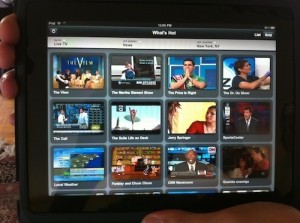
As demonstrated today, FiOS customers will eventually be able to browse a channel selection indistinguishable from what they’d otherwise view on their television—though Verizon touted their “What’s Hot” iPad app, a mosaic view of what other FiOS customers in your area are watching, updated every five minutes. Content would be piped in via WiFi directly from FiOS, without the need for an intermediary streaming device a la Slingbox. Although Verizon CIO Shaygan Kheradpir was hot on Apple, praising the iPad’s live TV capabilities as a realization of “why [they] built FiOS,” the company emphasized that their new service would be available across all platforms.

Verizon FiOS Wants to Put 600 Channels of Live TV On Your iPad

A timeframe for the live TV service remained murky—Verizon reps at the event refused to specify a release by even next year’s time, pinning the delay on pending negotiations with content providers. The company was murkier still on the policy implications of the service with regards to recent net neutrality turmoil—as the thought of a dedicated mobile television service for FiOS customers resonates with anyone who feared the Google/Verizon proposal cleared the way for a non-neutral “second-internet.” No comment was given on whether you’d be able to, say, watch TV on your iPad over your girlfriend’s connect, if you’re a FiOS subscriber but she isn’t. The company stated that “ideally,” rival ISPs wouldn’t be discriminated against, but refused to comment further.

Source: Gizmodo.

iPhone 4 FaceTime Makes For A Great Phone Sex Experience

Mexican City Installing Eye Scanners To Track People: Is This The End Of Privacy?
You can also press the left/right arrow key on your keyboard to go to previous/next post
  On August 19, 2010(2 years, 9 months ago.)

Recent Search

Recent Tutorials

This tutorial will show how to use S.M.A.R.T. (Self Monitoring Analysis and Reporting Technology) to continuously collect information on health of your equipment.
In this tutorial I'll show you how you can easily protect yourself from any kind of security breaks that may occur through Java.
Today Apple enabled "Two Step Verification" for iCloud And Apple ID. But the process is not that simple. But no worry, here we have made a step by step tutorial.
Cant remember your iPhone passcode? Here I will show you some workaround on what to do and how to recover and restore for every possible scenario.
This tutorial will show you how to perform the Winapp2.ini installation inside CCleaner and how to use it under Windows operating system.
With app called AD Sound Recorder, you can record any stream that passes through your sound card or speakers and in this tutorial I will show you how to do that.
If you want to have Boxee app inside your Apple TV, in this tutorial we will show you how to install XBMC and Boxee using Windows on your Apple TV.
This tutorial will show you how to transfer PS3 Saved Game Files from your PC to your PS3 game console.
Adding videos from external sources such as internet, more specifically from YouTube, is a great solution to enhance a presentation; in this tutorial I will show you the procedure.
If you are one of new comers to Windows Phone 8, like me, in this tutorial I will walk you through the process to update your Windows Phone 8 device.
Close You Have To Login
User:
Pass:
Login With »Login With TwitterLogin With Facebook