
People are always crazy about Apple product. iDevice like iPhone, iPod and iPad comes with Apple headphone in the box. This small headphone was always users’ favorite for clear sound and crystal clear voice quality. In this post we will show 8 exceptional use and control of Apple headphone.
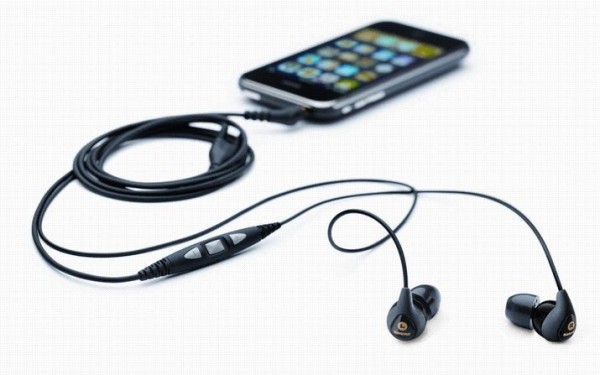
At the time of purchasing iPhone or iPod, you will get a pair of Apple Earphones with Remote and Mic. The mic portion of the headphones has Volume Up (+) and Volume Down (–) buttons. The fact many people might have not noticed is that there is a “Center Button” in the indentation between Volume Up (+) and Volume Down (–) buttons.
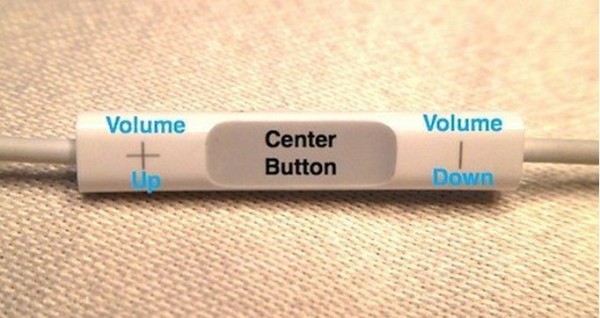
With these 3 simple buttons, you can control your iPhone or iPod without even taking it out of your pocket/bag. Here are the 8 facts that Apple in-ear headphone can do :
# Activate Siri
By pressing and hold the Center Button, iPhone 4S users can activate Siri.
# Snap a Picture
If you have an iPhone with Apple’s Camera app, then you can snap pictures by pressing the Volume Up (+) button. Remember, this feature only works with Apple’s Camera app, not with other apps like Camera+, Facebook Camera, or Instagram.
# Play/Pause a Song or Video
By simply pressing the Center Button once, users can play/pause current audio.
# Skip to the Next Song or Chapter
By pressing the Center Button twice and quickly, users can move to the next song or chapter.
# Fast-forward/Rewind
By pressing the Center Button twice and hold the second press, users can fast-forward the current track. In order to rewind, users have to press the Center Button three times and hold on the Center Button at third press. Whenever he/she wants to resume play, he/she has to release the Center Button.
# Answer and End Phone Calls
By pressing the Center Button once, users can accept incoming phone call. Similarly users can disconnect/end the conversation/line by pressing the Center Button again just for once.
# Declining Phone Calls
By holding down the Center Button for nearly two seconds, users can ignore an incoming phone call. After releasing the Center Button, users will hear two beeps that confirms the user that the call has been successfully declined.
# Switching Phone Calls
When you are talking and that time if an incoming call comes, by pressing the Center Button once, you can switch from current call to that call. If you want to disconnect the current call and receive the second call, then you have to hold down the Center Button roughly for two seconds. Hearing two beeps after the release of the Center Button means first call has been successfully ended/disconnected.
Source : Tekserve
[ttjad keyword=”ipod-touch”]

![Read more about the article [Tutorial] How To Configure Remote Access To Your WD MyBookLive](https://thetechjournal.com/wp-content/uploads/2012/11/settings-mybooklive-as87we9879w87rwerwe.jpg)
![Read more about the article [Tips] How To Perform Google Image Search With A Picture](https://thetechjournal.com/wp-content/uploads/2012/10/image-search-asd7987upoiu32113.jpg)
![Read more about the article [Tutorial] How To Easily Rename Multiple Files At Once In Windows](https://thetechjournal.com/wp-content/uploads/2012/10/notepad-exe-freename-asd4e7r9w87t9w87564rf.jpg)
Before proceeding to below steps make sure you download Aerofoil app for Windows from this link on your laptop and continue following steps below.
http://www.celebs.com/