
Facebook has just unveiled a new video chat service powered by Skype, which is built into the messaging service on Facebook’s website and Facebook also unveiled a new design for its messaging application and is giving users a more streamlined way to add users to a group chat. And you can find how to make video call on facebook on this post…………

Facebook announced its new Skype-powered video calling along with a new group text chat feature. On this post you will find
a complete step by step procedure of initiating a video call. The procedure is very simple and will take only two minutes to setup. Now you can use Skype on Facebook too! Lets go to the steps now:
Step 1:
Open your browser, Log in to your facebook account and go to ‘www.facebook.com/videocalling’.

Step 2:
Click on ‘get started’. Facebook will ask you who do you want to call and give you a list of online friends.
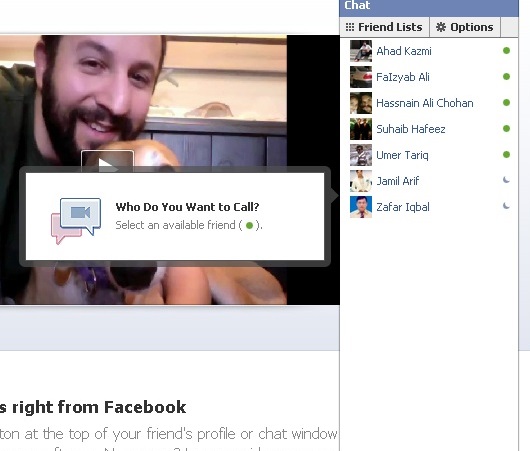
Step 3:
When you click on a friends name, a regular chat window will open and have a small ‘video chat’ button added to top. Click it to initiate call.

Step 4:
Now you will get a dialogue box that will ask you to setup video calling. Click on ‘Setup button’.

Step 5:
This will download a file for you named ‘FacebookVideoCallSetup.exe’. Run it and it will install automatically. After installing the plugin, click on any friend’s name in the online list and you will see an added button on top of every chatbox!
![Read more about the article [Tutorial] How to Force Adobe Flash Player To Be Updated Manually In Windows](https://thetechjournal.com/wp-content/uploads/2012/11/run-flash-as8d798y798r7y98r7.jpg)
![Read more about the article [Tutorial] How To Manually Update Windows 8](https://thetechjournal.com/wp-content/uploads/2012/10/settings-as465s4d6a5s4d65a4s6d4a.jpg)
![Read more about the article How To Redeem iTune Promo Code[Tutorial]](https://thetechjournal.com/wp-content/uploads/2010/09/iTune-Reedme-TTJ-300x178.jpg)
wow it so am@zing . . . . . . . . . .
Amazing write-up! This could aid plenty of people find out more about this particular issue. Are you keen to integrate video clips coupled with these? It would absolutely help out. Your conclusion was spot on and thanks to you; I probably won’t have to describe everything to my pals. I can simply direct them here!