
If you like tweaking your Microsoft Office Word, Excel, Outlook or PowerPoint environment and options, you probably noticed an intriguing option called feedback with sound. This option is meant to enable sound notification inside Microsoft Office suite, such as when you close the application, save a document, delete text, or many other different actions. However if you enable this option inside Microsoft office 2007 or 2010 versions you wont notice anything since there are few additional steps you need to perform in order to make it work and in this tutorial i will show you how to do that.
To get started follow steps below
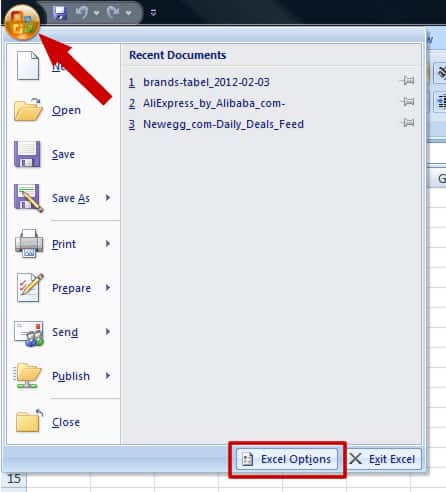
Step 1: First we will need to enable the audio feedback inside Microsoft Office. In my case I will perform his inside Excel; click the Office button located in top left (or File tab if you are using Office 2010) then Options.
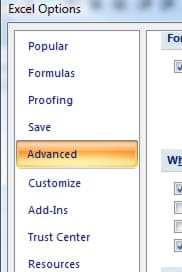
Step 2: From left pane click Advanced
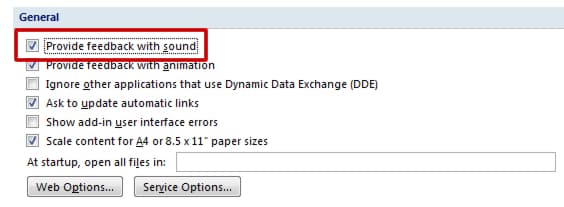
Step 3: In the General section, select the checkbox in front of Provide feedback with sound. If a warning window appears close it.
Step 4: Click OK to save your changes.
Step 5: Now you need to download Office Add-in: Office Sounds from this link and intall it on your computer.
Step 6: Now to add sound for certain events in Microsoft Office click Start menu and then choose Control Panel.
Step 7: Choose Category view, and then click Hardware and Sound.

Step 8: Now under Sound section click Change system sounds.

Step 9: A new feature called Microsoft Office should be visible in here.
Step 10: The events for which you can add sound are listed. Click on the event to set up. Click the Test button to play the selected sound by default.
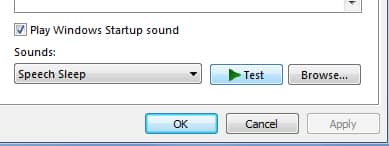
Step 11: Click the Browse button to choose a different sound from your hard drive. It should be WAV file format. You will find many sounds in the folder C:\Windows\Media, select the one you like and click Open.
[ttjad keyword=”microsoft”]
Step 12: To make a silent event, pull down the Sounds list and select (None).
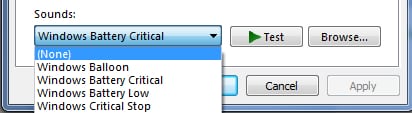
Step 13: Then press OK to save your changes.

![Read more about the article [Tutorial] How To Customize Your Twitter Profile Header](https://thetechjournal.com/wp-content/uploads/2012/10/twitter-header-customize-ttj-logo-512x211.jpg)
![Read more about the article [Tutorial] How To Restrict Access To Certain Games Or Software In Windows](https://thetechjournal.com/wp-content/uploads/2012/10/gpedit-as8d7986sd4gf654asd.jpg)
![Read more about the article [Tutorial] How To Dosconnect Facebook From Skype](https://thetechjournal.com/wp-content/uploads/2012/02/facebook-skype-disconnect-512x245.gif)
If you like tweaking your Microsoft Office Word, Excel, Outlook or
PowerPoint environment and options, you probably noticed an intriguing
option called feedback with sound.
http://injuryattorneysnj.com/