
You want to read a PDF file on a tablet or a mobile phone? To automatically adjust the text size on the screen of your device, it is better to use the ePub file format. ePub is a free and open e-book standard by the International Digital Publishing Forum with extension .epub. ePub is designed for reflowable content, meaning that the text display can be optimized for the particular display device used by the reader of the EPUB-formatted book. With the free tool called Calibre you can convert your PDF eBooks in ePub format and in this tutorial I will show you how.

To get started we will need to download and install Calibre which is a free program available for Windows, Mac OS and Linux. Once we have Calibre up and running on our computer and you lunch it for the first time it will offer you to
- choose in which language you want to use Calibre
- chose a location for your books.
- choose your e-book devices on which you will be reading your ePub files
Step 1: With Calibre up and running click the arrow next to Add Books button and choose how you want to add your PDF files.

Step 2: Select the PDF on your hard drive and click Open.
Step 4: PDF files are then added to the Calibre library.
Step 5: From the list of all available PDF files select the one you want to convert to ePub.
Step 6: Now click Convert books button location at the top of your window.

Step 7: When new window opens, from top right scroll down the list output format and select EPUB.
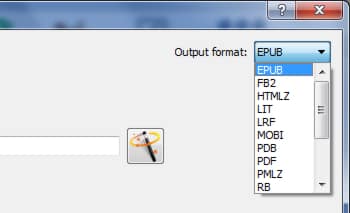
Step 8: From bottom right of your window click OK to start conversion. Note that you can also use this window to customize the output file font size, line height, indent size, etc…
Step 9: The files are then converted to ePub. Click on a file in the library with the right mouse button and from context menu click Open containing folder.
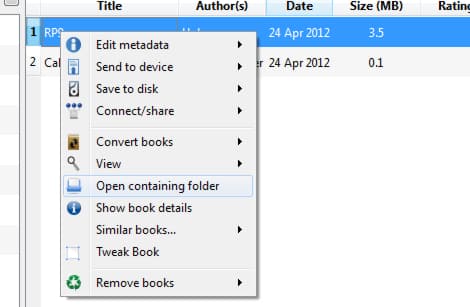
Step 10: Calibre folder of this book is open. You’ll find the original PDF version and converted ePub version.
Step 11: All you have to do now is upload ePub file to your tablet or mobile phone and enjoy.
[ttjad keyword=”all-in-one-desktops”]

![Read more about the article [Tutorial] How To Customize The Names Of Ripped Audio Files In Windows Media Player](https://thetechjournal.com/wp-content/uploads/2012/11/tools-options-as5d4e8e8e89w8e-512x242.jpg)
![Read more about the article [Tutorial] How To Use Your iPhone As A Mouse and Keyboard](https://thetechjournal.com/wp-content/uploads/2012/03/idevice-keyboard-mouse-logo-512x240.jpg)
![Read more about the article [Tutorial] How To Speed Your Web Browser By Changing Your DNS](https://thetechjournal.com/wp-content/uploads/2012/04/dns-logo-512x233.jpg)
Thanks for the tutorial. Most PDFs I deal with have structure in them (like headers and footers) which make a real mess of things when converting into epub. Any suggestions on automatic ways to handle (get rid of) these artifacts before or during the conversion process?