
website statistics

[Tutorial] How To Disable All Sounds In Skype Or Add Your Own Ringtone

Skype is instant messaging software that allows you to call your contacts around the world. By default, the software has a ring tone that you can obviously change however if you don’t want to have any sounds, Skype allows you to disable all sounds on the software. Read this tutorial to find out how to customize both options inside Skype.

When do you use Facebook?

View Results

Loading ... Loading ...
1 Star2 Stars3 Stars4 Stars5 Stars (Rate This)
Loading ... Loading ...

Skype is instant messaging software that allows you to call your contacts around the world. By default, the software has a ring tone that you can obviously change however if you don’t want to have any sounds, Skype allows you to disable all sounds on the software. Read this tutorial to find out how to customize both options inside Skype.


To add your own ringtone in Skype follow below steps

Step 1: Start Skype, click Tools and then Options.

Step 2: Then go to tab General and sub tab Sounds.

Step 3: Then choose ringtone from the dropdown list and select the sound you want. You can listen the sounds before you select it by clicking Play this sound. Note that these sounds are the default ones in Skype.
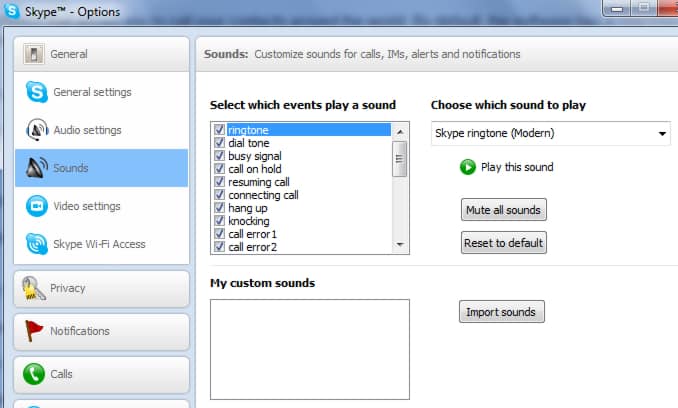
Step 4: However if none of offered sounds match your taste you can also add a custom ringtone with a file from your computer. To do that click Import sounds, then choose your file. Note that Skype only supports formats .wav and .skype formats.

Step 5: Once you import your sound it will appear in My Custom Sounds List

To disable all sounds in Skype follow below steps

Step 1: Launch Skype, click Tools and then Options.

Step 2: Go to tab Notifications and then sub tab Sounds

Step 3: From right frame click button Mute all sounds

You now know how to add your custom ringtone or disable all sounds in Skype!

Buy Cheapest Related Product From Amazon.com


ASUS A53U-ES21 15.6-Inch Laptop

LG Optimus Vu Powered By Android, Officially Launched
You can also press the left/right arrow key on your keyboard to go to previous/next post
  On February 20, 2012(1 year, 3 months ago.)

Recent Search

Recent Tutorials

This tutorial will show how to use S.M.A.R.T. (Self Monitoring Analysis and Reporting Technology) to continuously collect information on health of your equipment.
In this tutorial I'll show you how you can easily protect yourself from any kind of security breaks that may occur through Java.
Today Apple enabled "Two Step Verification" for iCloud And Apple ID. But the process is not that simple. But no worry, here we have made a step by step tutorial.
Cant remember your iPhone passcode? Here I will show you some workaround on what to do and how to recover and restore for every possible scenario.
This tutorial will show you how to perform the Winapp2.ini installation inside CCleaner and how to use it under Windows operating system.
With app called AD Sound Recorder, you can record any stream that passes through your sound card or speakers and in this tutorial I will show you how to do that.
If you want to have Boxee app inside your Apple TV, in this tutorial we will show you how to install XBMC and Boxee using Windows on your Apple TV.
This tutorial will show you how to transfer PS3 Saved Game Files from your PC to your PS3 game console.
Adding videos from external sources such as internet, more specifically from YouTube, is a great solution to enhance a presentation; in this tutorial I will show you the procedure.
If you are one of new comers to Windows Phone 8, like me, in this tutorial I will walk you through the process to update your Windows Phone 8 device.
Close You Have To Login
User:
Pass:
Login With »Login With TwitterLogin With Facebook