
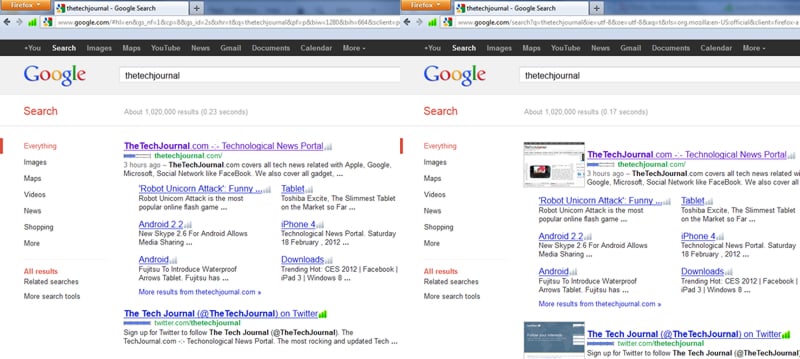
If you want to inserts preview images (thumbnails) and popularity ranks of web sites into the Google, Yahoo and Bing search results pages to be able to identify and get a clear picture of how website look like before you visit him you can install and customize your results with simple Mozilla Firefox add-on.
Step 1: Open your Mozilla Firefox, download and install following add-on.
Step 2: Once installed restart your Firefox browser and use Google, Bing or Yahoo search engine. From now on you will notice a thumbnail next to each website
Step 2: If you want to return your results to previews formatting without image simply disable SearchPreview add-on
Step 3: If you noticed that certain thumbnail don’t correspond to the actual website design, go back to Google, Bing or Yahoo search results. Right click on thumbnail and from context menu choose Request update of this SearchPreview image.
[ttjad keyword=”hdtv”]

![Read more about the article [Tutorial] Setting Auto Reply Messages For Rejected Calls On LG G3 S](https://thetechjournal.com/wp-content/uploads/2014/12/Home-432x768.png)
![Read more about the article [Tutorial] How To Take A Good Screenshot In iPad](https://thetechjournal.com/wp-content/uploads/2012/04/screenshot-logo-512x221.jpg)
![Read more about the article [Tutorial] How To Mount Physical USB Devices In Virtualbox Virtual Machine](https://thetechjournal.com/wp-content/uploads/2013/01/virtualbox-usb-device-ttj-logo-512x222.jpg)