
It can be quite frustrating when you work on several things at once on your computer and after installing software or updates, your computer ask you to make a restart. When Windows is shut down and restarted, all the software that was launched and all the documents you had open are closed. So you should start again and open the document you were working. To save you time, CacheMyWork software will allow you to automatically restart the programs that were open before restarting. In this tutorial I will show you what action you need to perform and how to setup this awesome freeware tool for Windows.

Before we see how CacheMyWork app actually work I will give you a small tip. If you need to be away and you want to stop your computer to not use unnecessary electricity but do not want to lose your current work, then you should be using Standby mode! Below steps will show you how to put your in StandBy
Step 1: Click the Start button, click the arrow next to the Shut down button and click Sleep.

Step 2: Your computer is then paused.
Step 3: Press the start button on your computer, your computer resumes from standby. Enter the password to your user account if you have protected and confirm.
Step 4: You are returned to the software and documentation as you left them.
Restart and return your software
You are working on lots of documents and have lots of open applications and the moment comes when you must restart your computer.
Step 1: Download and install CacheMyWork from following web site
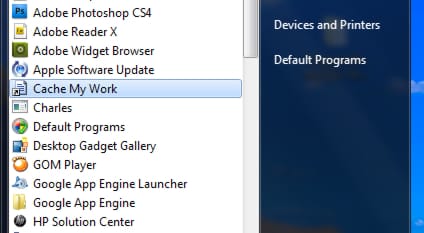
Step 2: Start CacheMyWork by clicking its shortcut in the Start menu.
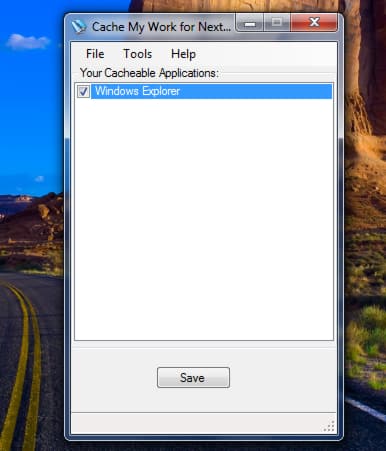
Step 3: The list of currently open applications is displayed. Check the boxes in front of application to automatically open it the next time after restart.
Step 4: To configure Windows to automatically display files opened at the last stop, click the Tools menu and click Options.
Step 5: Then check the box Restore previous Explorer windows at next logon.
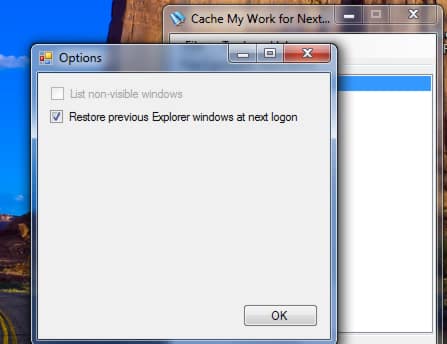
Step 6: Click OK and then Save button.
Step 7: Then restart or shut down your computer.
Step 8: On the next start, all programs previously selected CacheMyWork are automatically opened.
Step 9: To find documents that you were working, simply display the history of your software.
[ttjad keyword=”all-in-one-desktops”]

![Read more about the article [Tutorial] Save Snapchats And Open Them Later With Snaphack](https://thetechjournal.com/wp-content/uploads/2013/10/snapchat-512x425.png)
![Read more about the article [Tutorial] How To Import Google Reader Subscriptions In Outlook 2007](https://thetechjournal.com/wp-content/uploads/2012/02/google-reader-subscriptions-export-to-outlook-512x360.jpg)
![Read more about the article [Tutorial] How To Answer Calls On iPhone With Pre-defined Text Messages](https://thetechjournal.com/wp-content/uploads/2012/11/white-phone-icon-as6d4er7w98er9.jpg)
ADDDDDDDDDDDDDDDDDDDDDDDDDDDDDDDDDDDDDDDDDDDDDDDDDDS
more adds then info