
If from some reason you are not able to access to Control Panel options directly from Windows there is always on alternative to gain access from Command Prompt. DOS is quite resourceful place from where you can gain access to a huge number of Windows tools and features when you are not able to access them on ordinary way. This tutorial will show you how to use DOS Command Prompt and access some Control Panel tools with just typing few commands.
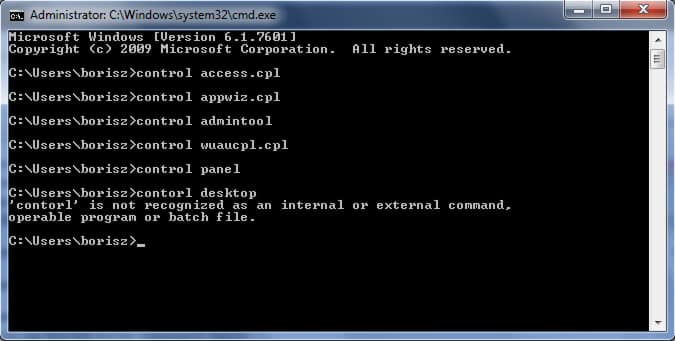
To get started follow steps below:
Step 1: To access Command Prompt go to Start menu, inside search field type cmd and press Enter
Step 2: Once DOS Command Prompt opens you will be able to access any Control Panel tools by typing control and then applet’s name and press Enter to confirm command. You can find full list for commands below:
- Accessibility Options : control access.cpl
- Add/Remove Programs : control appwiz.cpl
- Add Hardware Wizard : control hdwwiz.cpl
- Administrative Tools : control admintools
- Automatic Updates : control wuaucpl.cpl
- Bluetooth Properties : control bthprops.cpl
- Control Panel : control panel
- Desktop Properties : control desktop
- Desktop Appearances Properties : control color
- Display Properties : control desk.cpl
- Fastfind Properties : control findfast.cpl
- Firewall Properties : control firewall.cpl
- Fonts Folder : control fonts
- Game Controllers : control joy.cpl
- Infrared Properties : control infrared
- Internet Options : control inetcpl.cpl
- iSCSI Initiator : control iscsicpl.cpl
- Java Control Panel : control jpicpl32.cpl
- Keyboard Properties : control main.cpl keyboard
- Licensing Mode : control liccpa.cpl
- Mouse Properties : control main.cpl
- Network Connections : control ncpa.cpl
- Network Setup Wizard : control netsetup.cpl
- ODBC Properties : control odbccp32.cpl
- Power Options : control powercfg.cpl
- Printers Folder : control printers
- Regional and Language Options : control intl.cpl
- Scanners and Camera Properties : control sticpl.cpl
- Schedule Tasks : control schedtasks
- Sound and Audio Devices : control mmsys.cpl
- Stored Passwords : control keymgr.cpl
- System Properties : control sysdm.cpl
- Telephone and Modem Properties : control telephon.cpl
- Time and Date Settings : control timedate.cpl
- User Accounts : control nusrmgr.cpl
- User Accounts Advances : control userpasswords2
- User Passwords : control userpasswords
- Windows Security Center : control wscui.cpl
- Wireless Link : control irprops.cpl
[ttjad keyword=”microsoft”]

![Read more about the article [Tutorial] How To Increase The Stability Of The Windows Explorer – Windows 8](https://thetechjournal.com/wp-content/uploads/2012/12/chnage-folder-a65s489w7er98wer.jpg)
![Read more about the article [Tutorial] How To Pin Your USB Drive, External Hard Drive or Folder To Taskbar – Windows 7](https://thetechjournal.com/wp-content/uploads/2012/02/pin-to-taskbar-512x273.jpg)
![Read more about the article [Tutorial] How To Get Old Facebook Back](https://thetechjournal.com/wp-content/uploads/2012/02/facebook-logo-512x265.jpg)