website statistics

[Tutorial] How To Schedule A Virus Scan With Built-In Antivirus In Windows 8

Windows Defender provides most of its protection in real-time, and you most probably want to set up an automatic scan and this tutorial will show you how to do that.

When do you use Facebook?

View Results

Loading ... Loading ...
1 Star2 Stars3 Stars4 Stars5 Stars (Rated: 5.00/5)
Loading ... Loading ...

If you did look inside Windows Defender interface you most probably noticed that it does not include an option to scheduler antivirus scan in your Windows 8 computer. Although Windows Defender provides most of its protection in real-time, you most probably want to set up scan to occur regularly without any actions from you end and this tutorial will show you how to do it in Windows 8.

windows-defener-a6s54ed6w5465wer

To get started follow steps below:

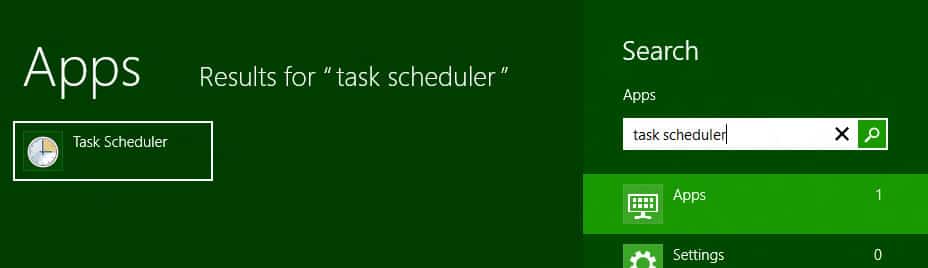
Step 1: On your keyboard press Win+Q, inside search field type task scheduler and then press Enter on your keyboard.
task-scheduler-as5465we4r65we4r

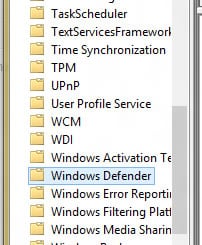
Step 2: When Task Scheduler window opens up inside left pane follow this path Task Scheduler Library\Microsoft\Windows\Windows Defender\.
win-defender-as65e4w6r4ew65

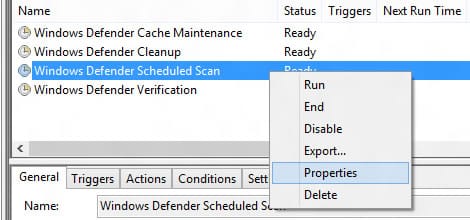
Step 3: With Windows Defender selected in left pane, inside right pane right mouse click on Windows Defender Scheduler Scan and from context menu that opens up choose Properties.
wdss-properitese-as4d65ew4r65we4r

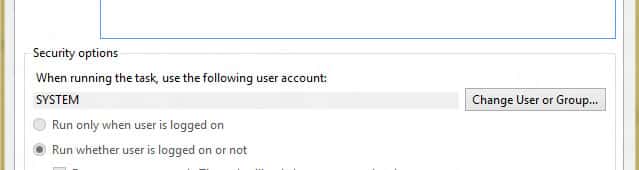
Step 4: From new window that opens up, under General tab, you will need to ensure that the proper user is selected to run this task. By default that user is SYSTEM so make sure its selected.
system-general-tab-as5d46we4r65ew4r6

Step 5: Also under General tab make sure that Run with highest privileges is selected.

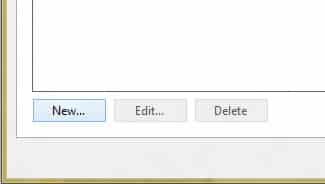
Step 6: Now select Triggers tab and then click on New button.
new-a23sd4w6e5465ew

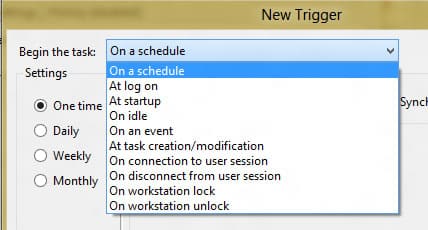
Step 7: Now under Begin the task: select On a schedule option.
on-schedulea--as54e6w4r6we

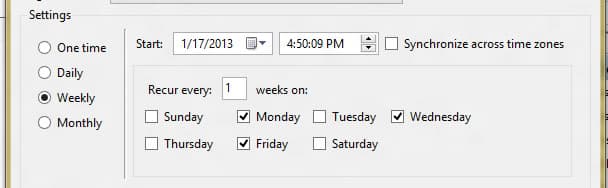
Step 8: Under Settings section select how often you want to run the scan: One time, Daily, Weekly or Monthly. My suggestion is to use Daily or Weekly scan and then inside right pane select when to start the scan.
settings-weekly-as546ew54r6w5e4r6w5e

Step 9: Under Advanced settings section select checkbox in front of Enabled. Click OK to save your changes.
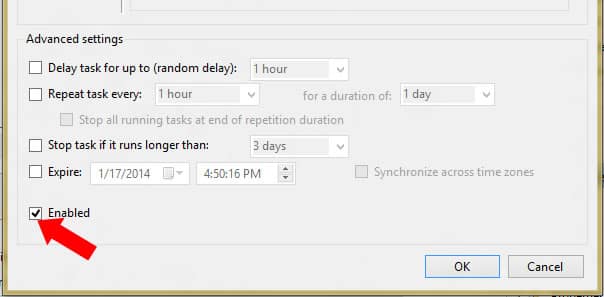
enable-as54e654r65ewr4weew

Step 10: Now select Actions tab you will see a default action is already configured for you so leave it as it is and don’t make any changes.
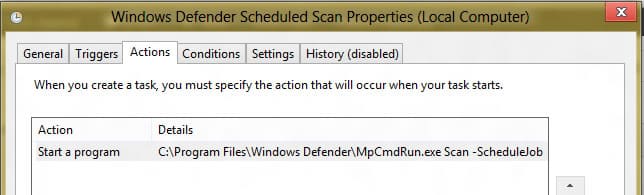
actions-tab-as5465e4r6ew54r

Step 11: Under Conditions tab you can specify starting conditions in order to ensure your task only runs when you want it to. Make sure that option Start the task only if the computer is on AC power is selected.
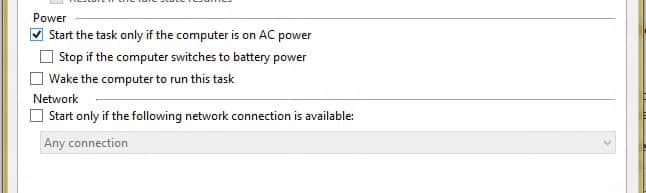
start-ac-a6s46ew4re6w4r5e5ee5

Step 12: Under Settings tab select option Run task as soon as possible after a scheduled start is missed. Also make sure that you select Do not start a new instance from drop down menu located at the bottom of Settings tab.
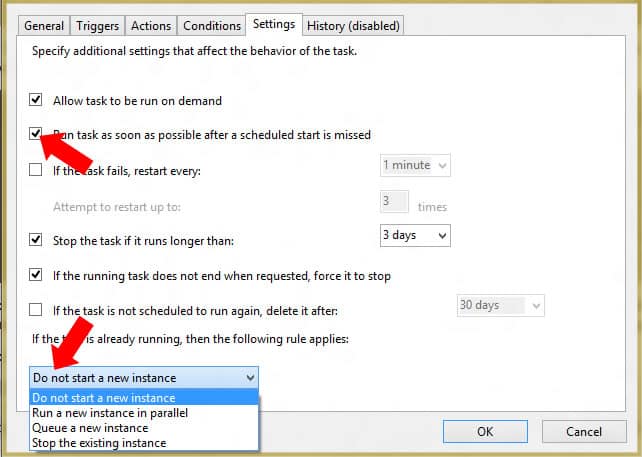
settings-tab-a6s4e654er6we5e531j65u4o65

Step 13: Click OK to save your changes and your antivirus Task Scheduler will be created.

Buy Cheapest Related Product From Amazon.com


New Job Listing Hints Apple Is Aiming To Expand Siri’s Functionality

Google Will Move Its UK Headquarters To King’s Cross By 2016
You can also press the left/right arrow key on your keyboard to go to previous/next post
  On January 18, 2013(4 months, 3 days ago.)

Recent Search

Recent Tutorials

This tutorial will show how to use S.M.A.R.T. (Self Monitoring Analysis and Reporting Technology) to continuously collect information on health of your equipment.
In this tutorial I'll show you how you can easily protect yourself from any kind of security breaks that may occur through Java.
Today Apple enabled "Two Step Verification" for iCloud And Apple ID. But the process is not that simple. But no worry, here we have made a step by step tutorial.
Cant remember your iPhone passcode? Here I will show you some workaround on what to do and how to recover and restore for every possible scenario.
This tutorial will show you how to perform the Winapp2.ini installation inside CCleaner and how to use it under Windows operating system.
With app called AD Sound Recorder, you can record any stream that passes through your sound card or speakers and in this tutorial I will show you how to do that.
If you want to have Boxee app inside your Apple TV, in this tutorial we will show you how to install XBMC and Boxee using Windows on your Apple TV.
This tutorial will show you how to transfer PS3 Saved Game Files from your PC to your PS3 game console.
Adding videos from external sources such as internet, more specifically from YouTube, is a great solution to enhance a presentation; in this tutorial I will show you the procedure.
If you are one of new comers to Windows Phone 8, like me, in this tutorial I will walk you through the process to update your Windows Phone 8 device.
Close You Have To Login
User:
Pass:
Login With »Login With TwitterLogin With Facebook