
The Switcher in Windows 8 is used to help you to switch in between active apps, however some users find it annoying because it is constantly showing up when you move your mouse to the left side of your screen. In this tutorial, I will show you how you can switch it off in order to now show up any more.

To get started follow steps below:
Step 1: Press Win+C on your keyboard to bring Charm menu and then select Settings.

Step 2: Now choose Change PC settings.
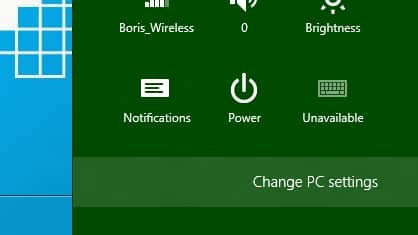
Step 3: Inside left pane click on General section.

Step 4: Now inside right pane, under App switching move slider to On or Off, depending what you actually need.
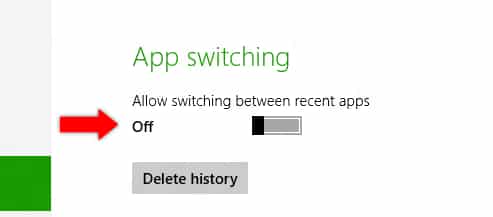
Once you are done, close all active windows and you switcher configuration will be active.
[ttjad keyword=”microsoft”]

![Read more about the article [Tutorial] How To Find Out If Your Computer Is Compatible With Windows 8](https://thetechjournal.com/wp-content/uploads/2012/11/run-win8-upgrade-avisor-as5d6465w4r6e4wer-512x305.jpg)
![Read more about the article [Tutorial] How To Setup And Use SVN Client In Windows](https://thetechjournal.com/wp-content/uploads/2012/03/subversion-logo-512x205.jpg)