website statistics

Google Search Can Now Tell You if Your PC is Infected With Malware

Google Online Security team has developed a way to identify infected machines using Google Search. They rare then able to notify the user of infection

When do you use Facebook?

View Results

Loading ... Loading ...
1 Star2 Stars3 Stars4 Stars5 Stars (Rate This)
Loading ... Loading ...

Google has decided to harness their powers for the good of the people, and they are doing it in a very interesting way.
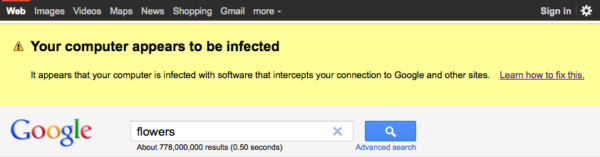
Google Security

So here is the scenario.  You are browsing the web on your PC and you decide to use Google Search.  As you enter your search term, a big yellow warning appears that says your computer is infected with malware.  I know your first thought is probably that the malware itself has redirected to a page and wants you to buy their “antivirus” scanner for a chunk of change.  But this isn’t the case at all.

It is actually Google’s servers that have identified the malware on your PC, and notifying you of the infection.  Yes, Google is actually the good guy in this case.  It seems some security engineers at Google have found a way to use Google Search as a means of identifying infected PC’s.

Seems complicated, but it isnt.  Here’s what Google’s Online Security team says about the new scanning procedure.

This particular malware causes infected computers to send traffic to Google through a small number of intermediary servers called “proxies.” We hope that by taking steps to notify users whose traffic is coming through these proxies, we can help them update their antivirus software and remove the infections.

Basically an infected machine acts differently, and sends out different data to Google’s proxy servers.  Google is able to identify this, and in turn send you a big, bright yellow notification telling you that “Your Computer appears to be infected.

I know this seems a little farfetched, but it is 100% legit.  Google has already loaded the script and the program is up and running.  So if you get a yellow warning on top your Google Search page, don’t fret.  It’s just Google trying to help.

via Google Online Security Blog


Pix-Star FotoConnect HD Digital Picture Frame

Apple Closes the Door on White MacBook
You can also press the left/right arrow key on your keyboard to go to previous/next post
  On July 23, 2011(1 year, 10 months ago.)

Recent Search

Recent Tutorials

This tutorial will show how to use S.M.A.R.T. (Self Monitoring Analysis and Reporting Technology) to continuously collect information on health of your equipment.
In this tutorial I'll show you how you can easily protect yourself from any kind of security breaks that may occur through Java.
Today Apple enabled "Two Step Verification" for iCloud And Apple ID. But the process is not that simple. But no worry, here we have made a step by step tutorial.
Cant remember your iPhone passcode? Here I will show you some workaround on what to do and how to recover and restore for every possible scenario.
This tutorial will show you how to perform the Winapp2.ini installation inside CCleaner and how to use it under Windows operating system.
With app called AD Sound Recorder, you can record any stream that passes through your sound card or speakers and in this tutorial I will show you how to do that.
If you want to have Boxee app inside your Apple TV, in this tutorial we will show you how to install XBMC and Boxee using Windows on your Apple TV.
This tutorial will show you how to transfer PS3 Saved Game Files from your PC to your PS3 game console.
Adding videos from external sources such as internet, more specifically from YouTube, is a great solution to enhance a presentation; in this tutorial I will show you the procedure.
If you are one of new comers to Windows Phone 8, like me, in this tutorial I will walk you through the process to update your Windows Phone 8 device.
Close You Have To Login
User:
Pass:
Login With »Login With TwitterLogin With Facebook