website statistics

Google Launches Notifications To Alert DNSChanger Malware Victims

When do you use Facebook?

View Results

Loading ... Loading ...
1 Star2 Stars3 Stars4 Stars5 Stars (Rate This)
Loading ... Loading ...

DNSChanger has been a malware that has been able to infect millions of computers around the globe. Currently, most of the users who have their machines infected with the malware are quite unaware of it. So now, Google is launching a notification system in which it would alert the users who have their machines infected with DNSChanger, to tell them that if they don’t take action soon, they won’t be able to user internet any more.
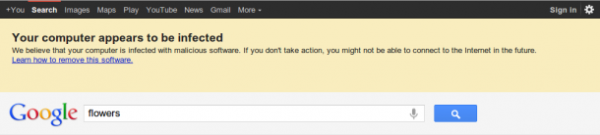

FBI had set up a number of servers to help the victims of DNSChanger malware. However, on coming July 9, FBI is planning on disconnecting and taking down these servers so that they would no longer be supporting the malware victims. For a lot of users with infected machines, this would mean that they will no longer be able to use internet.

To stop this from happening, Google has launched a notification system in which a whopping half a million population will be notified about this impending doom for DNSChanger-infected machines.

According to Google security engineer Damian Menshcer, “The warning will be at the top of the search results page for regular searches and image searches and news searches. The text will say, ‘Your computer appears to be infected,’ and it will give additional detail warning them that they may not be able to connect to the Internet in the future.”

The way DNSChanger works is quite simple. When the user is trying to open a perfectly normal and safe website, it redirects the user to a website of its own liking. Also, Google is using a clever mechanism to detect when an infected PC talks to the server and then displays the notification specifically in such PCs.

Source: Google

Courtesy: CNET

Buy Cheapest Related Product From Amazon.com


Asus And MSI Announces First Thunderbolt Certified Motherboards

Ballmer: 500 Million Users Will Be Using Windows 8 By Next Year
You can also press the left/right arrow key on your keyboard to go to previous/next post
  On May 23, 2012(12 months, 1 day ago.)

Recent Search

Recent Tutorials

This tutorial will show how to use S.M.A.R.T. (Self Monitoring Analysis and Reporting Technology) to continuously collect information on health of your equipment.
In this tutorial I'll show you how you can easily protect yourself from any kind of security breaks that may occur through Java.
Today Apple enabled "Two Step Verification" for iCloud And Apple ID. But the process is not that simple. But no worry, here we have made a step by step tutorial.
Cant remember your iPhone passcode? Here I will show you some workaround on what to do and how to recover and restore for every possible scenario.
This tutorial will show you how to perform the Winapp2.ini installation inside CCleaner and how to use it under Windows operating system.
With app called AD Sound Recorder, you can record any stream that passes through your sound card or speakers and in this tutorial I will show you how to do that.
If you want to have Boxee app inside your Apple TV, in this tutorial we will show you how to install XBMC and Boxee using Windows on your Apple TV.
This tutorial will show you how to transfer PS3 Saved Game Files from your PC to your PS3 game console.
Adding videos from external sources such as internet, more specifically from YouTube, is a great solution to enhance a presentation; in this tutorial I will show you the procedure.
If you are one of new comers to Windows Phone 8, like me, in this tutorial I will walk you through the process to update your Windows Phone 8 device.
Close You Have To Login
User:
Pass:
Login With »Login With TwitterLogin With Facebook