
website statistics

Yahoo’s Redesigned Homepage Leaked Ahead Of Public Release

We have been hearing about a possible redesign of Yahoo's homepage. Now, it seems, images of redesigned homepage have leaked on the web ahead of public release.

When do you use Facebook?

View Results

Loading ... Loading ...
1 Star2 Stars3 Stars4 Stars5 Stars (Rate This)
Loading ... Loading ...

Yahoo has been trying hard to sustain itself in the face of fierce competition. Ever since the new CEO, Marissa Mayer, joined the company, she has been trying to introduce a number of radical changes which may, after all, sail Yahoo to calm waters. We have been hearing about a possible redesign of Yahoo’s homepage and now, apparently, it has leaked onto the web ahead of public release.
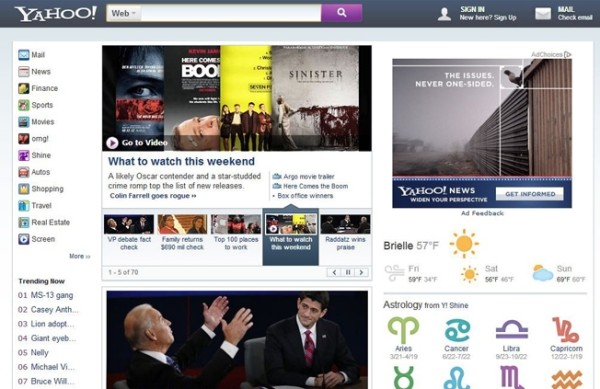

Yahoo's redesigned homepage

Yahoo.com draw up to 170 million visits every day and the ads displayed on the page are the major revenue stream for the company. It definitely makes sense that Yahoo’s CEO is trying to revamp the design of the page to make it more enticing and user-friendly.

According to the leaked homepage redesign, the categories to the left of the page will be lot less cluttered, showing only the major divisions. There’s also an addition of a dynamic search bar which will be displayed at the top of the page even when the user scrolls down.

The display of the trending stories and headlines on top of the page is such that it contains more stories but manages to look a lot more neat. Stories also have their tiny summaries displayed rather than mere headlines. If the leaked redesign is authentic, Yahoo did well to do away with a number of useless categories such as Dating, Messenger, Music, Jobs and a number of others.

With such a redesign, it is quite possible that Marissa Mayer is able to significantly bolster the traffic attracted by Yahoo’s websites, thus registering a bump in the overall revenue of the company.

Source: Business Insider

Courtesy: BGR

Buy Cheapest Related Product From Amazon.com


Robot Mimics Traditional Japanese Calligraphy Perfectly!

[Tutorial] How To Forward Port (Using UPnP) On Your Router
You can also press the left/right arrow key on your keyboard to go to previous/next post
  On October 14, 2012(7 months, 6 days ago.)

Recent Search

Recent Tutorials

This tutorial will show how to use S.M.A.R.T. (Self Monitoring Analysis and Reporting Technology) to continuously collect information on health of your equipment.
In this tutorial I'll show you how you can easily protect yourself from any kind of security breaks that may occur through Java.
Today Apple enabled "Two Step Verification" for iCloud And Apple ID. But the process is not that simple. But no worry, here we have made a step by step tutorial.
Cant remember your iPhone passcode? Here I will show you some workaround on what to do and how to recover and restore for every possible scenario.
This tutorial will show you how to perform the Winapp2.ini installation inside CCleaner and how to use it under Windows operating system.
With app called AD Sound Recorder, you can record any stream that passes through your sound card or speakers and in this tutorial I will show you how to do that.
If you want to have Boxee app inside your Apple TV, in this tutorial we will show you how to install XBMC and Boxee using Windows on your Apple TV.
This tutorial will show you how to transfer PS3 Saved Game Files from your PC to your PS3 game console.
Adding videos from external sources such as internet, more specifically from YouTube, is a great solution to enhance a presentation; in this tutorial I will show you the procedure.
If you are one of new comers to Windows Phone 8, like me, in this tutorial I will walk you through the process to update your Windows Phone 8 device.
Close You Have To Login
User:
Pass:
Login With »Login With TwitterLogin With Facebook