website statistics

HTC Nexus One Is Going To Space, Thanks To NASA

NASA has locked down on HTC Nexus One as the device that it will be sending to space in 2013 as part of its PhoneSat program.

When do you use Facebook?

View Results

Loading ... Loading ...
1 Star2 Stars3 Stars4 Stars5 Stars (Rate This)
Loading ... Loading ...

In 2010, HTC attacked a Nexus One device to a rocket which was then fired. The rocket travelled right to the edge of the space with the smartphone appended to it, which recorded the entire video of the flight. The experiment provided a unique scenario where the power of a smartphone can be used. Now, HTC is planning to send Nexus One on an even longer mission, one that will take it to space.
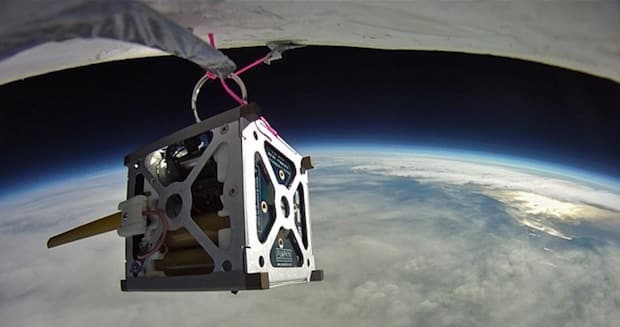

NASA PhoneSat

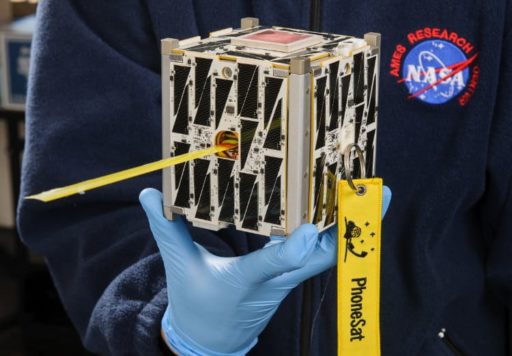
The company is collaborating with NASA to have the smartphone sent to the space. Of course this wouldn’t be a pleasure trip, rather the Nexus One device that will be lucky enough to go for the ride will be used as part of NASA’s PhoneSat program.

NASA’s PhoneSat program is a highly innovative idea of incorporating today’s smartphones into the very design of a satellite. This may sound somewhat absurd but is perfectly workable since the hardware packed by today’s smartphones is enough to run a satellite.

The device will be launched by NASA in 2013. Of course, NASA didn’t just see the display of Nexus One, found it impressive and decided to send it to space. Rather, the space agency has put the device through a number of rigorous tests. These ranged from extreme vibration tests to thermal-vacuum chambers as well as high-altitude balloon flights. Only when Nexus One endured through all this that NASA decided that it was the one.

Space enthusiasts, as we are, are hoping that folks over at NASA would record the video of the flight which would definitely be a treat for our eyes.

Source: HTC

Courtesy: Engadget

Buy Cheapest Related Product From Amazon.com


[Tutorial] How To Access Windows 8 Help and Support

Top iPhone 5 Groans: Lightning Cable, Battery, Reception And More
You can also press the left/right arrow key on your keyboard to go to previous/next post
  On October 11, 2012(7 months, 15 days ago.)
  • http://twitter.com/ibnulsharar Ibnul Sharar

    wtf ?


Recent Search

Recent Tutorials

This tutorial will show how to use S.M.A.R.T. (Self Monitoring Analysis and Reporting Technology) to continuously collect information on health of your equipment.
In this tutorial I'll show you how you can easily protect yourself from any kind of security breaks that may occur through Java.
Today Apple enabled "Two Step Verification" for iCloud And Apple ID. But the process is not that simple. But no worry, here we have made a step by step tutorial.
Cant remember your iPhone passcode? Here I will show you some workaround on what to do and how to recover and restore for every possible scenario.
This tutorial will show you how to perform the Winapp2.ini installation inside CCleaner and how to use it under Windows operating system.
With app called AD Sound Recorder, you can record any stream that passes through your sound card or speakers and in this tutorial I will show you how to do that.
If you want to have Boxee app inside your Apple TV, in this tutorial we will show you how to install XBMC and Boxee using Windows on your Apple TV.
This tutorial will show you how to transfer PS3 Saved Game Files from your PC to your PS3 game console.
Adding videos from external sources such as internet, more specifically from YouTube, is a great solution to enhance a presentation; in this tutorial I will show you the procedure.
If you are one of new comers to Windows Phone 8, like me, in this tutorial I will walk you through the process to update your Windows Phone 8 device.
Close You Have To Login
User:
Pass:
Login With »Login With TwitterLogin With Facebook