website statistics

Control Your Wheelchair With Computerized Tongue Piercing

When do you use Facebook?

View Results

Loading ... Loading ...
1 Star2 Stars3 Stars4 Stars5 Stars (Rate This)
Loading ... Loading ...

Are you tired of controlling the wheel chair manually? Are you bored with the same controlling system of the wheel chair? Don’t worry. Now you can control your wheelchair and move around just like magic. It’s like some invisible thing is moving or pushing/pulling your wheelchair. Wow! What would you call this wheelchair? ‘Ghost Wheelchair’?


A group of Engineers at the Georgia Institute of Technology (GIT) have created a device to control anything (especially for wheelchairs) with a combination of a magnetic tongue piercing and a paired retainer. This is quite different but unique and impressive. It is especially designed for those people who suffering with debilitating spinal cord injuries and diseases. In simple word, just pressing the tongue the wheelchair moves.
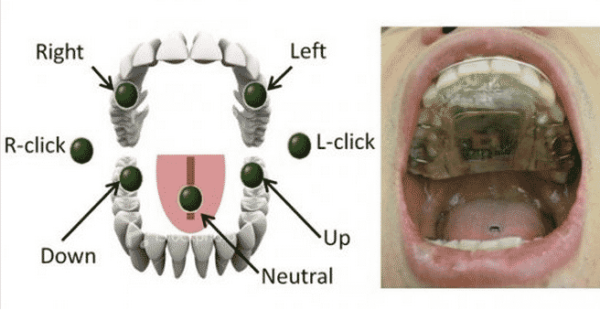
The system is called the Tongue Drive. It has two parts. One is a small magnet which is attached to the tip of the tongue via sticky, piercing or implantation. There is a headset with two 3D magnetic sensors mounted on it. The other one is a mobile device like iOS devices or the iPhone or iPod Touch. The system is a waterproof retainer on the roof of the mouth which contains a Li-ion battery, induction coil for charging and several magnetic contact points to detect the position of the tongue-mounted magnet. When the system beams the signal wirelessly to a mobile device, it converts those commands. To be noted, different beams provide different signals, more accurately different commands. In simply word, the headset picks up the location of the tongue via the magnet and transmits that information to a smartphone.

The engineers are specifically looking to replace ‘sip-n-puff’ system for controlling wheelchairs through using the Tongue Drive. The lead Georgia Tech researcher, ‘Maysam Ghovanloo’ designed the Tongue Drive software that is able to convert the position of the tongue into joystick or mouse movements, allowing the severely disabled to control a wheelchair or computer. “This device could revolutionize the field of assistive technologies,” Ghovanloo said.

Being hope that, it will be very useful to disable people and they are gonna welcome it.

Source : PopSci, Wired
Image Credit : Georgia Tech


[Tutorial] How To Stop Your Mouse From Waking Up Your Windows 7 Computer From Sleep Mode

[Tutorial] How To Download Entire Wikipedia To Your Computer
You can also press the left/right arrow key on your keyboard to go to previous/next post
  On March 2, 2012(1 year, 3 months ago.)

Recent Search

Recent Tutorials

This tutorial will show how to use S.M.A.R.T. (Self Monitoring Analysis and Reporting Technology) to continuously collect information on health of your equipment.
In this tutorial I'll show you how you can easily protect yourself from any kind of security breaks that may occur through Java.
Today Apple enabled "Two Step Verification" for iCloud And Apple ID. But the process is not that simple. But no worry, here we have made a step by step tutorial.
Cant remember your iPhone passcode? Here I will show you some workaround on what to do and how to recover and restore for every possible scenario.
This tutorial will show you how to perform the Winapp2.ini installation inside CCleaner and how to use it under Windows operating system.
With app called AD Sound Recorder, you can record any stream that passes through your sound card or speakers and in this tutorial I will show you how to do that.
If you want to have Boxee app inside your Apple TV, in this tutorial we will show you how to install XBMC and Boxee using Windows on your Apple TV.
This tutorial will show you how to transfer PS3 Saved Game Files from your PC to your PS3 game console.
Adding videos from external sources such as internet, more specifically from YouTube, is a great solution to enhance a presentation; in this tutorial I will show you the procedure.
If you are one of new comers to Windows Phone 8, like me, in this tutorial I will walk you through the process to update your Windows Phone 8 device.
Close You Have To Login
User:
Pass:
Login With »Login With TwitterLogin With Facebook