website statistics

New Google Patent Confirms Side-Mounted Trackpads For Project Glass

When do you use Facebook?

View Results

Loading ... Loading ...
1 Star2 Stars3 Stars4 Stars5 Stars (Rate This)
Loading ... Loading ...

When Google first unveiled its Project Glass and showcased Google glasses to the world, many of us wondered about the navigation system that will be used by those tooling the glasses. Google hadn’t explained it well enough and some had speculated that it will probably be done with the help of an input mechanism on the side of the glasses. Now, a new Google patent more or less confirms this.
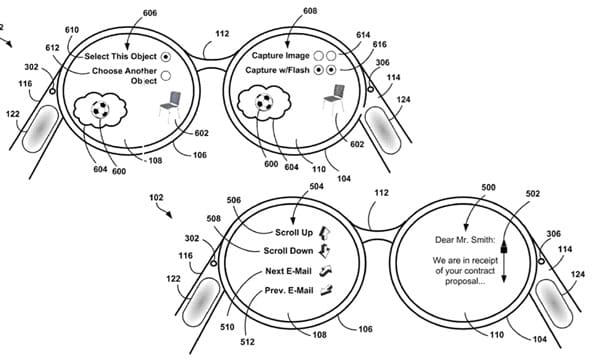

A new patent now grants Google rights over an ‘integrated finger-tracking input sensor device’ on a heads-up display. This is quite probably related to Project Glass since such an input device will go quite well with Google glasses.

The track-pad will be installed on either side of the glasses. One of these pads will allow the user to maintain fine motor control. The other will enable him for other, more broad movements. Apparently, Google hasn’t yet decided on what material to use in making the track-pad and the possibilities include metal oxide, glass or plastic.

The controls of the track-pad will be flexible in that left-handed users can tweak the settings to control which side controls what functions. So, for instance, if you are a left-handed user, you can choose the side with which you wish to maintain fine control.

Making it even more relevant to Google glasses, the company says in the filing that the trackpad will either be transparent or at least translucent so as to ensure peripheral vision for the user. Moreover, a number of functions could be accomplished on such a trackpad including single or double-tapping, scrolling through lists and flipping through different options.

Source: USPTO

Courtesy: The Verge

Buy Cheapest Related Product From Amazon.com


HTC Admits One X Wi-Fi Connectivity Flaw

Hundreds Of Fake Accounts Were Used To Populate Reddit In Its Early Days
You can also press the left/right arrow key on your keyboard to go to previous/next post
  On June 20, 2012(12 months, 3 days ago.)

Recent Search

Recent Tutorials

This tutorial will show how to use S.M.A.R.T. (Self Monitoring Analysis and Reporting Technology) to continuously collect information on health of your equipment.
In this tutorial I'll show you how you can easily protect yourself from any kind of security breaks that may occur through Java.
Today Apple enabled "Two Step Verification" for iCloud And Apple ID. But the process is not that simple. But no worry, here we have made a step by step tutorial.
Cant remember your iPhone passcode? Here I will show you some workaround on what to do and how to recover and restore for every possible scenario.
This tutorial will show you how to perform the Winapp2.ini installation inside CCleaner and how to use it under Windows operating system.
With app called AD Sound Recorder, you can record any stream that passes through your sound card or speakers and in this tutorial I will show you how to do that.
If you want to have Boxee app inside your Apple TV, in this tutorial we will show you how to install XBMC and Boxee using Windows on your Apple TV.
This tutorial will show you how to transfer PS3 Saved Game Files from your PC to your PS3 game console.
Adding videos from external sources such as internet, more specifically from YouTube, is a great solution to enhance a presentation; in this tutorial I will show you the procedure.
If you are one of new comers to Windows Phone 8, like me, in this tutorial I will walk you through the process to update your Windows Phone 8 device.
Close You Have To Login
User:
Pass:
Login With »Login With TwitterLogin With Facebook