
iPhone Dev Team has released redsn0w 0.9.6 for Windows to jailbreak iOS 4.1 / 4.0 running on iPhone 3G and iPod Touch 2G.Those who want to jailbreak iPhone 3G and iPod Touch 2G running iOS 4.1 or iOS 4.0 on Windows here i’m giving a step by step guideline for them.
Need:
# An iPhone 3G or iPod Touch 2G on iOS 4.1 or iOS 4.0
# iTunes 10 installed on your Windows PC
# Save iOS 4.0 or iOS 4.1 on your desktop
# Redsn0w 0.9.6 BETA for Mac [Download link]
The steps are given below.
Step 1: Connect the iPod Touch or iPhone to your Windows PC using the USB cable.
Step 2: Run Redsn0w and click Browse. Select the Firmware 4.0 or iOS 4.1 from the desktop of your computer and then click Next to continue.
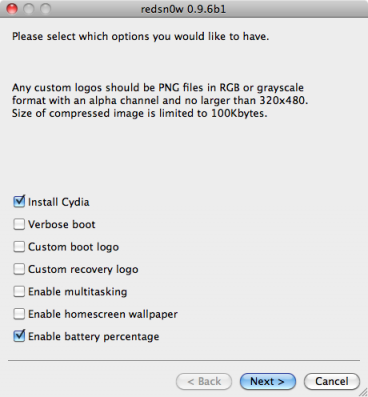
Step 3: You will now have a new screen where you can select packages to install. Select Cydia and if we wanted to, also check to enable multitasking.
Step 4: You will be prompted to put the iPod Touch in DFU mode. To do so: Press the Home and Power together for exactly 10 seconds then release the power button while continuing to press home only until a screen will appear all white. Another automated process will start to quickly run the jailbreak.
Step 5: After Cydia restarts, its real logo now appears, and the standard sources should be ready to use.
That’s all.
Thanks
Click On Adds To Buy iPhones


Will there ever be an easier jailbreak for the iPhone 3G than redsn0w or sn0wbreeze